Any chance that the sampler will become stereo till release?
4 Likes
Well there is clouds - i think three different types
I don’t mean mono as in playing mono samples. I mean monophonic, as in it can’t play chords.
I might be reading it wrong, but looks like one sampler can play mono notes, and the other is duophonic, which means 2 notes chords, but each note shares the same env, lfo, etc.
dont be suprised if someone flags your post because you used ai . its not popular ‘round these parts’
2 Likes
At least a spoiler tag would be nice, not that pleasant nor helpful to read in all honesty.
13 Likes
you. might get lucky … your list was clear and concise … quicker than reading a manual .
You can change the slice / sample per step.
Some information about the Rompler is here: Rompler | dadamachines/docs but that is for sure not the last word.
In general best to ask @rma what is possible.
But for everything that is crucial for you in terms of features > make sure to also add it here: TBD-16 questions - dadamachines - dadamachines forum
4 Likes
Each Rompler is a monophonic voice.
You can do all the standard things:
- Text-based sample browser
- View the waveform
- p-lock sample per step, i.e. one Rompler can play a different sample per step
- Pitch +/-12 semitones (hack the fw if you want more)
- Speed +/- 2 times (i.e. forward / backward playback)
- Set start / stop / loop position
- Play single shot / loop / ping pong
- Time stretch (low quality rotating tape heads style)
- AD amplitude envelope
- Multi-mode filter
- Short FM decay envelope if you want to add percussive transients
- Bit crusher
- Pan
- Send FX (delay + reverb)
- Pretty much all of these params can be either p-locked per step and / or modulated with LFO / random generator
- At the moment the default groove box fw has 4 Romplers tracks active
You could use two Romplers each panned hard left/right to play a stereo sample.
You could use four Romplers to play polyphonically.
We will have an editor, where you can select more Romplers than the default 4, e.g. 8 Rompler tracks. With that you have a lot of freedom to do what you like, i.e. Polyphonic stuff or drum kit sample. Note that p-locking the sample per Rompler already allows you with just one Rompler to play pretty much a whole drumkit. Say each 16th note on one track gets a different sample.
12 Likes
I really admire dadamachines for the automat toolkit which I dream to one day afford to have! This thing looks so compact and powerful I do imagine how liberating it would be to carry such small gear to a live set. Very cool. Really loving form factor and design here
3 Likes
I have one question can the Rompler can emulate beat repeat echo freeze type of thing?
1 Like
Not yet, but that’s a cool idea to implement. The basic controls for it are basically there. You can probably “simulate” it already (with limited resolution) by doing p-locks on the steps.
2 Likes
any idea when pre-orders will start? 
I’m planning to send a newsletter with more information next Thursday.
I originally wanted to send it earlier, but we need to finalize everything with the dealers who will be our launch partners.
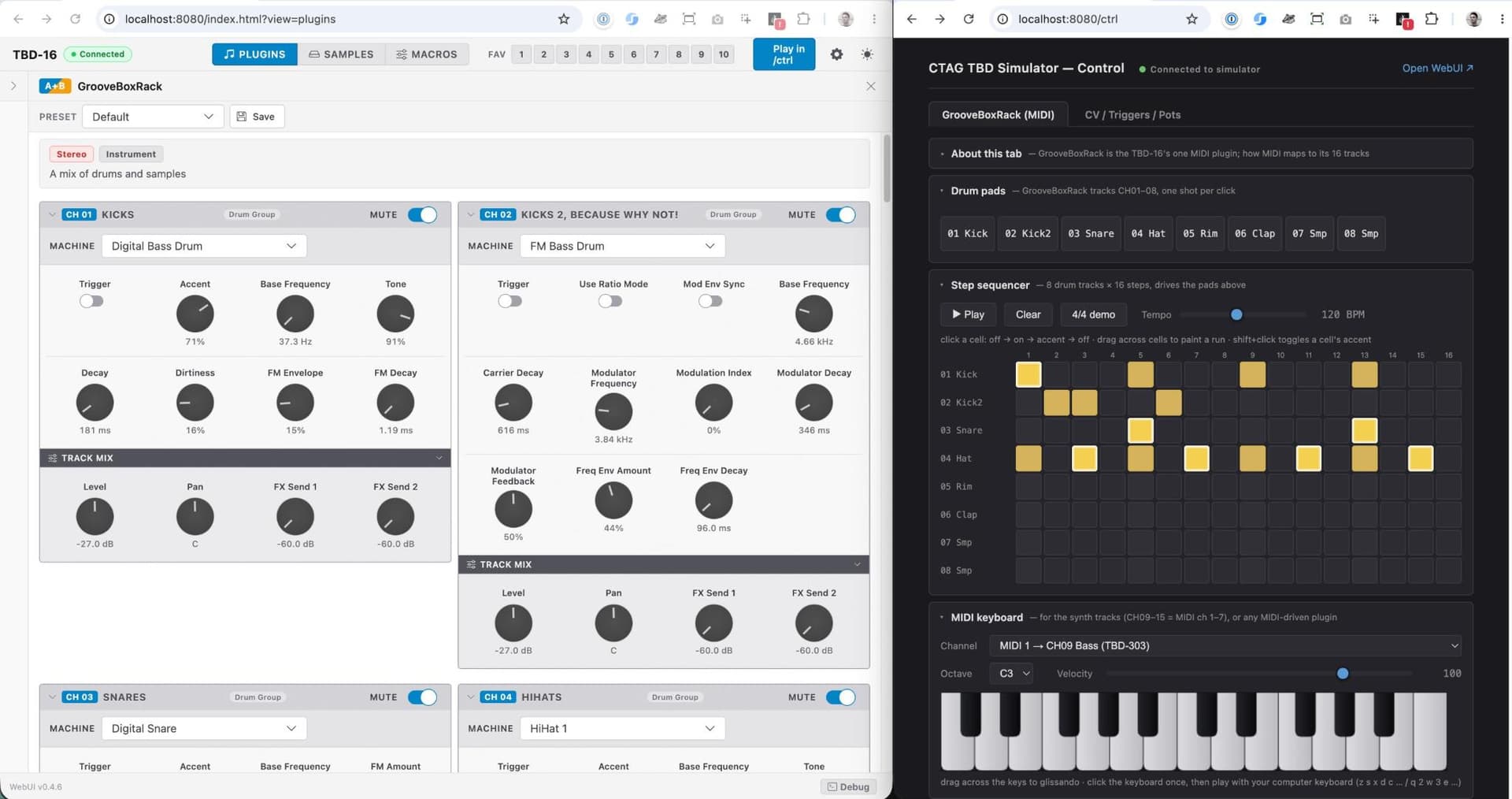
In the meantime, I’ve updated the Simulator so you can run the Groovebox on your desktop.
It’s not 100% the same, of course, but it’s very close. (at least the sound engine)
For anyone who wants to build custom firmware, plugins, or machines, this is a great starting point. Find the guide here.
That said. Happy to talk to DSP / Firmware developers – and everyone who is interested in getting some dream machine out there.
23 Likes
this is gonna be amazing. like a portable, open source machinedrum on steroids. the only question is…which colour to choose
1 Like
Very cool project!
Tried to test out the simulator so not sure if this is correct place to report this but … i am doing it anyway
tried to go through tutorial and to build a machine(i guess it is correct name)
couple issues:
- paths are have actually changed: in rackgen.js it refers to sdcard_image/data/synthdefinitions.json but actual path is sdcard_image/factory/synthdefinitions.json
- similar stuff for plugins: rackgen-> sdcard_image/data/sp/mui-GrooveBoxRack.json
real path → sdcard_image/factory/plugins/mui-GrooveBoxRack.json - my new machine does not show in WEB UI (in CH02 only FM BD and Sampler available)
- ./load-test --machine my3 gives:
=== load-test --machine: unknown voice id “my3” ===
My machine is called my3 because my2 failed to generate because of paths.
I have check that all the listed files in step 9(here) have changes.
Simulator compiles and runs completely fine
HTH
1 Like
That is a very good topic.
I have created a Poll in our forum so that you can vote on the colors.
4 Likes
Hey.
Thanks for testing.
Probably better to report this on the dadamachines forum or create a Github Issue which I have enabled just now.
I will look into right away.
Thanks!
3 Likes
I’m just afraid that this will go for sale and it will have two years backlog until all the preorders are done. Are there preorders already? I signed up with my email… how many units the first batch will be?
Thanks for the great report — you found a real bug.
There was a directory mismatch after a repo restructure, which caused rackgen.js to patch the wrong location. That’s why the machine didn’t show up in the WebUI and load-test --machine my3 couldn’t find the voice.
This is now fixed in 3e114655 on dada-tbd-master. Please git pull and then run:
cd generators
node rackgen.js rack-my3.json -i
cd ../simulator/build && cmake . && make
2 Likes
Okay, I found the simulator page … but it took a bit of hunting to find the repo.
Unless I’m dumb and I missed it, you may want to include the repo on that page @johannes-dada ?