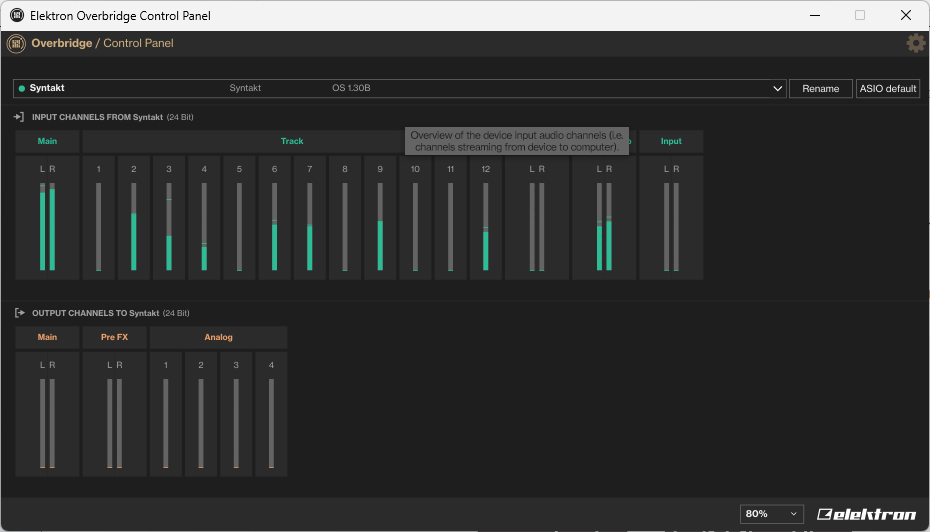
Just played a track I made using syntakt standalone via overbridge and I noticed the kick which was on track 9 sounded worse. So I checked the levels comparing to the raw output from the overbridge plugin to the individual track output and the track 9 output is lower in volume by about 2 decibels. As in the volumes don’t match despite me having added utility for volume correction. However it’s only some tracks that have mismatched volumes. I checked the other tracks and on some the volumes match each other, yet on others the volumes are different. Syntakt audio routing settings are set to post fader/mixer so that’s not the issue. Nor are the tracks that are misbehaving routed to any effects or the FX block.
Anyone have this happen to them? Is there some mixer setting I’m missing? It’s not a huge deal but it is a minor annoyance having to set the levels of everything again.
Hey, so it’s good to understand that overbridge stems do not reflect track levels. Only the stereo track takes into account track levels or hardware mix. All track stems will output pre-fader from overbridge no matter what device settings you choose.
The concept of overbridge is tracking out your beat for mixing and processing in the DAW and outputting some stems at lower volumes than others is not a practical way to approach a real final mix. That’s all that’s going on here.
You can track out individual tracks via overbridge though, one at a time, using the stereo track output and those will reflect your hardware track levels so when combined should sound closer to the levels of your final mix, but of course that will require realigning the start points of the tracks and if you don’t turn off the fx for those recordings then it will sound different when recombined than how it would sound on the device.
Your best bet if you want pre-leveled stems is to make sure that none of the tracks are sent to the fx, then record all stems individually as stereo tracks, then trim and realign those, then send everything back to the FX, then record the FX as a combined “fx track” stem, and then align that in your daw, and then see if you want to do any additional mixing.
Not only does that sound like a pain in the butt, I also suspect that the end result still won’t sound 1:1 like it does on the hardware but you might be able to get it closer, depending on the depth of the fx you’re using and on how many tracks.
But just to advise you, the standard overbridge behavior is track stems will record dry (no fx), below 0db (like -12db usually) and all at the same flat recording level unaffected by the track levels (except the stereo track which gives the same mix you hear at the physical outs).
Thanks. I just stumbled across this same problem as I want to fade in some tracks via the mixer which now seems impossible to me (impossible to record without doing some post fx). I find it confusing that overbridge doesn’t even give the option to have the track volumes synced to the hardwares track volumes. I see the point with it being disturbing for mixing but in some cases like recording sth. it’d be great to be able to have this option and to not have to another work around.
I have not done it so can’t confirm this but try recording changes to the amp volume parameter as opposed to track level and Overbridge will probably respect those types of volume changes which are not related to the mixer section (track level is part of the mixer, amp volume is an amp page parameter). Does that make sense? Give it a try and let me know if it works for you.
I’m going off of the fact that LFOs are a tool of sound design and when an LFO modulates amp volume, those changes become part of the track sound and are recorded so I don’t see any reason why physical modulation of the same parameter would be ignored.
To reply to both of you guys, setting audio routing to “post fader” in the audio routing menu makes both amp and track level changes audible in overbridge.
So overbridge is respecting my amp page settings, however the relative volumes of tracks are wrong despite this. It’s almost as if volume scaling is different between the master output via overbridge vs the individual stems.
Also I know they record without fx, but the relative volumes of tracks with no effects applied still don’t match the master output from overbridge. Again it’s not s huge deal but it is tedious when I spent time making a layered kickdrum and the relative volumes of it’s parts are off. I’m wondering if it’s some bug or hardware fault or if there is some setting I’m overlooking
If you record all stems including the FX track and then layer them in the DAW does the relative volume sound different than the volume without the FX stem?
This is by design. The whole point of Overbridge is to allow mixing/mastering to be done on the DAW instead of the Syntakt.
ie. Overbridge isn’t for “recording the song”.
You can easily see it by opening the Overbridge control panel and twisting the track LEVEL knob on different tracks. It has no effect on the levels you see there:
Muting is done at the sequencer level, afaik. Aka, it’s an all-trig mute, not a track mute. That’s why longer sounds still ring out after you’ve muted them.