Waaooowwww - I was contemplating asking you to add this  Doooopppeeee!!!
2 Likes
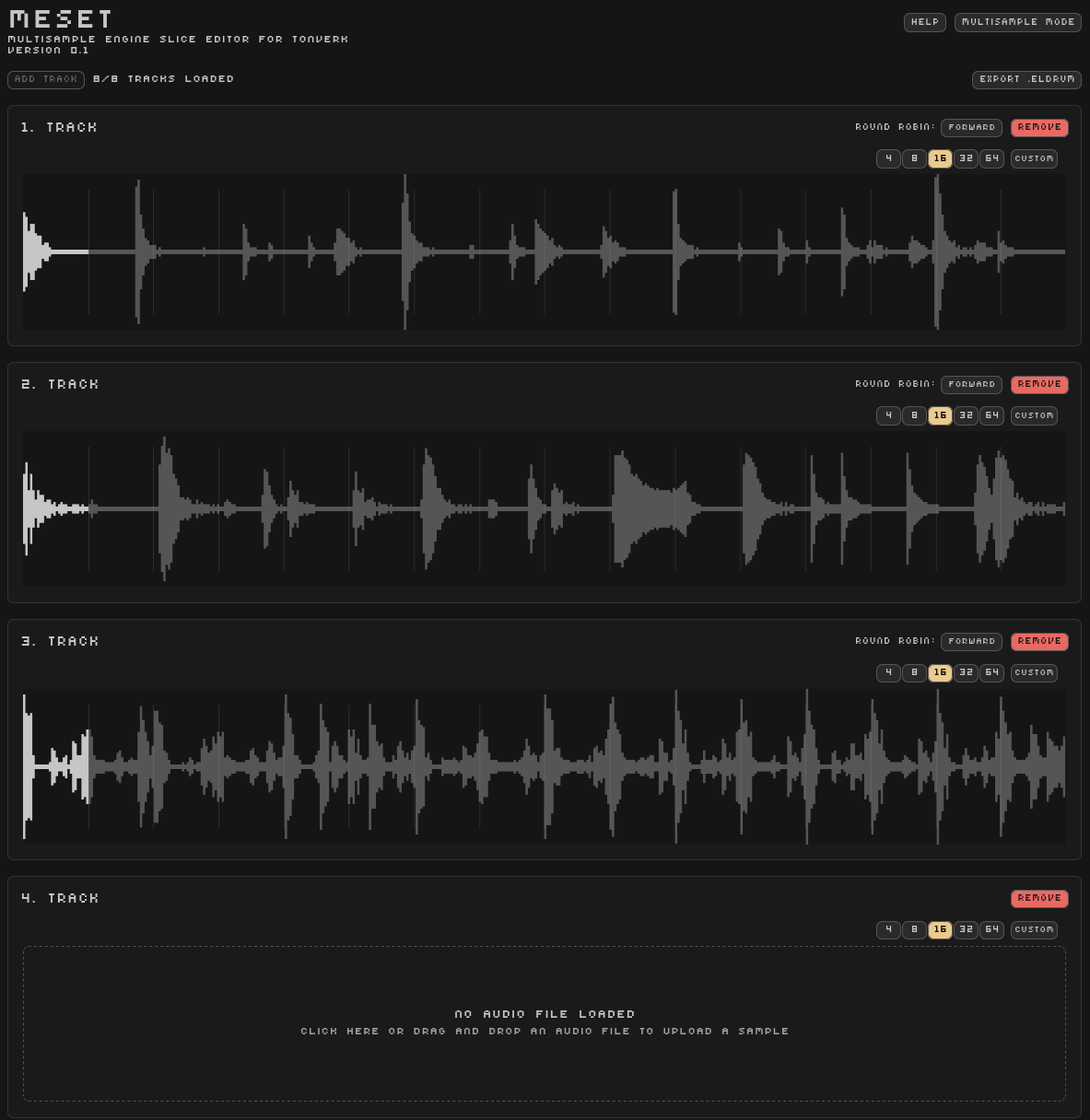
I’ve added a mode to generate round robins for all 8 subtracks from sample chains / loops
Custom slice divisions as well
19 Likes
Amazing work! @.@
1 Like
Thanks !
Keep in mind there are a bunch of issues to iron out but until then it might still be less painful than manually editing the .el* files
2 Likes
Trying it now in Round Robin mode, and it seems to be duplicating the dragged-in tracks sometimes, and shuffling them around.
Happy to try and send more info, if that’s helpful.
Thanks a lot for sharing the tool.
2 Likes
If anyone is interested in the output, here is an example with drum breaks
4 first subtracks are in Forward mode, the 4 others are Random
You should be able to find the kit in Tonverk under the name TEST
TEST.zip (5.1 MB)
Edit : just realized there are only 7 slots in this patch so subtracks 7 and 8 are duplicated
4 Likes
That works a treat.
The random ones do produce the expected audio, even though the screen doesn’t show an assigned sample for subtracks 5-7. Same for forward track 4.
1 Like
The waveform display behaviour seems a bit random currently, sometimes it does show it
And if shown it only displays the first slice regardless of the one playing back
Probably due to the fact that the round robin feature has not been fully implemented yet?
I’m not seeing anything in the .eldrum file that might fix it
1 Like
This looks great! I noticed a bug where clicking around on the slices to play them reduces the amplitude of the whole audio buffer on every click of a different slice.
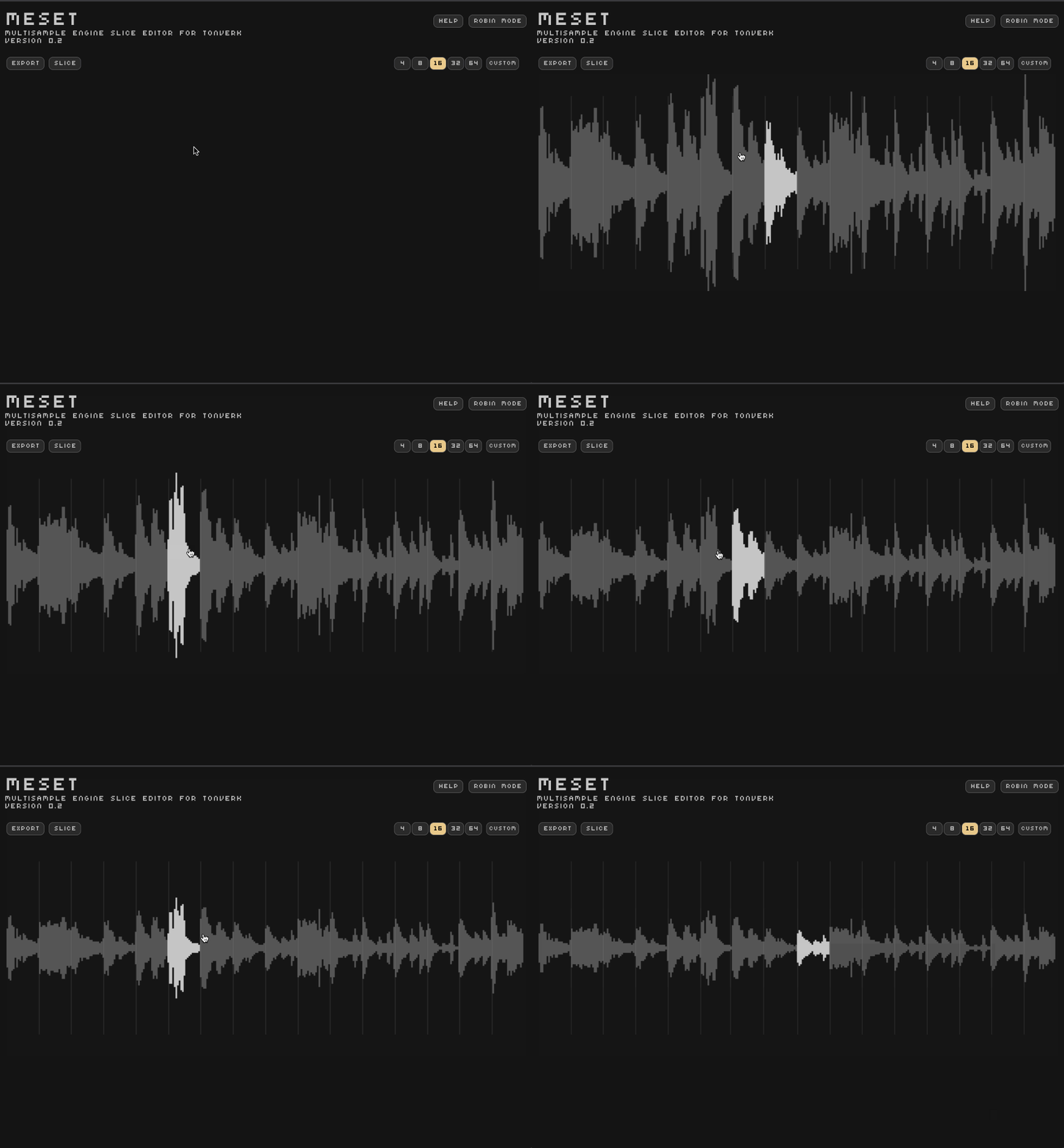
And if you grab a slice marker and drag it around, it happens quite quickly
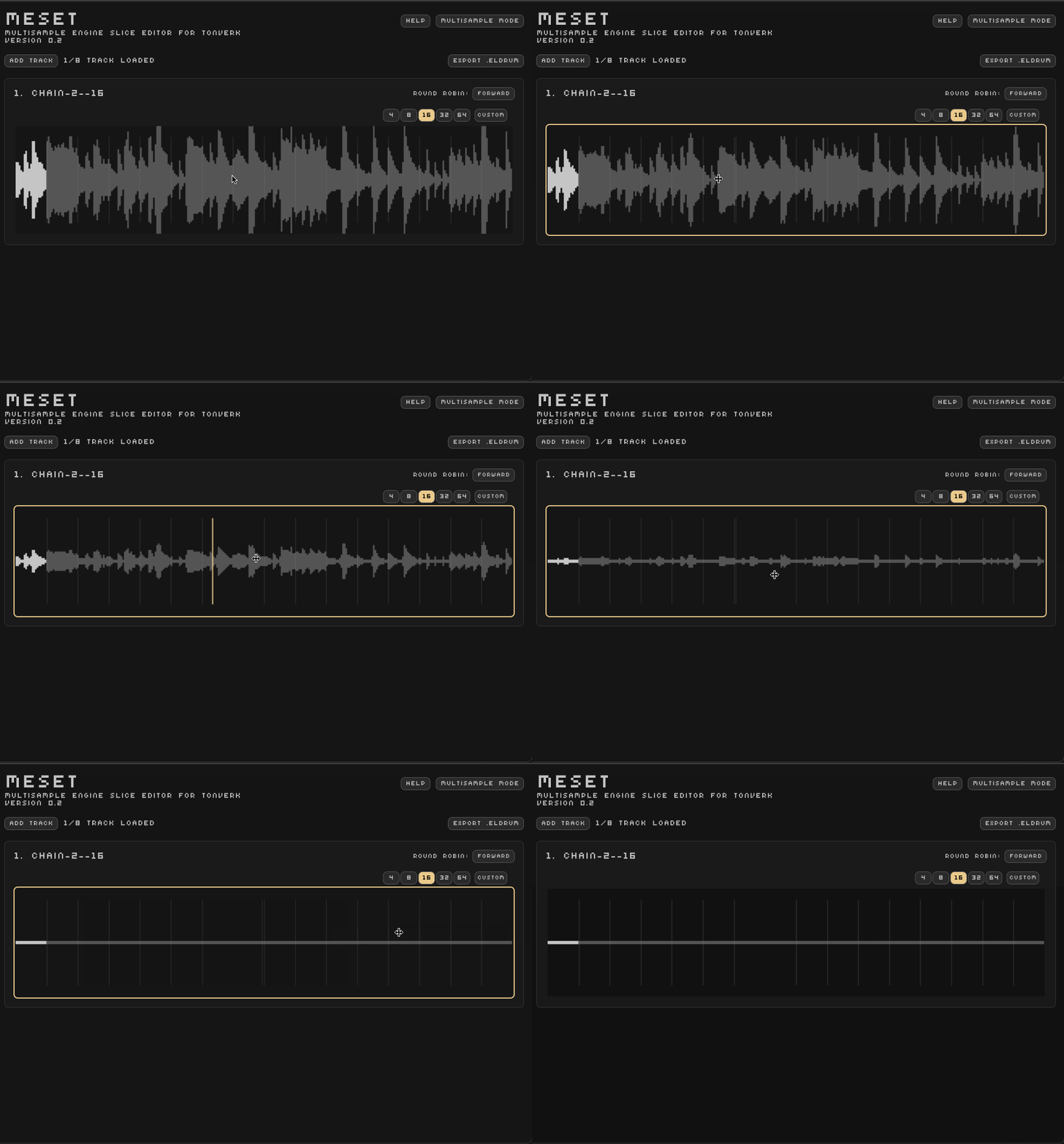
Eventually you get to silence, and this modified buffer is output in the downloaded files, happens on both the main and the robin waveform clicking.
I suspect it’s React re-parsing the existing audio buffer for each re-render of the component as its state changes from the passed input event/prop?
3 Likes
Good catch thanks for reporting!
You’re right I’ve handled the states really poorly, I’m currently attempting to clean the mess up with zustand which will hopefully resolve a bunch of related issues
2 Likes
Not that this needs confirming… but I can confirm this strategy works with creating a whole .eldrum instrument.
I picked 8 sounds from my TR-6S and sampled 8 hits of each into ableton (through Tonverk in fact). Each of these sample chains I then cut up in ReCycle and exported as individual hits.
Putting it all together in the .eldrum file was quite easy, and with a decent text editor you can find & replace a lot of the sample names with your own.
Things to keep in mind
- The midi notes follow the midi notes of the white keys starting at 60 (as C4 I think)
- Only the name of the
.eldrumfile and thenamevariable needs to match. All the sample names can be all over the place - The velocity value of
0.9960785is a remnant of a multisample I made previously. It is quite possible just1.0would work also - Making the samplers sound good and actually having their levels compliment each other, that is the real challenge

TR-9S.eldrum
# ELEKTRON DRUM SET MAPPING FORMAT
version = 0
name = 'TR-9S'

[[key-zones]]
pitch = 60
key-center = 60.0
velocity-layers = [
    { velocity = 0.9960785, strategy = 'Forward', sample-slots = [
      { sample = "BD909 001.wav", loop-mode = 'Off' },
      { sample = "BD909 002.wav", loop-mode = 'Off' },
      { sample = "BD909 003.wav", loop-mode = 'Off' },
      { sample = "BD909 004.wav", loop-mode = 'Off' },
      { sample = "BD909 005.wav", loop-mode = 'Off' },
      { sample = "BD909 006.wav", loop-mode = 'Off' },
      { sample = "BD909 007.wav", loop-mode = 'Off' },
      { sample = "BD909 008.wav", loop-mode = 'Off' }
    ]}
]

[[key-zones]]
pitch = 62
key-center = 62.0
velocity-layers = [
    { velocity = 0.9960785, strategy = 'Forward', sample-slots = [
      { sample = "SD909 001.wav", loop-mode = 'Off' },
      { sample = "SD909 002.wav", loop-mode = 'Off' },
      { sample = "SD909 003.wav", loop-mode = 'Off' },
      { sample = "SD909 004.wav", loop-mode = 'Off' },
      { sample = "SD909 005.wav", loop-mode = 'Off' },
      { sample = "SD909 006.wav", loop-mode = 'Off' },
      { sample = "SD909 007.wav", loop-mode = 'Off' },
      { sample = "SD909 008.wav", loop-mode = 'Off' }
    ]}
]

[[key-zones]]
pitch = 64
key-center = 64.0
velocity-layers = [
    { velocity = 0.9960785, strategy = 'Forward', sample-slots = [
      { sample = "RS909 001.wav", loop-mode = 'Off' },
      { sample = "RS909 002.wav", loop-mode = 'Off' },
      { sample = "RS909 003.wav", loop-mode = 'Off' },
      { sample = "RS909 004.wav", loop-mode = 'Off' },
      { sample = "RS909 005.wav", loop-mode = 'Off' },
      { sample = "RS909 006.wav", loop-mode = 'Off' },
      { sample = "RS909 007.wav", loop-mode = 'Off' },
      { sample = "RS909 008.wav", loop-mode = 'Off' }
    ]}
]

[[key-zones]]
pitch = 65
key-center = 65.0
velocity-layers = [
    { velocity = 0.9960785, strategy = 'Forward', sample-slots = [
      { sample = "CP909 001.wav", loop-mode = 'Off' },
      { sample = "CP909 002.wav", loop-mode = 'Off' },
      { sample = "CP909 003.wav", loop-mode = 'Off' },
      { sample = "CP909 004.wav", loop-mode = 'Off' },
      { sample = "CP909 005.wav", loop-mode = 'Off' },
      { sample = "CP909 006.wav", loop-mode = 'Off' },
      { sample = "CP909 007.wav", loop-mode = 'Off' },
      { sample = "CP909 008.wav", loop-mode = 'Off' }
    ]}
]

[[key-zones]]
pitch = 67
key-center = 67.0
velocity-layers = [
    { velocity = 0.9960785, strategy = 'Forward', sample-slots = [
      { sample = "CH909 001.wav", loop-mode = 'Off' },
      { sample = "CH909 002.wav", loop-mode = 'Off' },
      { sample = "CH909 003.wav", loop-mode = 'Off' },
      { sample = "CH909 004.wav", loop-mode = 'Off' },
      { sample = "CH909 005.wav", loop-mode = 'Off' },
      { sample = "CH909 006.wav", loop-mode = 'Off' },
      { sample = "CH909 007.wav", loop-mode = 'Off' },
      { sample = "CH909 008.wav", loop-mode = 'Off' }
    ]}
]

[[key-zones]]
pitch = 69
key-center = 69.0
velocity-layers = [
    { velocity = 0.9960785, strategy = 'Forward', sample-slots = [
      { sample = "OH909 001.wav", loop-mode = 'Off' },
      { sample = "OH909 002.wav", loop-mode = 'Off' },
      { sample = "OH909 003.wav", loop-mode = 'Off' },
      { sample = "OH909 004.wav", loop-mode = 'Off' },
      { sample = "OH909 005.wav", loop-mode = 'Off' },
      { sample = "OH909 006.wav", loop-mode = 'Off' },
      { sample = "OH909 007.wav", loop-mode = 'Off' },
      { sample = "OH909 008.wav", loop-mode = 'Off' }
    ]}
]

[[key-zones]]
pitch = 71
key-center = 71.0
velocity-layers = [
    { velocity = 0.9960785, strategy = 'Forward', sample-slots = [
      { sample = "RC909 001.wav", loop-mode = 'Off' },
      { sample = "RC909 002.wav", loop-mode = 'Off' },
      { sample = "RC909 003.wav", loop-mode = 'Off' },
      { sample = "RC909 004.wav", loop-mode = 'Off' },
      { sample = "RC909 005.wav", loop-mode = 'Off' },
      { sample = "RC909 006.wav", loop-mode = 'Off' },
      { sample = "RC909 007.wav", loop-mode = 'Off' },
      { sample = "RC909 008.wav", loop-mode = 'Off' }
    ]}
]

[[key-zones]]
pitch = 72
key-center = 72.0
velocity-layers = [
    { velocity = 0.9960785, strategy = 'Forward', sample-slots = [
      { sample = "CC909 001.wav", loop-mode = 'Off' },
      { sample = "CC909 002.wav", loop-mode = 'Off' },
      { sample = "CC909 003.wav", loop-mode = 'Off' },
      { sample = "CC909 004.wav", loop-mode = 'Off' },
      { sample = "CC909 005.wav", loop-mode = 'Off' },
      { sample = "CC909 006.wav", loop-mode = 'Off' },
      { sample = "CC909 007.wav", loop-mode = 'Off' },
      { sample = "CC909 008.wav", loop-mode = 'Off' }
    ]}
]
4 Likes
Round-robbins with crossfaded loops in .elmulti can work like this btw:
Summary
# ELEKTRON MULTI-SAMPLE MAPPING FORMAT
version = 0
name = 'LD-Rave-Detuner2'

[[key-zones]]
pitch = 36
key-center = 36.0

[[key-zones.velocity-layers]]
velocity = 0.49411765
strategy = 'Forward'

[[key-zones.velocity-layers.sample-slots]]
sample = 'LD-Rave-Detuner-C1-V127-XIUV.aif'
loop-mode = 'Forward'
loop-start = 217676
loop-end = 276730
loop-crossfade = 1000

[[key-zones.velocity-layers.sample-slots]]
sample = 'LD-Rave-Detuner-C1-V127-I7SS.aif'
loop-mode = 'Forward'
loop-start = 234155
loop-end = 276843
loop-crossfade = 1000

[[key-zones.velocity-layers.sample-slots]]
sample = 'LD-Rave-Detuner-C1-V127-7QP2.aif'
loop-mode = 'Forward'
loop-start = 246496
loop-end = 277648
loop-crossfade = 1000

[[key-zones]]
pitch = 39
key-center = 39.0

[[key-zones.velocity-layers]]
velocity = 0.49411765
strategy = 'Forward'

[[key-zones.velocity-layers.sample-slots]]
sample = 'LD-Rave-Detuner-D#1-V127-BV95.aif'
loop-mode = 'Forward'
loop-start = 257848
loop-end = 276632
loop-crossfade = 1000

[[key-zones.velocity-layers.sample-slots]]
sample = 'LD-Rave-Detuner-D#1-V127-5QUK.aif'
loop-mode = 'Forward'
loop-start = 220925
loop-end = 277143
loop-crossfade = 1000

[[key-zones.velocity-layers.sample-slots]]
sample = 'LD-Rave-Detuner-D#1-V127-MVXS.aif'
loop-mode = 'Forward'
loop-start = 237871
loop-end = 264200
loop-crossfade = 1000

[[key-zones]]...
6 Likes
wait .elmulti supports round robin as well??
2 Likes
The velocity ranges from 0.0 to 1.0
Here are the values extracted from a 128 velocity layer multisample patch, from 1 to 127
Summary
    0.007843138,
    0.015686275,
    0.023529414,
    0.03137255,
    0.039215688,
    0.04705883,
    0.054901965,
    0.0627451,
    0.07058824,
    0.078431375,
    0.08627451,
    0.09411766,
    0.10196079,
    0.10980393,
    0.11764707,
    0.1254902,
    0.13333334,
    0.14117648,
    0.14901961,
    0.15686275,
    0.16470589,
    0.17254902,
    0.18039216,
    0.18823531,
    0.19607845,
    0.20392159,
    0.21176472,
    0.21960786,
    0.227451,
    0.23529413,
    0.24313727,
    0.2509804,
    0.25882354,
    0.26666668,
    0.27450982,
    0.28235295,
    0.2901961,
    0.29803923,
    0.30588236,
    0.3137255,
    0.32156864,
    0.32941177,
    0.3372549,
    0.34509805,
    0.3529412,
    0.36078432,
    0.36862746,
    0.37647063,
    0.38431376,
    0.3921569,
    0.40000004,
    0.40784317,
    0.4156863,
    0.42352945,
    0.43137258,
    0.43921572,
    0.44705886,
    0.454902,
    0.46274513,
    0.47058827,
    0.4784314,
    0.48627454,
    0.49411768,
    0.5019608,
    0.50980395,
    0.5176471,
    0.5254902,
    0.53333336,
    0.5411765,
    0.54901963,
    0.5568628,
    0.5647059,
    0.57254905,
    0.5803922,
    0.5882353,
    0.59607846,
    0.6039216,
    0.6117647,
    0.61960787,
    0.627451,
    0.63529414,
    0.6431373,
    0.6509804,
    0.65882355,
    0.6666667,
    0.6745098,
    0.68235296,
    0.6901961,
    0.69803923,
    0.7058824,
    0.7137255,
    0.72156864,
    0.7294118,
    0.7372549,
    0.74509805,
    0.75294125,
    0.7607844,
    0.7686275,
    0.77647066,
    0.7843138,
    0.79215693,
    0.8000001,
    0.8078432,
    0.81568635,
    0.8235295,
    0.8313726,
    0.83921576,
    0.8470589,
    0.854902,
    0.86274517,
    0.8705883,
    0.87843144,
    0.8862746,
    0.8941177,
    0.90196085,
    0.909804,
    0.9176471,
    0.92549026,
    0.9333334,
    0.94117653,
    0.9490197,
    0.9568628,
    0.96470594,
    0.9725491,
    0.9803922,
    0.98823535,
    0.9960785
]
1 Like
At this point my assumption is that .eldrum and .elmulti “packets” (folder plus samples and definition file) are essentially the same.
My bet is that there is a difference in how Tonverk loads them. If the definition says .eldrum it then plays only eight specific notes (60, 62, 64, 65, 67, 69, 71, 72), and it provides individually adjustable amp and filters for those notes, but otherwise it would work just like .elmulti.
This is my not very thoroughly researched hypothesis
2 Likes
Available Strategies
in 1.0.0 :
Forward
PingPong
Random
added in 1.0.1 :
Reverse
RandomNoRepeat
17 Likes
Thanks for the heads up !
I do not see this info in the changelogs, how did you find it?
1 Like
It was probably overlooked when compiling the updates list, it was discussed for an intervening (not public) update before this release today
4 Likes
Yes!
Hi, thank you for the great work!
Would it be possible to add an option to delete some slices, so we could keep only the BD on subtrack 1 and the SD on subtrack 2?
I could try Recycle, but I can’t remember if there was an easy way to do that.
Also, I suppose Elektron will eventually give us easier access at some point.
Big thanks!