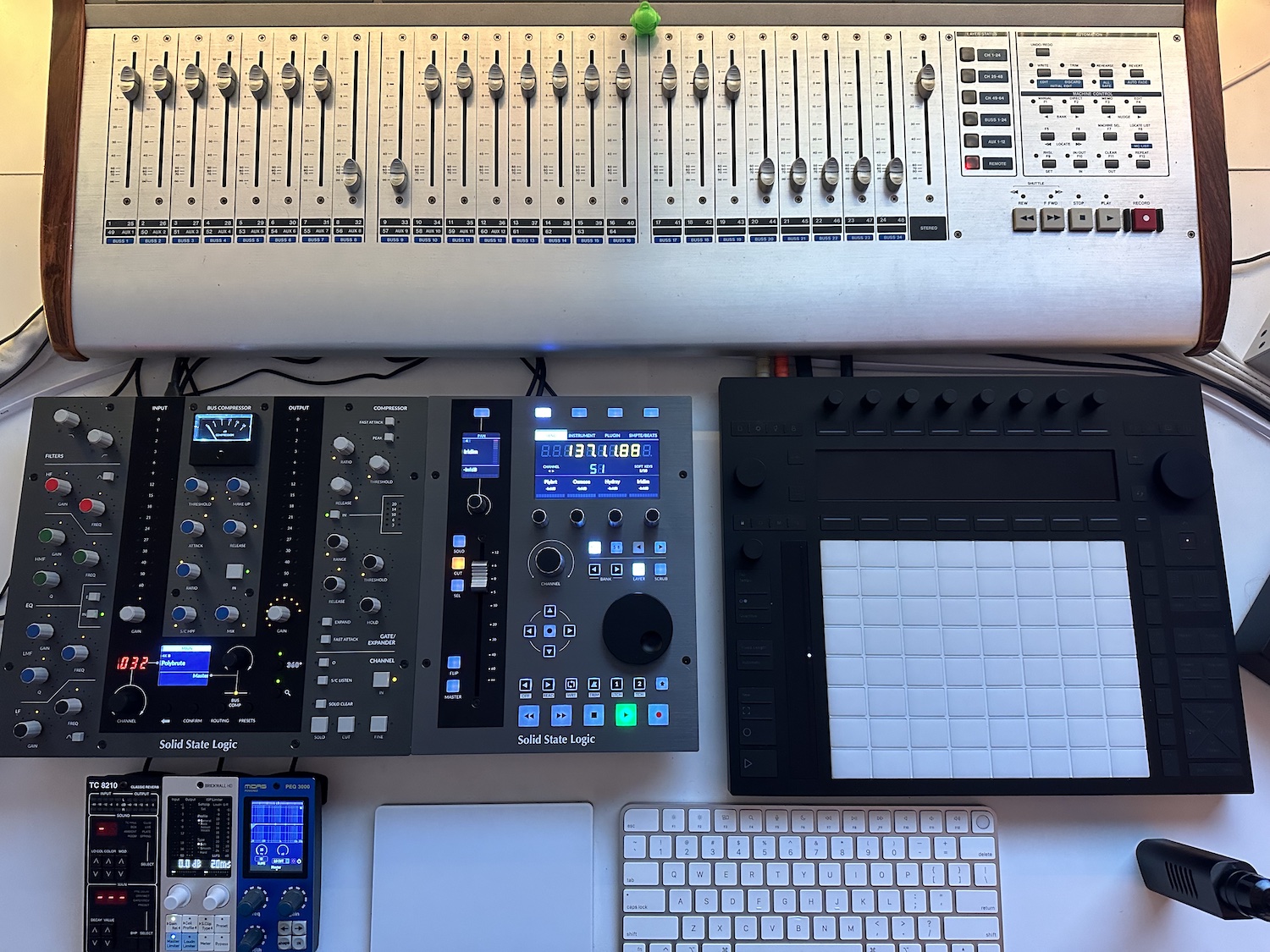
This thing looks so good and compact, I‘m very tempted - price is steep but I suspect it has the build quality to match?
To those who own one already, how‘s its footprint on your desk (size, height, ergonomics)?
This thing looks so good and compact, I‘m very tempted - price is steep but I suspect it has the build quality to match?
To those who own one already, how‘s its footprint on your desk (size, height, ergonomics)?
Build quality is great, thick steel and everything feels nice, the jog wheel is metal but the pots are plastic. The footprint is about the right size, doesn’t seem overly big like the UF8 and fits nicely on my crowded desk. The screens are really nice, I especially like that I can put the ssl meter plugin on my master buss and have all that info be on the screen of the UF1.
Now some tips for the bitwig users after messing around with it tonight:
I ended up selecting the logic daw profile in SSL 360 and then using the Mackie MCU-Control Universal by driven by moss (I also turned on ‘display track names in first display’ in the controller settings – do NOT turn on ‘only has 1 fader’ or else the SEL button on the UF1 doesn’t work anymore). And to my surprise most everything seems to be working correctly. Most hiccups I have encountered have just been due to the limitations of the UF1 and MCU and not due to bitwig (aside from the fact that bitwig doesn’t have a scrub function so you cant scrub with the jog wheel). I am pleasantly surprised! This thing is deep though so I still have a lot to learn and custom soft keys to configure, etc.
I’ve been spending some more time setting this up. Due to the great job driven by moss did with mcu and the customizability of the UF1 via the ssl360 software this literally has the best integration of any hardware controller I have used with bitwig so far. Just read through the mcu section of the driven by moss manual to see how he implemented everything and then edit the uf1 softkeys how you want (they can even be a series of keyboard commands if you want). You can even change what names they display so wierd bitwig mcu functionality is not confusing (like nudge being used for tap tempo in bitwig can actually say tap tempo instead of nudge).
I just ordered a UF1 to use along side the Push 3 in Ableton. I have always wanted a dedicated fader controller with recall. I love the Launch Control XL, but I think of it more as a midi cc controller for hardware. I have also wanted the feature where you hover over a VST control with the mouse and control it with a knob for a long time; some of the Audient interfaces have this feature.
Good time to get one. They just updated the software with a load of decent features.
Just got one of these. Seems really nice, but I can’t seem to get the record arm soft key working properly in Live.
It currently works on channel 1 only. When I select any of the other channels so the fader and display is showing the currently selected channels parameters, and hit the Rec Arm soft key, it turns on record arm on track 1 even if I’m on eg. Track 6.
Happening in session and arrangement view.
What am I doing wrong?
Edit: fixed it by using a keyboard shortcut instead of MCU rec ready message. Seems a bit daft if doesn’t work with MCU but seems to be fine with keyboard shortcut so all good.
Has anyone figured out if/how you can switch the button light behaviour on the assignable buttons from momentary to toggle?
Eg. Have mapped Live metronome to the metronome button and want light to toggle on and off according to metronome status, but at the moment it just flashes momentarily when pressed.
Took advantage of the current big discount on the 4KE for UF1 owners.
This thing is so nice. Sounds ace, loads of flexibility and really opens up the options by adding a 360 mixer layer on top of the Live layer I have set up.
I’m using it mostly in a minimal laptop screen use setup with a predominantly hardware rig, and having the 4KE EQ displayed in a nice graphic EQ curve, coupled with the meter plugin is really cool.
Would be great if they added some better visual feedback for the compressor and dynamics modules in the channel strip too.
been looking for a rock-solid 4-8 channel motorized device, old-school midi, usb-midi or rtp-midi/ethernet. preferably without extras or displays. does it exist?
Got one of these a few days ago and using it with Logic. I won’t return it, it works really well.
I do wonder tho - the integration with SSL’s channel strips is quite tight as is. Why would one get a UC1 as well? Is it that big of a difference in workflow that it warrants owning both?
Hey, anyone here using this one with Ableton Live? I was watching some vids about this and heard you can open plugins and control their parameters from the unit without the need to use the mouse or computer screen. Is this true for all plugins or only the SSL ones?
Another question is, can you navigate a project with this? Say you have a big project with dozens of tracks; does the UF1 allow you to jump from, say, track 1 to track 30, without having to use the scroll wheel on your mouse to view the track?
Thinking about this one being the sole daw controller in my studio and use it to lessen my mouse dependence in Live when mixing and general project navigation. 
You can use it to control SSL plugins, as well as map other plugins to the controls. Some plugins already have pre mapped configuration, such as Waves and UAD SSL channel strip plugins.
You can’t open the plugin window from the controller though, as there isn’t a mappable function in Live. If you have the plugin windows set to only show when that track is selected, then you can leave them open, and when you change tracks, the corresponding plugin window(s) will show.
You can use the dial and buttons on the UF1 to scroll through tracks in Live, and navigate. There’s also several banks of mappable buttons that you can assign to almost anything.
Thank you so much!
One thing to note, though: you can actually map the wrench in Ableton to open up the GUI with the key mapping function. I was hoping the controller would have that baked in, but it’s awesome that it can do everything else. It sounds like it’s winning the controller race for me!
Right, but it’s an all or nothing affair, and not something they can bake in due to it being manually mapped. You can assign that key to a button on the UF1 though.
That’s what I’m planning to do when i buy the UF1! I see it uses USB C, would it work with an adapter or hub, or are the power requirements forcing you to use a USB c port directly from the computer, depending on this i might have to get a new computer first 
It comes with an C to A adapter, works with A or C from a powered hub, I haven’t tried it with a non powered hub, but it uses a power adapter, so should be fine, as it doesn’t pull any power from USB.
There are no downsides to this one! Or do you know of any?
I’m biased, I have the UF8, UC1, and the UF1, also have a second UF8 up for sale as I don’t really need 2.
The only gripes I’ve had have mostly been covered in the updates over the past year.
One very minor gripe I have is the focus mode where you hover over a plugin parameter with the mouse to control with the UF1 knob only works if the plugin is compatible with mouse scroll wheel functionality. A lot of the plugins that I use (Moog & Arturia off the top of my head) don’t work like this. The device mode described above works fine. I have the UF1 paired with a Push 3 and MP-Midi controller. The combo feels very close to hardware and even better when I use an external sequencer like the Hapax or Torso T-1.