Thinking about it though, it doesn’t really make sense to go from 100% to -100%.
It would make more sense for the depth to be 127 to -127, if the destination is a CC.
Thinking about it though, it doesn’t really make sense to go from 100% to -100%.
It would make more sense for the depth to be 127 to -127, if the destination is a CC.
HAPAX TIP:
Something I discovered recently which may be of help to someone.
You can make use of the ‘Active Channel’ feature without actually setting your tracks to ‘All Active’.
I don’t have my tracks Input set to ‘All Active’, I need them set to specific differing inputs like ‘A’, ‘B’, etc. I thought this would exclude me from being able to use the Active Channel feature.
However, it seems to work both ways. I plugged in a Launchkey Mini MK3 directly to the USB Host port on my Hapax.
Then I went to settings, MIDI IN. Then set ‘ACTIVE TRACK PORT’ to ‘MIDI IN HOST’. Then picked the correct channel for my Launchkey.
Now, when a track is selected, my Launchkey will control that channel directly.
This doesn’t affect my other MIDI routings, everything works the same as before, with the added bonus of being able to use the Active Channel feature.
Hope this helps someone!
Edit: typo
Squarp released a complete Playlist of Hapax tutorials, 20 videos so far
https://youtube.com/playlist?list=PLf854BihJD42e5BHdhZw58MdxhpqKDafm&si=EcXEszXURn1PQGtb
That’s awesome thanks for sharing!
Whoa they beat me to it!!! I will make my series later on!
The tutorial on algorithms teases that new ones are being worked on!
A question to the Hapax users:
Is it possible to use the Hapax for instant quantizing? So, lets say, i go in with some voltage into one CV-in, and the Hapax does that in his current scale mode, and puts it our in one (or more) of its CV-out?
you mean without gate? (so, you could quantise 2 cv in) ( * )
if so, no not really…
quantisation (track or scale fx) works on note input, so you need to use cv/gate pair.
the only ‘hack’ I can think of is to use cv in to modulate scale fx - transpose. then you could lay down C3 on a track.
but this won’t work, since its not v/oct. - the issue here is scale/transpose = +/-36 semis, i.e. +/- 3 oct, whereas the cv input is +/-5v of that range… so its not v/oct.
theoretically, you could scale ( x 5/3 ) the input voltage in eurorack,.
but not really what you want, and a bit of a pain - not worth the hassle imho.
( * ) I assume this, as with cv/gate it just works out of the box… track in and out cv/gate, then use track scale or scale fx.
Ok, so it works? Cause yeah, i just would want to go into the Hapax with V/oct and maybe a gate, and lets do the Hapax its scaling to push this V/oct into its scale (scale per track or scale fx) and let spit it out trough its CV out.
yes, with cv/gate it will work (without gate it will not, as I posted above)
thanks!
HAPAX TIP: (in STEP MODE).
Say you want to change all the ‘F’ notes to ‘E’… but only on ONE page (eg one bar) of an 8 bar pattern etc.
Hold down the row button for that note.
Now press ‘2nd’ once (DO NOT HOLD IT DOWN, JUST PRESS IT ONCE).
You’ll see on the screen your selection changes to select only notes on the current page.
Whilst holding a row button, pressing and releasing 2nd switches between whole pattern and current page selections.
You can of course then hold down 2nd for additional secondary functions.
It’s in the manual but maybe you missed it! Very useful!
Hey guys just wanted to let you know I have resumed the Hapax boot camp series - these are just a different content style than the squarp videos.
I have shoehorned in previous tutorials and just renamed them as boot camp episodes because I don’t want to have to go over all of the basics all over again.
If interested here is the playlist >>
https://www.youtube.com/playlist?list=PLQvVnhG7o2ySBofHt9B4CmHhfhdwGzcts
Thanks!
HAPAX REVIEW!
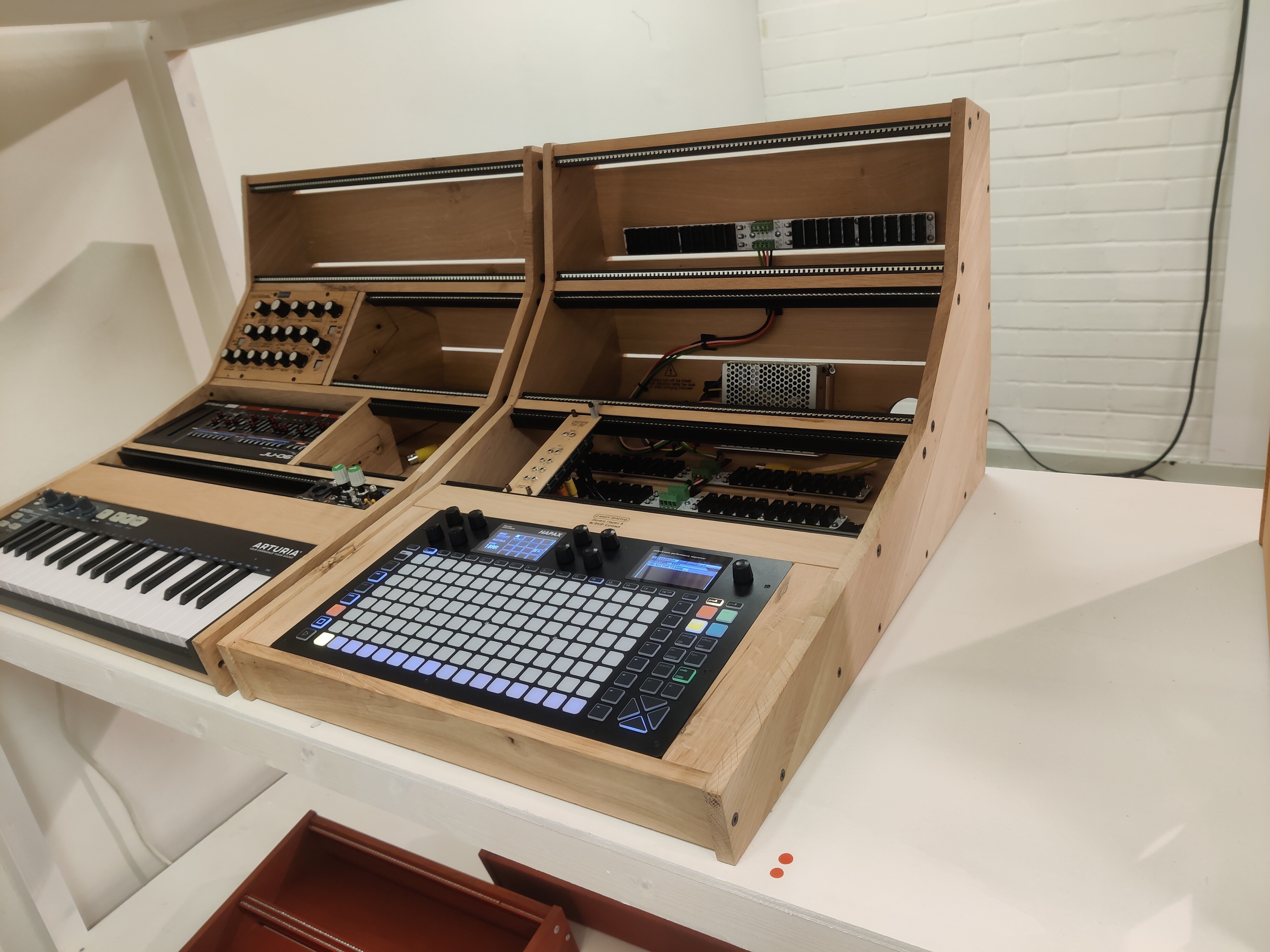
I’ve had my Hapax for nearly 2 years now. It was purchased for centralized sequencing in a hardware setup, replacing a Deluge (which I love but lacked certain features I needed).
Firstly I will say: in my opinion, the Hapax is the king of hardware sequencing.
The more I use it, the more I realize how much thought, care, and attention to detail has gone into it’s creation. It’s deep. Complex. Configurable. Yet simple. Logical. Usable.
Everything just makes sense, fits. The greatest compliment I can give it, is this:
It seems to vanish. When you’re using it, it ‘gets out of the way of itself’, and allows your ideas to flow. It enables a flow state, where you’re unaware of the device itself, and just creating. In my opinion, there aren’t many devices that achieve this level of transparancy.
Understand, that it takes a while to master. It’s bursting to the seams, in terms of features, and tricks, to improve your music and your experience. You’re not going to learn it in a day. It’s a life-long relationship, as the Hapax opens itself up to you and you connect with it.
If I try and describe everything that it does well, this review will be too long. I’ll touch on one little thing that I love then, as an example: Automation (and Instrument Definitions).
An ‘Instrument Definition’ is a little text file you create on your computer, with a list of CC’s and their associated names. You put these on the SD card. Now, when you press the automation button, you’ll get a list of your synths (or drum machine or fx etc) modulatable parameters. This enables a truly wonderful workflow, that goes like this:
You press the Record button (a nice and clear red button). You play notes or turn knobs on your synth.
Everything is immediately recorded and will play back. It just works perfectly. There’s more though. Far more, if you dig deeper.
The Hapax detects which knob you turned, automatically takes you to that automation lane, which will say ‘Filter Cutoff’ etc. You now have so many options it’s amazing. You can interpolate the data or not. You can change the PPQN (amazing for thinning out data, and ensuring that you can send many, many lanes of automation to your synth… the Hapax can automate 64 lanes, per Track! Insane!)
There’s more. You can create points by tapping pads, move them up and down using the encoder. You can zoom into any area (or the whole pattern etc), hold the ‘All’ button, and change the Min, Max, and Centroid values of the automation. I cannot explain how good this is. How easy, quick, and amazing it is to have this level of sequencing power.
Let’s talk about FX. There are a whole host of amazing FX, addable as modules, of which you can have up to 7 per track. There are too many to go into here. I’ll touch on one which everyone can relate to hopefully. LFO’s. The obvious use case, MIDI CC LFO’s, just works perfecly and that alone would be enough to make me happy.
However. When you click on the ‘Destination’ encoder, you’re presented with a stunning list of destinations: Any CC, Pitchbend, Aftertouch, Program Change, Velocity, NRPN, CC Pair, CV Out. Those are great. Then scroll down and realize you can also select as a destination, ANY PARAMETER OF ANY OTHER FX YOU HAVE LOADED ON THAT TRACK.
I cannot overstate the genius of this… it’s out of this world. LFO’s modulating LFO’s, modulating arpeggiators, chance, euclidean, harmonizers, swing, randomizers… and a ton more. The possibilities are staggering.
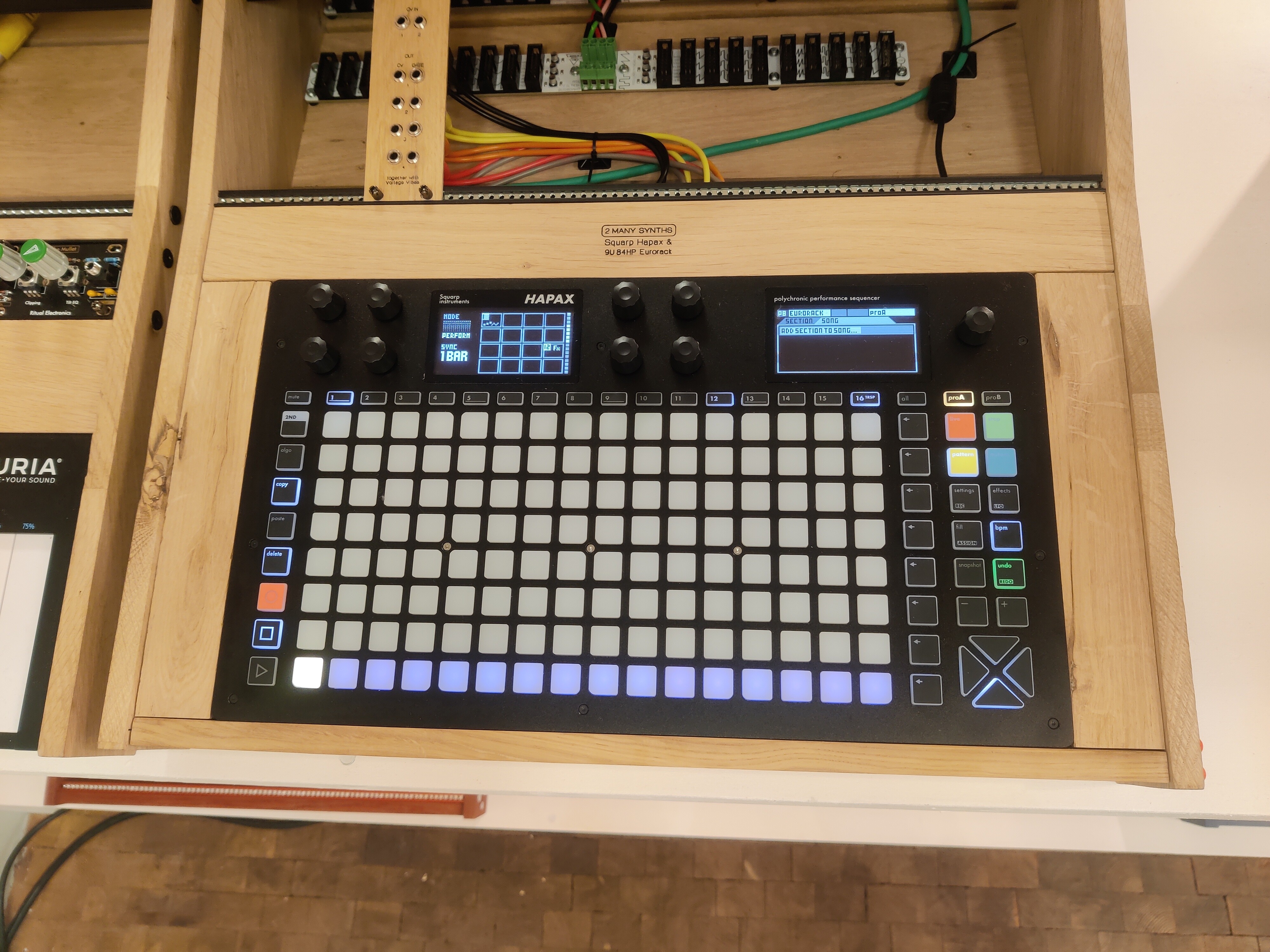
Build quality, and looks, briefly: Tank. Absolutely solid. Looks and feels premium. The 4 mode buttons are coloured, red, green, yellow, and blue. The rec button is red, those 5 buttons are the only splashes of colour when the Hapax is off. It screams seriousness, with a hint of playfulness. You quickly realize the colour-coding of the mode buttons helps your brain navigate easily. Dear God, why can’t other devices be this well thought out?
The one thing I changed (and highly recommend) was replacing the main encoder with a very large, metal, finger indented encoder. This is well worth changing out as the main encoder is too small in my opinion.
I have to mention the ‘Polychronic’ aspect. Basically you can load and play 2 projects simultaneously, for a total of 32 tracks playing. This gives you many options that other devices do not have or don’t do easily. Aside from the obvious one, of being able to ‘DJ’ one song into another, a track at a time if you wish, it also allows you to simply copy and paste stuff from one project to another. This is huge, and saves a huge amount of time in the long run, when creating and updating templates and so on.
Is it perfect?
No. Of course not. Nothing is. It’s certainly getting there though. There are things I think should have been implemented from the start, extra things I wish it did, I have a long list (I’m a demanding user and I want the moon-on-a-stick as my lollipop). However my list is shrinking as they improve it.
One last thing. The people at Squarp are very friendly and responsive, really I cannot say enough positives about this. Updates have been slow in coming, which can be frustrating, however, I’ve come to realize this is deliberate. When they update it, they tend to add a good amount of stuff, all of which is VERY well thought out and implemented. They seem committed to making THE BEST POSSIBLE SEQUENCER EVER, and have been slowly and steadily achieving this goal.
My eye has occasionally wandered. I’ve looked at other sequencers, wondering if they match up. Some look good. However, there’s always some sort of annoying limitation… 8 CC’s per-track or something similar. Sod that!
The Hapax has changed the way I’ve made music, for the better.
Long may it live!
Nice writeup. I’d like to see that list of cons or wishlist that you have. I have the Oxi One right now and have been thinking about getting the Hapax.
I’m in a similar boat. I enjoy my Oxi One and think it’s a great tool. It gets me to places I wouldn’t have gotten to without it, and it’s a lot of fun to use. Do I need another sequencer? No. But that hasn’t stopped me from continually looking at the Hapix. 
The wishlist is VERY long and not sure whether to post it, plus some of it is outdated as they’ve added it.
Cons, there isn’t much honestly. One thing that’s bugged me: the Hapax passes MIDI through sometimes unwantedly.
My setup is huge, MIDI going everywhere. I don’t use the Hapax as a node to pass MIDI through, for many reasons, the main one is, I try and eliminate latency in all it’s forms at every point (my setup is for playing live).
So, for instance, when I press a key on a controller keyboard, it sends MIDI both to the Hapax, and to a synth simulatneously. To the Hapax, to record to note, and to the synth, to sound the note. Therefore there’s zero chance of the Hapax adding any latency (most devices add at least a tiny amount).
I don’t want the Hapax sending the MIDI through as well, leads to doubled notes, and other issues. There’s a setting in the Hapax to only allow notes to be recorded, and stop them passing through. It works, but enabling it stops the MIDI Matrix from receiving data which stops other stuff from working.
So I have to use workarounds, not easy in a system where nearly every single CC (120 on each channel), on 16 channels does something, there’s not a lot of wiggle room for workarounds. They’re working on it though I think.
There are a few other bugs, here and there. Copying whole rows of patterns, seems to result in crashes. I never need to do this whilst jamming, and simply copy patterns one at a time otherwise.
Another small bug, related to remotely controlling the MIDI Matrix, seemingly separate values between on-device amounts, and amounts tweaked remotely. This one I really hope they fix. I can’t imagine it affects many people though.
Wishlist things, well the main one is I want more MIDI control of the Hapax. In my setup, I have control over everything. The Hapax allows each Track to have 4 parameters mapped in the MIDI Matrix, you have control over relative Depth, Polarity, Offset, etc. Very handy. I want more than 4 though. Even 8 would be a big improvement. Ideally though, I’d like CC control over every parameter of every FX loaded on a Track.
I’d like a Global Swing control which controls every Swing FX on every track and changes the swing. As it stands, I have a knob which sends 16CC’s to the Hapax simultaneously, to make a Global Swing. Ideally I wouldn’t have to do this (MIDI overload has to be avoided, especially down DIN cables).
Another big one: I’d like to be able route Tracks into Tracks. At the moment, I loop MIDI back into the Hapax through a router, which allows me to ‘print’ all FX, quantize, arpeggiation, onto another track. It works fine, but of course the inevitable slight latency slightly changes the feel. You can select all and microtime it back a tick which helps.
However, an internal loopback, or even ‘print’ to track would be great. Even a limited loopback, you can set a Tracks output back to itself once only, ie if a tracks input is another track, it will only output to external. So you can only daisy-chain two tracks. Would work for me.
Honestly though, the Hapax is fantastic. I’ve been making music a long time, hardware and software. I went in the box years ago, then switched to all hardware 5 years ago after a break (having kids etc).
Switching to hardware, there’s a real difference in quality, polish etc from in-the-box, it’s only natural. The Hapax though, has begun to erode this difference. You can get closer to the music you hear in your head.
It took me a long time to get fluent on it, there are a few tiny tips that if you miss them, your experience is much harder. You really need to learn every single feature to get it working at it’s best (just like any device). The nice part is though, the manual is superb, so easy to read, and the Hapax itself lends itself to learning.
No stupid esoteric button combos, weird inexplicable behaviour (cough cough Octatrack), it’s easy enough to learn given enough time.
Hope that helps!
Thanks! It definitely does. I think it is time for me to dive into the manual and make a decision. It really is checking a lot of boxes for me. While I really like the Oxi. I really do not like button combos and shortcuts that need to be committed to muscle memory. While some of it is well laid out or intuitive, I find I still need to look things up in the manual quite often while using the Oxi.
True of so many devices, even great ones.
I truly think the Hapax is pretty unique in this regard. It’s laid out so thoughtfully that you never need to remember silly combos.
There is a dedicated button for everything important, meaning most things are one press away. The 2nd (shift) button isn’t overused or needing to be combo’d with a 3rd button.
The other great thing that it does, is the long press/short press thing on many buttons (like Novation’s Circuits), where if you long press you temporarily enter a mode, and switch back on release. More devices need to do this!
Need to mention the twin screens now. It makes so much sense. The 8 encoders controlling the left screen, you always know exactly what’s happening, the main encoder controlling the right screen.
To balance it up, I’ll mention another minor bug that annoys me. Often when switching Definitions on a track, left-over automation lanes don’t get deleted, I have to delete them one at a time. I’d definitely like a ‘Delete All Automation Lanes’ option to clear them all before loading a new Definition.