4 Likes
be prepared 
 -rtfm pls
16 faders
some kill switches
some tap bpms
some mode switches
L/R
bounce bounce
-/+
424
esrever 
VU
octaves
lushhhhy
I/O
much luv

3 Likes
3.0 is live
take care
changelog from heaven
## [3.0.0] - stereo, fx, and much more
***Back up first. 3.0 changes the storage format.*Use Download all on the transfer site before you flash. The first boot formats the card. Every song on it is gone. Songs recorded on 3.0 survive later 3.x flashes.
### Sound
** Stereo. Takes record in stereo. Playback is stereo.*
** Mono or stereo per take. Page 8: tap a track to set its next take.*
** Speed range 0.25× to 1.5×. Pitch follows speed, as before.*
** The dropouts at max speed are gone. Four tracks at 1.5× with USB audio in plays clean. The one edge left: heavy effect stacks at that corner can still drop out.*
### Effects — eight pages
** Open a page: hold FN + a track button ~0.4 s. The faders become that page’s controls. Tap FN to close. FN + VOL−/VOL+ steps through all eight pages.*
** Page 1 FX: filter, chorus, distortion, trance gate.*
** Page 2 FX: bitcrush, ring mod, auto-wah, echo.*
** Page 3 FX: phaser, sweep, tremolo, reverb.*
** Page 4 TAPE: drive, tone, hiss / vinyl crackle, wobble.*
** Page 5 EQ: four bands on the whole mix.*
** Page 6 PLACE: stereo placement per track, saved with the song.*
** Page 7 TAKE & TIMING: downbeat offset, next take’s length in bars, and a per-track nudge (hold the track button, move its fader).*
** Page 8 MODE: mono / stereo for each track’s next take.*
** Taps on a page are resets. FN + T1 + T4 resets every page.*
** Second controls. Hold a track button and move its fader: wah resonance, echo feedback, tremolo shape and spread, reverb damping.*
** Tap a rate. Hold FN and tap a lane’s button in time. That lane follows your taps instead of the grid.*
** Routing. PLAY + VOL− = effects on the input (takes record with them). PLAY + VOL+ = effects on the tracks only. PLAY + double-click VOL = the whole mix.*
** Monitor mute. FN + both VOL on a page.*
### Bounce
** Tape copy. Hold PLAY, tap a track: the mix records into it at the speed you hear. Tap again to stop.*
** Sampler print. Hold PLAY, hold a track: records while you hold, baked to play back at 1×.*
### Playing
** Record = hold an empty track. Release; it is armed. Capture starts on the first sound. Tap it to stop.*
** Delete = tap a track, then press again and hold ~0.4 s. A double-tap no longer deletes.*
** Reverse a track. Hold FN + the track, tap PLAY. Works in every mode.*
** Isolate. Hold FN + PLAY, press a track: a momentary solo.*
** Octave up / down. Hold FN + PLAY, click the rocker.*
** Chop reset / home. FN + PLAY + VOL− resets the window. FN + PLAY + VOL+ moves it home.*
** The chop window reaches one block.*
### Timing
** The grid stays on the loops. The beat lights and the MIDI clock no longer drift off the audio over minutes. A pause keeps the beat phase.*
** Tap tempo retunes against the loops’ native tempo. A fifth tap no longer undoes the fourth. A rocker move no longer skews the next tap run.*
** Preset take length. Set bars on page 7. The take stops itself on the grid.*
### Lights
** VU meter on the side row while playing.*
** Page lights. Each lane shows its depth. Page 7 shows the beat chase.*
** Hardware PWM. The LEDs no longer cost CPU.*
### Not fixed
** A bounce at the full corner (three stereo tracks at 1.5× with USB audio in) can overrun. Bounce at 1× when it matters.*
### Transfer site (ships with this firmware)
** Reads and writes the 3.0 format: stereo WAV in and out, mono and stereo takes side by side, Download all.*
### Removed
** Heads-mode double-tap reverse (use FN + track, then PLAY).*
** The FN + rocker double-click chop reset (use FN + PLAY + VOL−). Every FN + rocker click now halves or doubles.*
8 Likes
I flashed my unit last night and was crazy impressed with the update.
the effects/stereo/pitching beautiful.
sampled psych soul dropped it an octave and added some sprinkles of tape noise and warble. bliss.
This is turning out to be the best $50 i spent. Such a great on the go companion/audio edit station for my 303 with a power bank!
5 Likes
yesss, have been feedbacking and suggesting a lot of these things like a few days ago within the closed beta 🫨 vinyl crackle or secondary fader functions to name a few 
btw. tape fx on page 4 is the real tapescam IOS code incorporated into the SP1, tape age, quality etc. are following in a few days, the trackN buttons will then do something important. 
4 Likes
gift that keeps on givin
1 Like
just try to bounce down with „play + tap trackbutton“ to start recording and also stop it on an empty track, this way all internal movement will get recorded and you can endlessly stack fx this way  if you have the reverb on full wet and stop the tape and start it again, the tape crawls thru the CPU until it’s audible again and that sounds so special like a Walkman with empty batteries.
the chop window is now also at audio rate modulation in the highest chop settings and that’s basically a complex drone oscillator which again, can be stacked with „bouncedown“ at different pitches 
4 Likes
i mean, just listen to the reverb-tail, that’s so lush and vibey  it’s a mutable-clouds algo afaik.
individual tap bpm on time based FXs 
3 Likes
what a vibe the reverb so lush and the stereo quality 
7 Likes
follow up firmware update with new beat-repeat, echo and reverb won’t share a lane (more of everything), performance fixes at high speed recording on full tracks (up to 16min per track) with fx! 🫨
5 Likes
Please go work for Roland, starting tomorrow on the tr1000 firmware, thanks
2 Likes
that’s what’s happening when not tied to a 10year business plan…
but it is most likely a combination of circumstances and interconnection that has led to the 3.0 tape looper firmware, which is a true Instrument and a masterpiece in functionality, it’s not flakey or experimental. it’s really a hardware 424 with massive fx and you can rely on the controls, learn the device and build upon that. Stereo looping is insane and it needs a bigger audience because the tapelooper is fire 
4 Likes
I love this forum for threads like this. I had no idea about this hardware existing or this amazing firmware project as of yesterday. Just ordered the machine on New Republic and am eagerly awaiting its arrival. Thanks everyone.
6 Likes


[/quote]
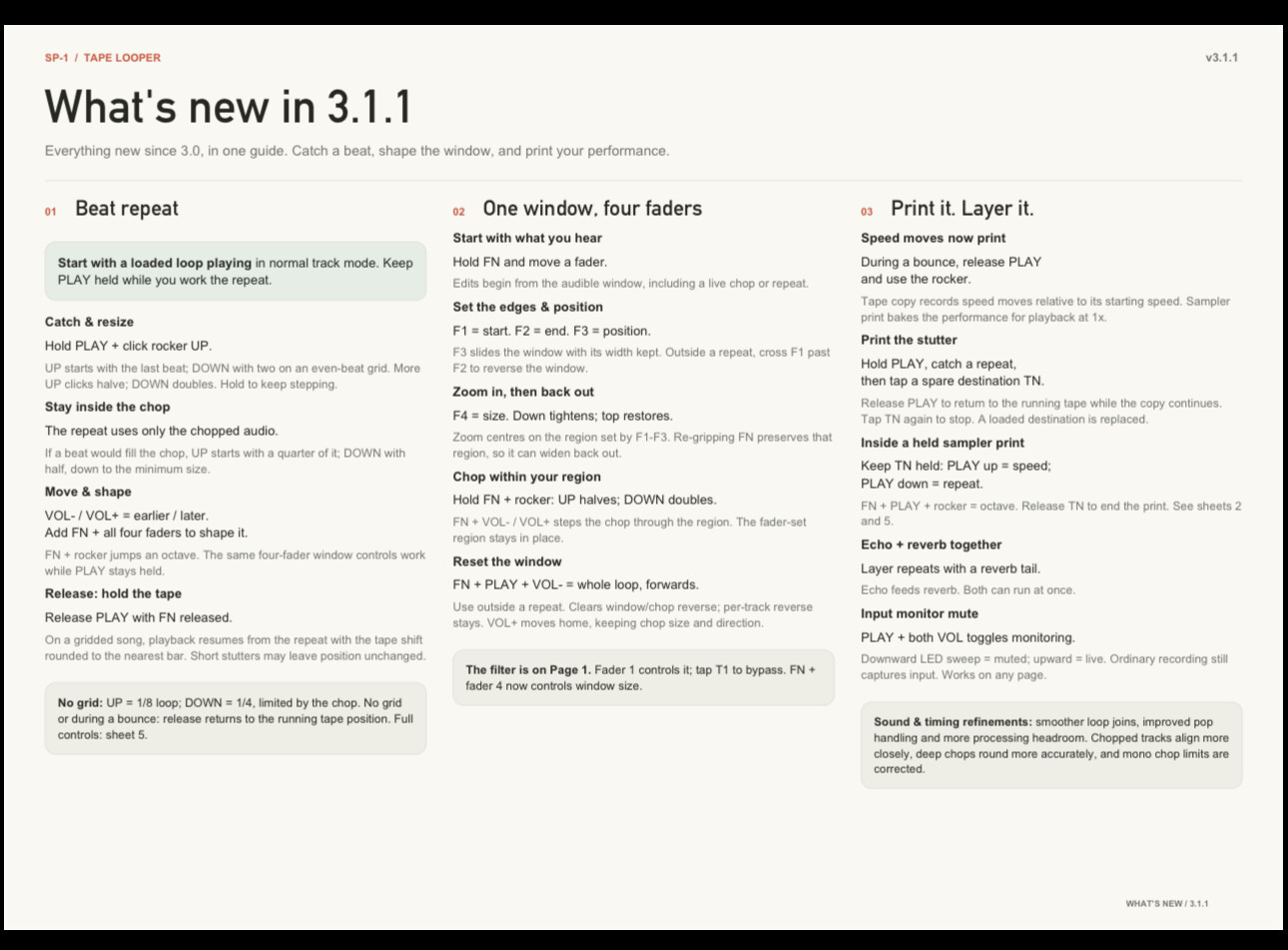
highly underrated new zoom fader on tapes
you can really pick a little snippet from a 12min recording, zoom even further into it and re-sample that over and over with fx added and baked into the sample over and over
3 Likes

6 Likes
this looks absolutely crazy! i’ve been following all the updates, would love to see any video examples of the full functionality. i understand that would be a huge video to make, but maybe someone will do it one day
2 Likes
Yes same here! Super exciting to see progress but not sure what this does.
Thanks 
1 Like
it’s grown from an already fun tapelooper (usbc input, 4 tracks to record with a loop-function) into a precise multitrack stereo 424 with the real “tapescam” tape fx, extremely powerful stereo fx (clouds reverb with damping, individual tap bpm on time based fx, sample zoom, chop, beat-repeat, drone synthesizer and a lot more to go deep on your digital tape, eq, panning, loop length etc etc
the 3d guide is a nice way to explore the unit but it’s so solid that one can lean into the controls and learn it the way one did with the OP-Z relying on sound and visual feedback with the LEDs, which are fire 
3 Likes