Soundcraft EPM channel inserts - direct out question

I’m a long-time Mackie user, but still a very inexperienced sound tech. Currently I own an 802VLZ4. Mackie’s manuals are pretty clear about using channel inserts as non-interrupting direct outs: insert a mono jack to the first click. The accompanying image is pretty helpful for understanding the internals.

I’m considering a Soundcraft EPM12 for my next mixer, mostly because reading Amazon reviews, Sweetwater reviews, and 15 years of gear threads leads to me to conclusion that the Soundcraft EPM signal path is slightly cleaner then the Mackie VLZ signal path by default.

One of my use cases is playing live, and recording stems into Ableton for subsequent mixing. I could run instrument outs through Ableton before the mixer, but I’d love to avoid that latency. So, I checked the Soundcraft manual for direct out behavior, and I’m confused by what I found:

Insert Point

The unbalanced, pre-EQ insert point is a break in the channel signal path, allowing limiters, compressors, special EQ or other signal processing units to be added in the signal path. The Insert is a 3-pole ‘A’ gauge jack socket which is normally bypassed. When a jack is inserted, the signal path is broken, just before the EQ section.

The signal from the channel appears on the TIP of the plug and is returned on the RING, with the sleeve as a common ground.
The Send may be tapped off as an alternative pre-fade, pre-EQ direct out- put if required, using a lead with tip and ring shorted together so that the signal path is not interrupted.

Now, a TS jack is, effectively, a TRS jack with the ring and sleeve shorted. So, the casual suggestion that I use a lead with the tip and ring shorted is very confusing to me, as I can’t imagine that they expect users of this line to produce non-standard leads by hand to take advantage of this feature. Is this an unhelpful way of telling users that they should insert a mono cable to the first click, the way that this feature works on a Mackie? I feel like I’m missing something very obvious here, but I can’t see it for the life of me. Any help is much appreciated.
Surely if the signal is returned on the ring then if you insert a TS jack to the first click you’ll only be connecting the tip of that jack to the return path for the signal and not the send? You need to insert the jack fully to connect to the send. By shorting the tip and ring the cable will act as a direct out; the signal will hit the tip of the jack then be returned to the channel on the ring. You’ll also have the signal present on the top and ring of the other end of that cable.

So yeah, they expect you to make up some specific leads as the one click trick won’t work.

Appreciate the response. Given that my goal is to tap the signal without interrupting the channel, isn’t a connection to Send precisely what I’m trying to avoid? I don’t want to process the signal then return it. I want to pull the pre-EQ signal into Ableton, while at the same time allowing the latency-free analog signal to proceed through the rest of the signal path. If I were to connect the signal to Send, would that not require a Return to allow the signal to proceed?

I think you want to use the aux sends for that. There are even buttons to switch them pre/post channel strips.

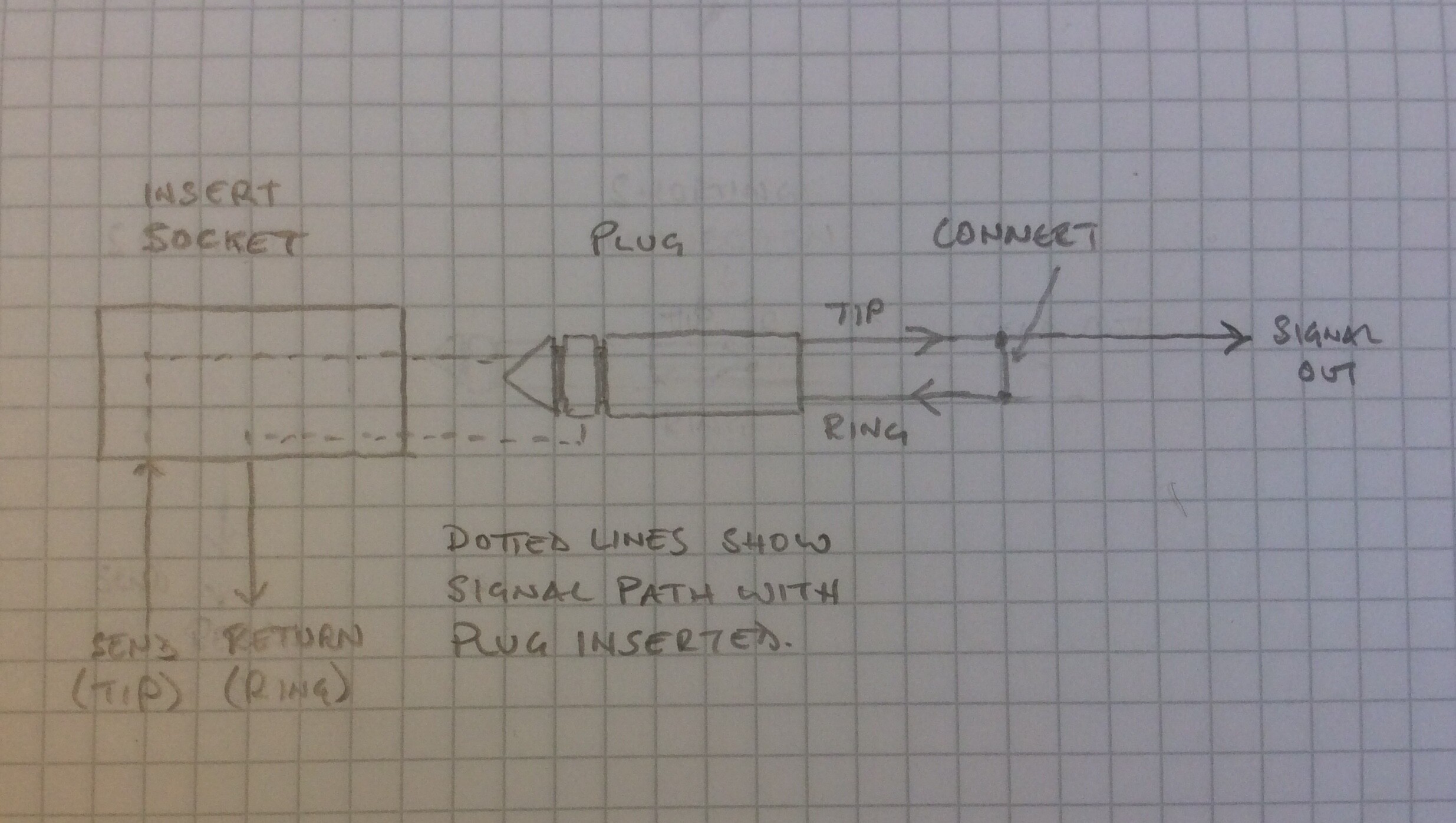
As @SKull says you could use the aux sends but if you wanted to use the insert you’d short tip to ring. You’re not interrupting the signal because the shorting of the tip and ring would mean the signal carries on to the channel strip. Think of it like this. If you picture the insert jack in the desk, the send out of the desk is on the tip connection and the return is on the ring connection. Now if you imagine you’ve connected the tip and ring in the jack plug when you insert the jack into the socket the switched connections are opened. The signal will travel from the tip connection of the socket to the tip connector of the plug. The ring is connected to the tip in the plug so the signal will travel back down to the ring of the plug and back onto the ring of the socket. Therefore the signal is returned via the ring to continue down the channel and also out via the tip/ring connection along the jack cable.

Here’s a highly technical render that might explain things a bit better

I’ve omitted the switched connections in the jack and the sleeve connections for clarity. The signal path is still the same

2 Likes

Just realizing that I ghosted out after you posted this - apologies. Thanks for drawing this! I think that I have my head around it now.

1 Like

The manual which comes with the EPM has a diagram for the proper wiring of a trs plug to serve as a direct out. That’s what soundcraft is - badass.

Late to the party here, but I stumbled on to this while trying to figure out if I was doing it right. I figured adding my set-up might be useful for people in the future (and my future self when I Google my way back 5 years from now having forgotten what I did! :joy:) …

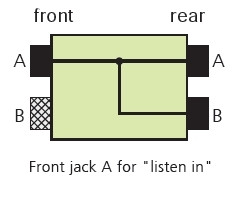
I’ve taken a slightly different approach that achieves the same goal, I bought an inexpensive Neutrik NYS-SPP-L1 patch bay and a fistful of insert cables. I have a Soundcraft EMP12 like the OP, and I plug the insert cables into the inserts (dur) and then the ‘send’ cable on the other end into entry A on the rear and the ‘return’ cable into entry B, also on the rear. Then I tap the signal from jack A on the front off to the sound card. (This could be TS or TRS, but I’m just using TS cables since it’s TS in on the back, so I figure what’s the point in TRS at this point? I stand ready to be corrected on this!)

If you look at the Neutrik website, they have this diagram:

Effectively I’m taking that “listen in” jack for the sound capture device and using rear jack B to return the signal to the EMP12.

No faffing with special cables, but there is the expense of the more cables and the patch bay itself, so probably $100 more? :person_shrugging:

Anyway, just thought I’d share.