Yes, it looks like that will give a feedback loop.
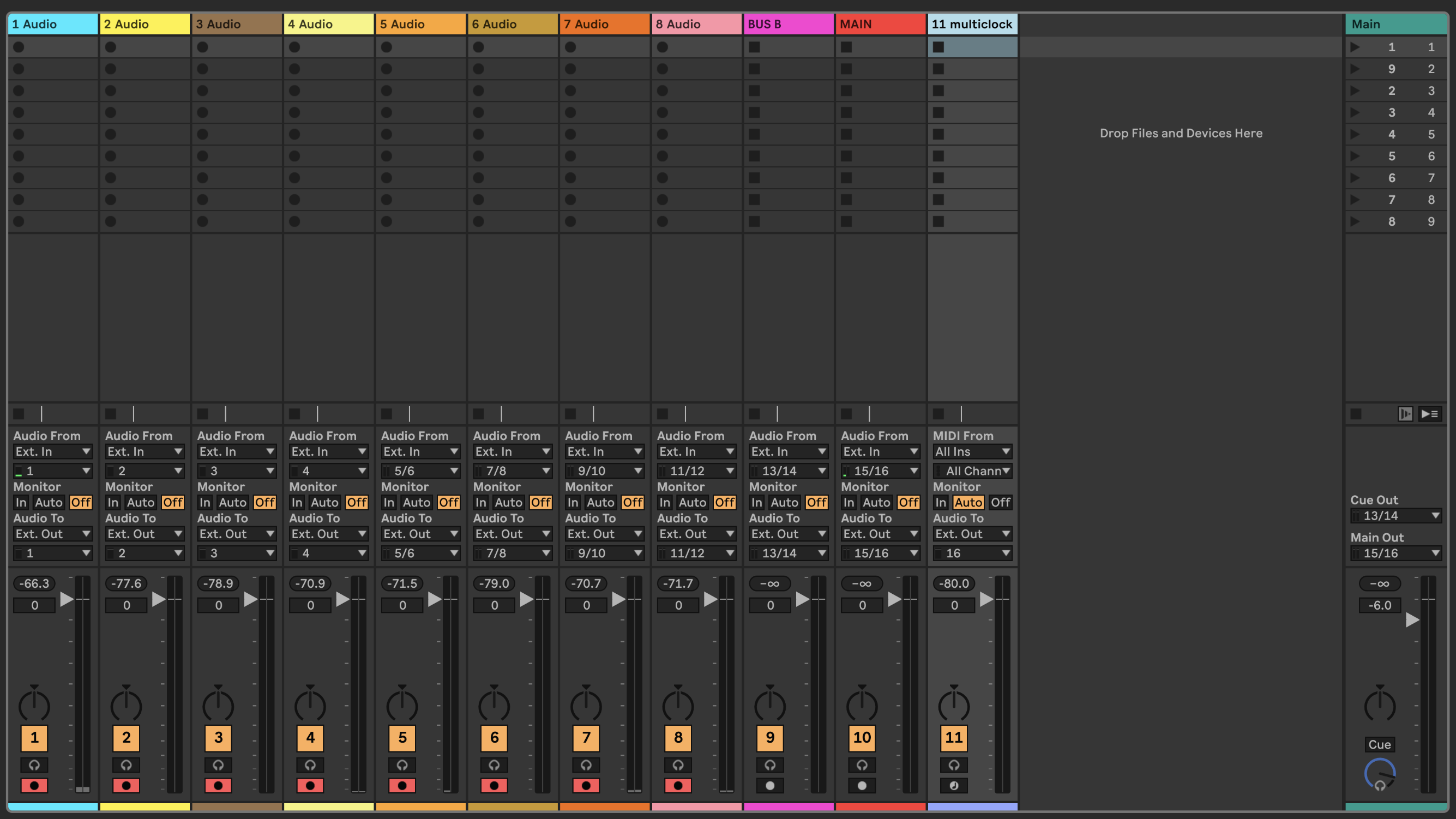
I always have monitoring to OFF on all B6 tracks in Ableton, because I am already hearing the mix from the B6 summing while recording.
Then to listen back to a track I press the “From USB” button. This is where the monitoring being off is important, because the output from the DAC interface comes before the DAC input, so there is a feedback loop being created there on each channel if monitoring is turned ON.
The BiG SiX is a bit peculiar in that it doesn’t function easily as a “normal” interface.
DAC outputs 1-12 are hardwired to the respective channelsq. 13/14 and 15/16 are not sending to BUS B and MAIN as you might expect (because that is where they are recording from), but is hardwired EXT 1 and EXT 2 respectively. The latter has the switches to enable them at the top row.
This means that you cannot just send you DAW mix to the B6 MAIN channel and have it go directly to you speakers through there - you have to go through either of the 16 channels mentioned above.
This results in a use of the B6 for me where I handle it as my primary mixer. I don’t mix in Ableton, I mix in the B6, then records the stems to the DAW. When I’m ready to do the mix down it still happens through the mixer and I arm to record the track labeled MAIN.
When you record a stem track it is crucial then that the monitoring is set to off.
To me this is the workflow that emerges from the B6 routing. It took me a while to get used to, because I was used to an 8 in 8 out Sound card where the DAW was the mixer.
But this setup facilitates starting and doing most of the work without the computer even being plugged in, but still being there to record and being used when it is needed.
Apologies for the long post, and if it turned more into a random ramble than actual useful info. Hope it made some sense though.
Edit: I forgot to mention that the Multiclock track in the screenshot is a great example of how the mixer is different from a normal interface.
On a sound card I would just have one output permanently hooked up for Multiclock click track duty, but on the B6 all my tracks 1-12 plus EXT 1 and EXT 2 are already used for gear hooked up.
So in order to get the click track out I have to send it to one channel, override its normal functionality (in this case my reverb return) and take it out through my Patchbay to the E-RM Multiclock.
Once I’ve recorded all the stems into Ableton and I am ready to record the mix down with the reverb again, I have to revert the EXT 2 usb to normal input and then record the full mix.
@videomusik : Which “From USB” button are you referring to? I tried to do it step by step, but still can’t get channel 1 and 2 to work. If it is some kind of feedback loop I don’t understand why I am able to hear all other channels correct, even though if they are also part of the summed signal of the B6.
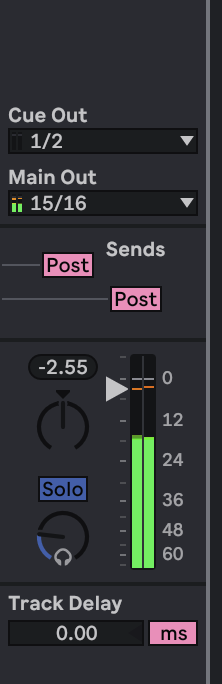
@tubefund & @Boboulus : I am only able to set Main Output to 15/16 if I select the B6 as my output soundcard, but I want to hear the mix over my MacBook speakers while recording so when I select the MacBook as output I can only select 1/2 from the system.
Edit: If I just switch the cable from superanalogue line in 1 to superanalogue line in 3 (both channels are set up completely identical regarding knobs and potis), I hear the correct signal in ableton mono input 3. Ableton channels are also set up the same. I am beginning to think something is wrong with usb outputs for channel 1 & 2 of the B6.
Have you tried disabling all routing in Ableton and selecting only inputs 1 and 2, with nothing else configured? Connect a synth or drum machine to the jack inputs. Depress (button position high) USB 1/2 audio in on B6 and try to monitor and record. If you see a waveform and can playback the recording outside of Ableton using any WAV player app, you will know if the USB 1/2 DA converter is functioning correctly and that the issue is not hardware-related.
Identical setup on channel 3 of the b6 (everything is setup up the same except I switched the cable from mono channel 1 to mono channel 3 and select channel 3 in Ableton):
Sounds like a gated recording or something like that? You can try on another bitrate/depth but i am afraid the mixer needs service. Only thing i could think of is to try another computer but that does not make much sense because all other channels seem to work fine.
Ok just to let everyone involved know, what totally awkward solution solved this problem.
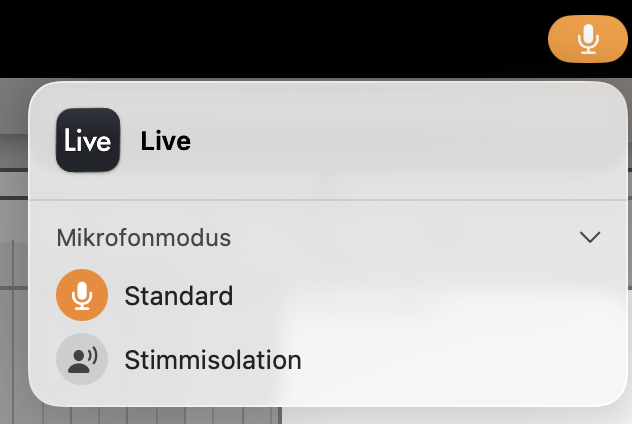
I dont know why this only happens on input channels 1 and 2 but I had “voice isolation” turned on for the microphone settings of the macbook, which caused this strange sound. By turning it off channels 1 & 2 sound normal.
Great to see that it was solved. It make sense it was in channel 1 & 2 since MacBook will assume that this is what is used for external sound and thus why you need to manually change it in the midi/audio setting to channel 15/16 to work with the audio out of the BiG SiX
For those who own the Big Six SSL, use Ableton and likely use hardware, I’ve never been quite able to produce audio out the DAW and hear my hardware instruments without hearing a ton of feedback (I was using the first two channels for USB out).
Perhaps others here might be able to help troubleshoot my set-up?
Based on a GPT, I was recommended the following:
In the Output Config, ensure that channels 13 & 14 are enabled.
Press the “USB” Button: Near the EXT 1 level knob, there is a button labeled USB. Press it down. Set the Level: Turn the EXT 1 knob to the 12 o’clock position (unity gain) for now.
Press the MAIN button: This lets you hear all your analog inputs (mics, synths) plugged into channels 1–12.
Press the EXT 1 button: This lets you hear the audio coming from Ableton.
I still wasn’t able to get a signal from the DAW after more GPT troubleshooting (which I can list those recommendations in a reply), but it seems like something relatively ‘small’ that’s not configured as it should be.
If you also use the EXT INPUTS for effects, that’d be an added bonus if you wouldn’t mind sharing how you got things running optimally.
This is how i have it connected with a reverb on FX1 and delay on FX2 since day one:
Connect Monitors to Monitor Outputs
Master outputs not connected or connected to a tape machine/DAT/hardware recorder.
Channels USB 1 to 11/12 unpressed (top row)
St cue 1+2 Master all buttons unpressed
Monitor source ext level at 0dB (middle)
Monitor source only Main button pressed
Main fader buttons only ext1 and 2 pressed and insert if you have any outboard gear as insert
DAW master/main routed to 13/14 or 15/16 as desired. To listen to DAW output, just press one of the EXT1 (or EXT2) buttons next to the Talk level.
That should give a basic setup. While recording, depress the EXT1/2 buttons to avoid feedback and to pass the hardware FX return connected to the ext1-2 analog connections.
So basically, when using the SSL to listen back to the DAW, you sacrifice the EXT1 or EXT2 audio return FX.
If you want to use a hybrid setup and want to have a VST synth running, just route that DAW synth channel to a desired fader USB channel and unroute that VST to the DAW master, and press FROM USB on the SSL to switch to digital input on that channel.
Mine arrives today and I need to learn how to best route my synths and effects pedals to record individual drum voices from the Hexdrums, Perkons and Jomox AB MK2 and use my Strymon and H90 pedals with it for recording to Logic Pro. I will spend my holiday weekend on it. What tips can you offer?
Experiment without usb first. It’s a straightforward mixer. But with a lot of flexibility if you need it. Just start mixing with only synths/drums to the individual channels before connecting fx and send/returns and all. If that works as expected add fx. Then usb. Every usb audio in button is basically a overwrite to the physical jack inputs. Usb digital converted audio for the fader channels is always present at your pc (pre/post fader) .
thanks great idea! I plan to have fun this weekend with it and putting together my 12u rack for future analog outboard gear. Only thing I need to buy next year are some patchbays and cables.
If you have space I highly recommend getting a patchbay for it an connect most of mixers in/outs to it so you can change your gear. I can imagine you might want to sometimes use individual outs from drum machines and sometimes just the main outs etc
yup on order since it will fit in my 12 rack case. I plan to add one along with the ssl alpha 8+ expander and a furhman power conditioner to protect my expensive gear against power surges/spikes. All will fit neatly in my new gator 12 rack once I put it together and can sit the big six ssl mixer on top for easy access. I bought a cheap patchbay so will see how it works for my studio.