Roland TR-1000 User Thread

Well in other news , today I loaded a kit from a backup and the machine just plain turned itself off , no lockup just turned off.

I wonder whether it was just coincidence as it’s been 34c in London today and the machine got hot all over,
So maybe a thermal cutoff ?

I mean it was too hot to hold certain areas

As a huge modern mpc user we’ll say… any mpc is a digital studio control center… I wouldn’t compare that to a analog drum machine…

1 Like

great jam buddy

2 Likes

Roland says to factory reset it after an update, probably they are messing with the project file structure, could be it ¯_(ツ)_/¯

Sorry to hear that, did you try loading it again?

I do factory reset it, although with how long a backup takes to restore it’s a pita , plus the time it takes to do the rest, we are talking 40mins. I keep having to remind myself it’s not 1998.

It’s the backup that has the issue.
I’ve tried trouble shooting it by starting with all clear projects , loading each pattern/kit (I have them connected) separately to see if it was a specific kit and associated samples. It isn’t however.
The only thing that makes the backup usable is if I delete all my own samples, then it starts behaving.

It’s either some indexing or something in the project , although I’m starting to think I have write issues with the actual nand memory.

Roland have been pretty helpful and we are still working on it.

Strange thing is , the project loads onto their machine fine, they can delete samples from it first time too, I have to reboot.

This is what’s making me think it’s a firmware issue specific to my machine or I have a faulty memory module

2 Likes

Ordered at Thomann and it came with 1.20 FW

3 Likes

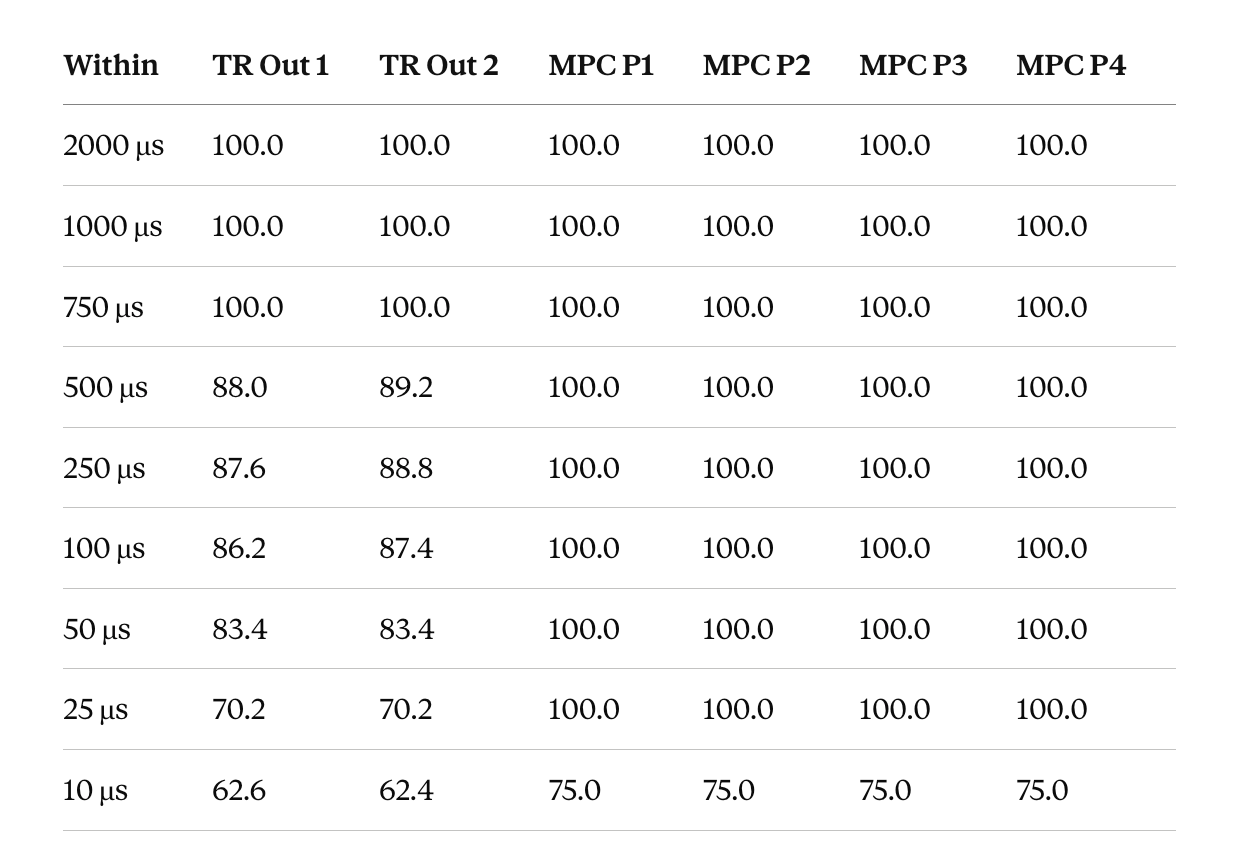
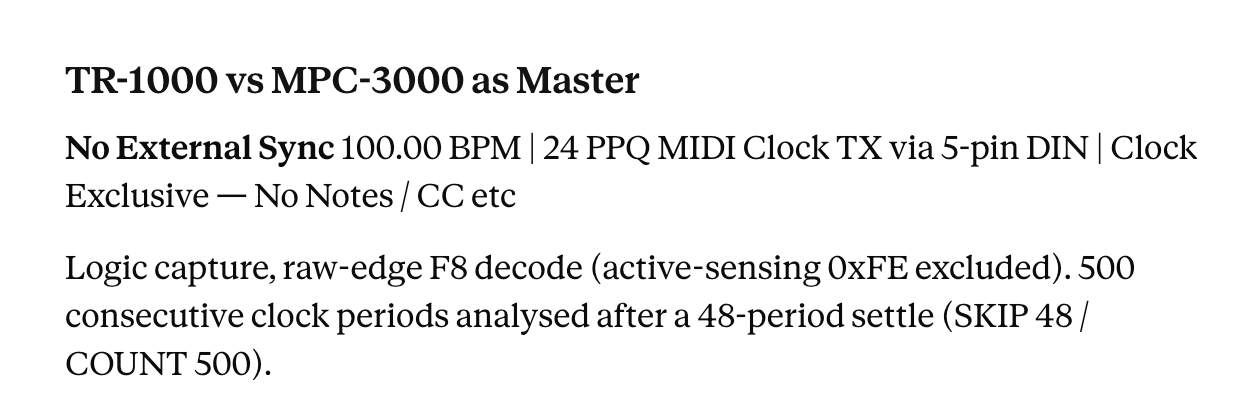
TR-1000 MIDI Clock Transmission needs a little work too… these numbers are both devices as system master - no slave sync.

TR-1000 > 1.20
MPC-3000 > 3.50T3

Same deal - high spikes are obvious but look at the overall stability - TR only manages 70% of clocks in the sub 25 µs region compared to 100% in MPC3K


7 Likes

Man. Hard to want to buy a TR1000 after all these numbers.

Have you compared other modern drum machines like the Alphabase.?

1 Like

All these numbers aren’t meant to put people off the TR-1000 at all.

If it wasn’t worth the effort I wouldn’t be here. I own one. It’s a highly ambitious and capable machine well worthy of flagship status on features alone. It just needs the screws holding it together to be a little tighter. If they can manage that - it will be a collectable classic in another 40 years.

As I keep saying — this stuff bothers some people, others not so much.

Like tuning / intonation on a guitar: pitch sensitivity bothers some people, others less so. The maths that drives all our creative toys is mostly taken for granted by end users. You can buy a car and drive it and have fun without knowing how the engine works.

But in usage — and when using in a hybrid setup alongside other things with a tighter spec — then these numbers start to mean something. Really these numbers should be published spec, but that’s another story.

Music production tech at its core is complex, but it can appear simple enough. The music tech industry and sponsored influencers would like you to think so too. Watch a few video tutorials. We go out and buy a MIDI interface / router / drum machines XYZ / sequencers XYZ — euro modules, synths and keyboards, vintage or current. They have 5-pin or TRS MIDI, USB or DIN sync. We plug them all together, press play, and music comes out. Not rocket science.

That’s just the basics. You’ve started the car and put it in drive. Without doing some deeper investigation, we have no real idea what’s going on underneath:

What is the best tempo clock master? What makes it a good tempo master? Why ? Should I use USB? Direct or HUB ? Is my USB HUB any good? What a makes a good USB Hub? What about DAWless USB Host convertors / routers ?? Is my MIDI Interface / router transparent or does it get in the way and by how much ? Are the ports parallel or staggered and by how much? What are the start latencies of everything in my studio? Should I daisy chain my equipment? Why does MIDI over Ethernet suck? Bluetooth MIDI — looks good on paper? How long does it take my XYZ synthesizer to generate audio after receiving a MIDI event ? Is that fixed or variable? What causes this ? What order do I plug my equipment in, and why does the order matter?

They are all real questions and they ALL have an effect on the final creative output to a degree. The bigger the numbers the more the effect.

Or you can plug it all in press play (pray) and forget all that stuff have some fun.

No right or wrong - not creative vs sterile. The numbers will impact the end result that comes out of the monitors regardless.

Just take the MPC-3000 / TR-1000 duo in DAWless environment as a simple example.

We all know now the TR-1000 takes 53 ms to get going as a slave device - and remember this was not really documented on release so we weren’t to know at the time.

Setup 1 - MPC-3000 Master / TR-1000 Slave

Setup 2 = TR-1000 Master / MPC-3000 Slave

Just flipping them around will change the feel BEFORE we even look into clock stability and how either unit slaves to external sync.

And numbers also keep to a minimum the subjective / emotional / myths / click bait reviews and influencer opinions that get pumped around the internet. Saying the TR-1000 / MPC-3000 or any other XYZ kit is awesome doesn’t mean anything.

Have not played with Alpha Base II yet.
14 Likes

For me it’s meant using a fraction of the features, not just the TR1000, but also the Tonverk.

Really appreciate @innerclock weighing in here - I’m still not a TR-1000 user (was very close to doing something silly on release morning) but following things closely in the hope some of the dealbreakers (to me) get worked out.

I feel like a general latency/jitter/MIDI setup thread with your input would be super interesting. If only so I can ask whether going with a MioXM and rtpMIDI was a waste of time and effort on my part without feeling like I’m taking things off-topic :sweat_smile:

1 Like

yeah - I get it - not sure what the forum protocols are really but it would be off TR-1000 topic for sure.

1 Like

Would you be opposed to sending your research over to Roland?

With all this hard data supporting the real world issues, is this something that can even be addressed with an update?

It’s interesting as I just saw Speedy J using one in his live sets and I’m wondering how that’s setup.

I’m sure they know already

only the firmware team will know that

I see, well ; at least it’s not impossible :neutral_face:

It’s good to stay optimistic, but keep in mind all firmware development is like a house of cards — or like DNA. You can improve things and move things around to a point, but the original code foundations determine many of the limits in the final result. Patching isn’t the same as refactoring and regression testing.

It’s also why adding what seems like a simple feature isn’t simple. Adding the code is the easy bit. Ensuring the new injected ‘DNA’ doesn’t kill the patient is much harder.

Why does any of this matter in the end? Or is it abstraction for the sake of it?

We could go deep into the science of rhythmic entrainment in humans, but let’s leave it here:

Higher tempos mask rhythmic slop.

Ever heard a slow punk band?

You don’t have to be a great drummer to play fast and kind of get away with it. The converse applies — the slower the tempo, the tighter you have to be to maintain any feel.

It’s pretty easy these days with a bunch of average kit cobbled together to just crank the tempo, soak everything in effects / out of time delay taps and have a dance. Beer sometimes helps too. Online gear demos are notorious for this usually with a thumbnail telling you its a game-changer.

Speeding up the tempo doesn’t make the slop go away - it’s just less noticeable.

And that’s the point. We shouldn’t have to keep our machines pinned at high tempos to avoid getting a rash.

Even in a DAWless jam environment - connect up a few things - 135 BPM - you might not notice so much. Slower tempos are when you really hear / feel the numbers underneath the music.

I don’t want to live in a world where our machines only feel good doing hard style :slight_smile:

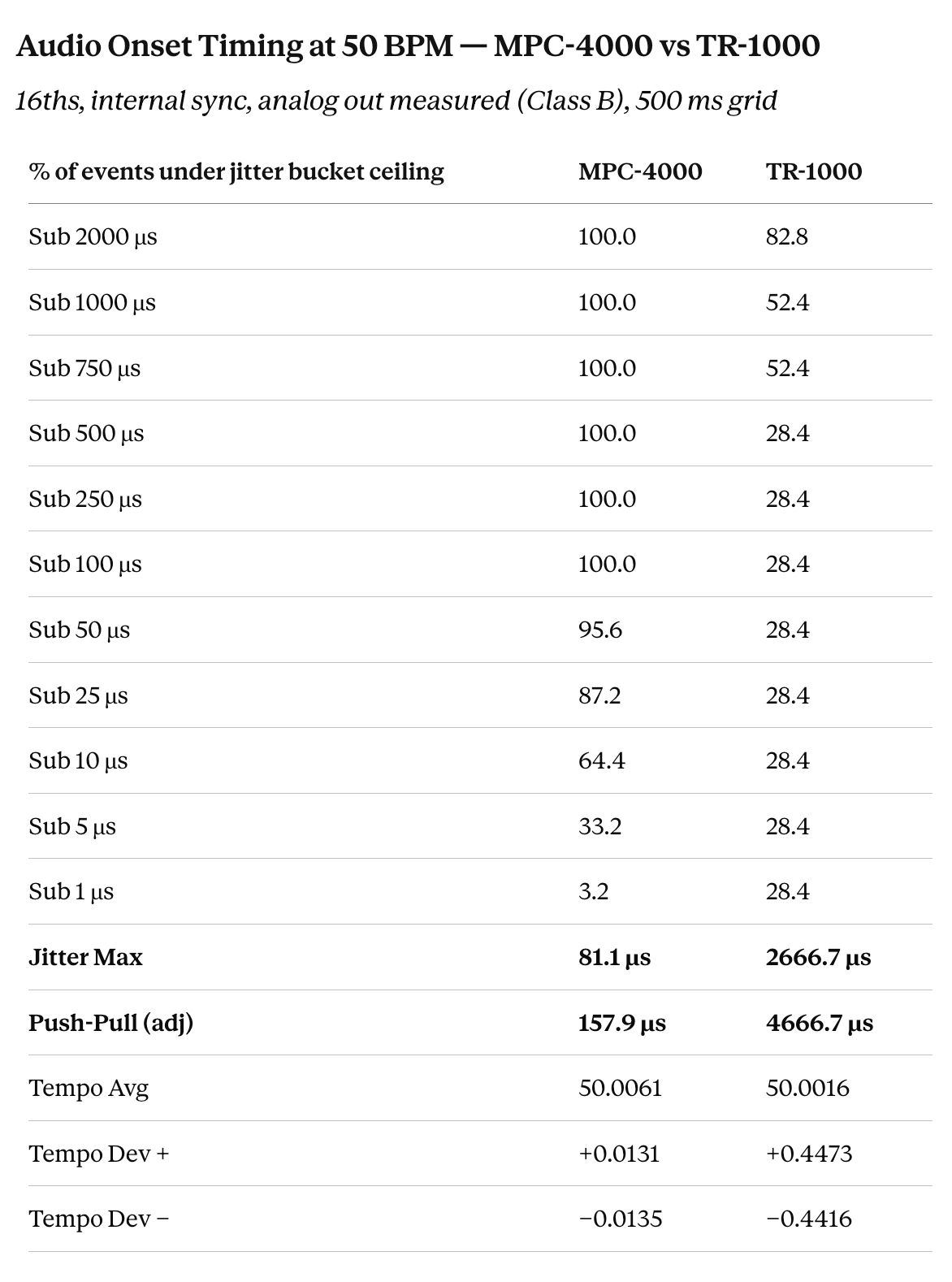
Addendum: Thought it only fair to put numbers to the tempo discussion. Ran the same two tests.

TR-1000 | All Tracks Mode | Rim Shot sample | 16ths, all steps | Internal sync | 50.00 BPM
MPC-4000 | Sequence Mode | Rim Shot sample | 16ths | Internal sync | 50.00 BPM

The MPC-4000 stays sharp down at 50 BPM — 100% of events land within 100µs of perfect time, 96% within 50µs.

The TR-1000 currently only manages 28% inside that zone, with nearly half its hits landing more than a millisecond off where they should be — and nearly 20% sit above 2ms.

Jitter Max as reported is how far any single individual step / event is away from the target interval.

Push-Pull is the largest adjacent step / event ‘hiccup’ across the capture — the worst single jump from one step to the next.

The MPC-4000 push-pull maximum between any two individual steps stays low because the jitter spikes are low across the entire capture.

The TR-1000 push-pull maximum ‘hiccup’ between any two adjacent steps is nearly 5ms.

And yes - that IS a lot.

4 Likes

Possibly, maybe? Which wouldn’t necessarily be a bad thing if they get it right.