My guess would be the notes are sent directly to Midi out without getting routed through the Mac. Data from that max for live device should appear though, I’d think.
when I put the ableton midi monitor shows the midi channel as nº 1 but I think is the default of the device. If you select send to other ableton seats it to that Chanel. I changed on the sh4d the 16 to the 1 but still doesn’t works.
Are those taken directly from manual? There’s an error in the manual I think
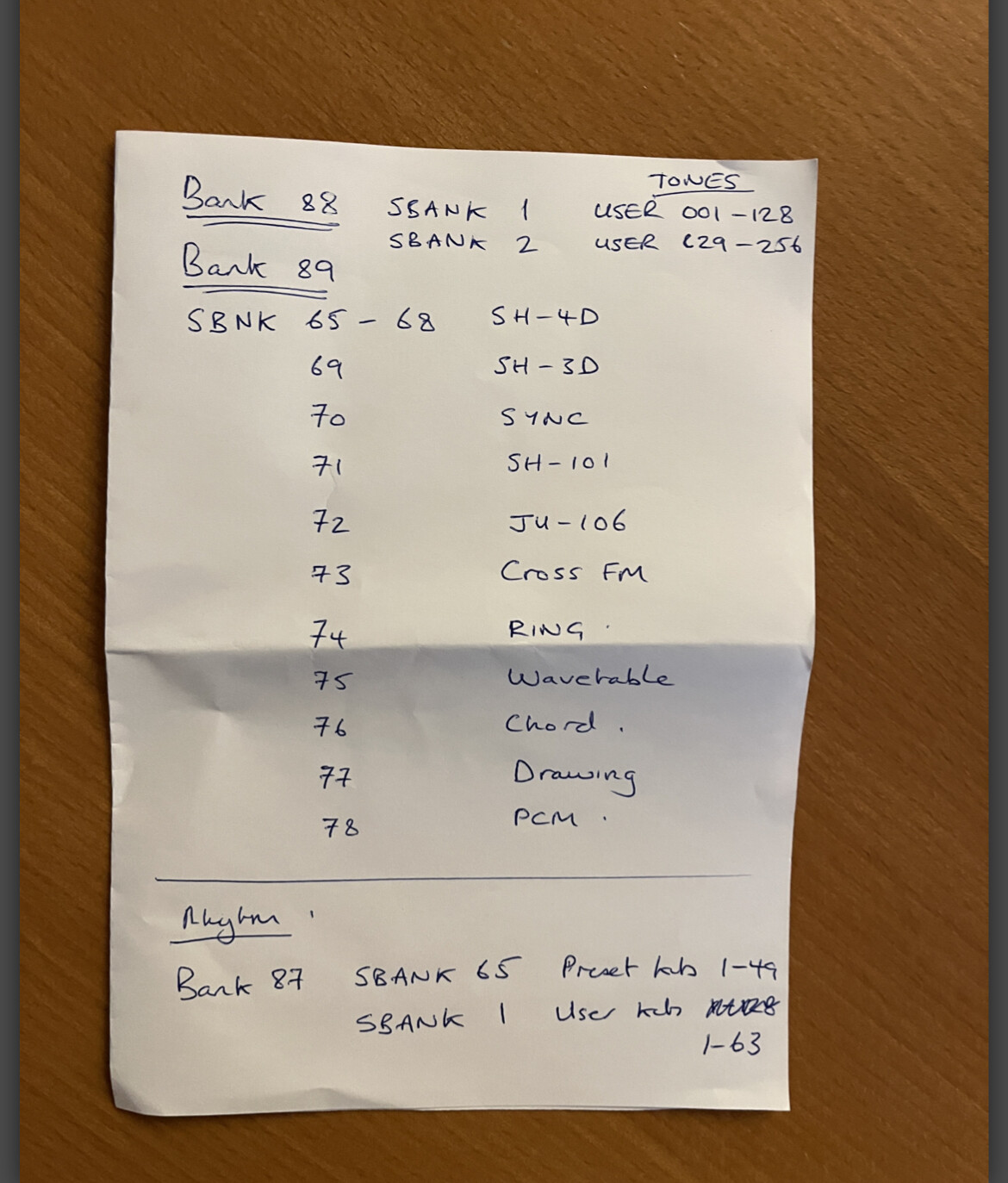
Finally moving all manually I can change the presets but only on the part channel and not on the specific PC channel. So weird but just works.
On the max device:
For the first 128 user sounds>>MSB 88>>LSB 1>>PC 1-128
For the second 128 user sounds>>MSB 88>>LSB 2>>PC 1-128
For the first 128 SH-4D>>MSB 89>>LSB 65>>PC 1-128
For the second 128 SH-4D>>MSB 89>>LSB 66>>PC 1-128
For the third 128 SH-4D>>MSB 89>>LSB 67>>PC 1-128
For the fourth 128 SH-4D>>MSB 89>>LSB 68>>PC 1-17
For the first 128 SH-3D>>MSB 89>>LSB 69>>PC 1-96
For the first 128 SYNC>>MSB 89>>LSB 70>>PC 1-51
For the first 128 SH-101>>MSB 89>>LSB 71>>PC 1-51
For the first 128 JUNO 106>>MSB 89>>LSB 72>>PC 1-31
For the first 128 CROSS FM>>MSB 89>>LSB 73>>PC 1-88
For the first 128 RING>>MSB 89>>LSB 74>>PC 1-49
For the first 128 WAVETABLE>>MSB 89>>LSB 75>>PC 1-95
For the first 128 CHORD>>MSB 89>>LSB 76>>PC 1-25
For the first 128 DRAWING>>MSB 89>>LSB 77>>PC 1-22
For the first 128 PCM>>MSB 89>>LSB 69>>PC 1-11
Those are all.
If I understand wright, you can only save tones to the 256 user slots?
Great! Yes, you need to use the part channel. The ctrl channel is used for changing the pattern.
1 Like
Fine, if you can only save your tones to the user I will edit a version of the max patch ato match the sh4d options and don’t have a headache using it for new users on the sh4d
OK, so it’s indeed a 1-based v 0-based issue. I’ve used the numbers as printed in the manual and they work perfectly fine with the Hapax. MSB and LSB are 0-based, PC is 1-based. Apparently in Ableton MSB and LSB are also 1-based so you need to add 1 to the values in the Roland manual to get it to work.
4 Likes
Glad that worked for you 
2 Likes
20 Likes
Nice new update.
G
1 Like
this is a wonderful update - all the things that stopped me buying it have now been resolved and improved
instant buy now
7 Likes
Sorry for the silly question…to update to V2 do I have to install the firmware for Mac/PC? I have a Mac with OS Sierra, can’t I update?
G
This is a really great update! Bought mine a long time ago, spending its time on the shelf waiting for this
4 Likes
Nice they are still supporting the SH-4d. I’m guessing making the FX global will prevent FX tails being cut off when chaining patterns so this makes sense. I can’t remember if sounds were also cut off when changing patterns. Will need to test this again tonight.
2 Likes
The Step Oscillator Model looks great. I’m guessing can be use to create trancegate and sidechain/ducking effects. Looking forward to having a play.
1 Like
are you kidding me. I never thought they would update it. I am curious whats in the video 
4 Likes
Generic USB driver! And everything else! Wow did not expect this one!
4 Likes
This is tempting me again.
And everytime it reminds me of the old Skate zine SM5D…
1 Like