Hi, im hoping some of you might have some good techniques and best practices to share!
I have a Yamaha psr-190.
It is the first instrument I laid hands on!
It is full of nostalgia for me, but I don’t want to hang onto it physically anymore. I’ve emailed Yamaha to see if they would share the samples with me but they refused.
So I’m recording a lot of the sounds.
The problem is that the keyboard picks up what sounds like cell tower interference, and the noise makes sampling it a real chore.
I used audacity and it’s noise removal tool to clean up the drum samples, which worked well enough for me.
However, recording sustained notes for the more melodic instruments wasn’t as easy. The attack and decay of the sound are both affected by the noise removal, and sometimes the algorithm doesn’t work well enough.
Can any of you offer advice on how to sample my childhood memories? The memories didn’t have noise interference in them….
First off, the obvious - balanced cables aren’t likely to be necessary here, but you never know. And record from the actual main output, not a headphone jack when possible. Still, such noise might be unavoidable. If so, you might turn to one of three solutions.
Also, does that thing run on batteries? You might try using a fresh set of batteries rather than any wall-wart power supply. Or maybe the recommended power supply rather than batteries.
Practical solution - recording longer sustained segments and creating your own attack and decays. It doesn’t work with a lot of sounds - especially those with complex tails - but it can do the trick with some patches.
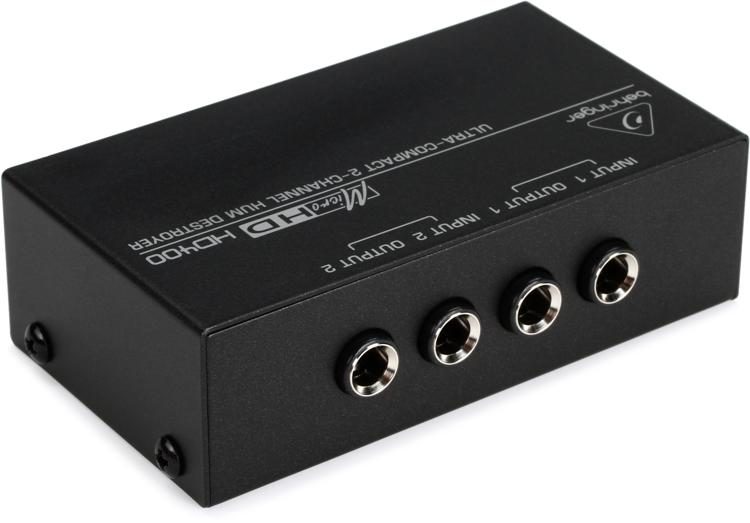
Hum isolator. I’ve had exactly the same problem you’re having with certain pieces of gear, and a hum isolator can often do the trick. You don’t have to spend an arm and a leg - Behringer make one for $25: it will drop the overall volume, but it will also kill a lot of unwanted noise.
Finally, Audacity is fine, but its tools are not on the same level as a good set of restoration tools. In my experience, iZotope’s RX almost always gets me out of trouble. I use its Spectral Denoiser quite a lot. Unfortunately, it’s only available in the rather pricey Standard and Advanced versions. However, you can get a 30-day trial or even a subscription. Alternatively, you might consider SoundSoap. I don’t find quite as effective as RX, but you can get the Solo version for $79 and there’s also a trial version. If you don’t want to spend any money, you can always download the trial version or Reaper and give its ReaFIR noise reduction plugin a shot. Again, this isn’t on a par with the iZotope stuff, but you can use it for free.
…u might wanna consider a proper audio repair tool…
like izotopes RX…it can do pretty much anything to make even worst audio quality issues vanish completely…all sorts of declicking, dehumming…u can feed it with an example of the trash u wanna get rid off, it analyzes that and removes/cleans out pretty much exactly ALL that from any audio… SO u can let it analyze what u did once to suit ur needs and then let it fly autopilot like to do the same procedure to any other bulk/heaps of audio at once…
perect for staples of multisampling content without going nuts…
If it doesn’t run on batteries look around for old monitor cables or whatever. Those thick cilinders that sometimes are clipped on are ferrite.
You can try to clip one of those on the power supply cable. Try shielded cables between instrument and audio interface too. Leave your phone out of the same room. Unplug all unnecessary other equipment. Those powerline internetadapters should be powered off too.
I’ve had old synths with this problem too. Looking at you Ensoniq ESQ-1.
I would not use Audacity noise removal tools! You will be seriously degrading the quality of the sound.
Polyimide Tape could be a solution too. It can help isolate components a bit, and maybe help reduce interference. But, that would require a bit of dedication: opening up the hood, identifying processors, DAC, etc. (could be fun).
I love noise, but I also love gear to work properly, so I get your problem.