I wanted to record a midi sequnce from another sequencer into the DT to trigger an audio channel. What happens: I can trigger the machine but cannot record the external events into the track.
Am I blind to see how to do it or is this known behaviour?
As quoted: the DT plays the sequenze fine, just does not record it.
On channel 1-8 and 14, the adudio tracks get triggered. I’m just not able to record that midi data into the DTs sequencer.
I think, if I’m not wrong, you would need to first change midi channel 1 on the first sequencer to 14, then select track 1 on the DT and record it in. Then change seq 1 track 1 back to one and change track 2 to 14, select DT track 2 and repeat.
Elektron boxes only record incoming midi data when being sent on the Autochannel midi channel.
I did not know this (or did not remember it from reading manual). That’s good to know. So you can’t record multiple things into the DT at the same time.
The Analog Keys has a live record on track channel option in the menu.
When active, in live recording mode the AK will record notes via the set midi channels for the tracks.
If not active, AK will only record on the currently selected track via auto channel.
Octatrack can record onto the midi tracks (IIRC also audio tracks) via auto channel or track channels.


 ), I’ll try that later on. Thx for the pointer!
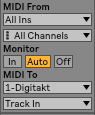 WRONG
WRONG 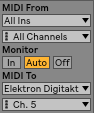 RIGHT
RIGHT