Using midi thru is ok for 2 or max 3 different synths, after that, having a long midi daisychain became messy, much better to use a splitter or a full 16ch midi interface
If Digitakt is the master clock source and is receiving no midi from external sources, it’s not gonna send any midi data out of its thru port, so unplug it.
Then go Digitakt midi out to Digitone midi in, with Digitone set up to both send and receive clock and transport in the settings. Then connect the Digitone to the other two via the midi out and midi thru from the Digitone (shouldn’t matter which one to which, as long as they’re all set up to receive the midi, it should be fine). Try this and let us know how it goes.
Also, if you have other midi cables, use them to eliminate the possibility that a cable is buggered.
Edit.
Sorry, missed the bit about sending note data to the 303, so connect that to the Digitone’s midi thru port and it’ll receive midi notes from the Digitakt, as long as you have the channels set up correctly.
1 Like
and the td3 needs to be configured as a thru device otherwise rm1x won’t receive the digitakt clock and transport signal passed through it downstream.
Don’t need to use the thru on the 303, Digitone can send clock to both of them.
I think my understanding of where the signal for out is generated on a downstream device is wrong, I thought out ports sent data from the device it was directly connected to and if you wanted the original clock or sequencer data like transport you needed it to go thru. It sounds like the original clock and midi transport signal will pass thru the out port as well so the rm1x will respond to clock as well as start and stop commands, good to know because I’ve always been hung up on routing it as a thru connection.
A lot of gear works like this, but Elektrons are special, they can do both.
1 Like
so basically, in this case, as long as the td3 is on the digitone thru port (to receive notes), you can put rm1x on the out port and both will get the original clock and transport? awesome possum. by the way I found some avocado memes for you but I have to remember when I put them lol
I’m not gonna bet my house on it, but I’m 99% sure this is the case.
I’ve only seen your shed but I think that’s a good call, and we’ll find out when theres an update.
1 Like
hello all! I’m moved to see you all responding and helping out!
i’ll give your ideas a shot tomorrow. It’s 00:12 here now. Nighty night for now
1 Like
@shigginpit
Okay!
Current setup:
Digitakt master clock
to digitone in, with digitone out to RM1X in and Digitone Thru to TD-3. This way everyone now gets sync, and the TD-3 is playing notes if I want it to via digitakt’s midi tracks. I first had a problem that TD-3 would only receive on channel 1 even if I switched it to 2,3,4,5, etc… Turns out when you hold func+channel on the TD-3 it by default starts changing the midi OUTPUT channel haha. You have to keep holding func+channel and then press “slide” to start selecting midi input channel and it also only gives you 3 seconds to do so. Finger yoga, but I digress
Once that was fixed I was almost there, but the digitakt would play the TD-3 fine for example ch 1 or ch 8 (I would select Midi track A -> SRC = CH1 or SRC = CH8, but if I changed the digitakt’s Midi track A to SRC = CH5, suddenly I start playing the first track on my RM1X?!
I went into the Digitone to see what could be causing this to happen, and there, when I go to Midi config -> channels by default “midi 1 channel” is set to 5. So if I would change that ‘midi 1 channel’ to for example 6, suddenly the RM1X would not play anymore. Now if would proceed to set digitakt’s SRC page to CH6, suddenly there the RM1X drums are sounding again. So The digitakt is playing the digitone’s midi channel, which then plays the RM1X, okay fair enough. And it’s possible to bypass this problem by setting digitone to “not receive notes” in MIDI Config -> Port Config
But just for the sake of understanding my instruments, now when I use the digitakt’s Midi track A, SRC page = CH6 and digitone has set their “Midi 2 Channel” by default to 6 (which is the case) The drums are NOT playing. And that’s where my confusion starts again.
Granted, I think it will be possible to do my liveshow now without having Midi problems anymore, I’m now simply trying to understand what’s happening. Cheers to those who are still here with me
Hey, it’s been a long time since I used a Yamaha rm1x, like 20 years probably, it sounds as though the Yamaha is listening on track 1 to midi channel 5, I’m going to pull up the manual for it and see if I can refresh myself on if there’s a way to change that.
First I might try and move the RM1X to the TD3 midi THRU. You will have to configure the TD3 to send the thru message instead of the out message (it looks like they share a port) so look in the menu for that option. RM1X is probably getting the commands from digitone OUT because it passes along the digitone sequencer transport and any note data using that port, if you send the td3 thru to rm1x then the only device sending commands is the digitakt.
I’ll look at the Yamaha manual and check back in here when I find it, I just can’t remember off the top of my head how because the device has so much menu diving.
midi tracks on digitakt are sequencer and controller channels controlled by digitakt using midi out, likewise midi tracks on digitone are the same but controlled by digitone, so the note and transport data generated by digitone is sent from it’s own out port, but the digitakt note and transport data is conversely passed from the digitone in port through to the digitone thru port. I think that’s what you’re asking about which may be confusing but that’s normally the way it is with midi.
I think RM1x midi filters need to be set to not receive note data because I seem to think the Yamaha track sounds are equivalent to note data, but you will have to try that out in order to confirm. Elektron does not use MMC like some other midi instruments and so the transport commands are not assignable by MMC (which yamaha, for example, likes to use) but the transport command should still reach the rm1x when synced to the thru port. You should be able to set the in and out from within the midi utility menu like is shown here. I think it’s best to try and set this and move the rm1x to the td3 thru port.
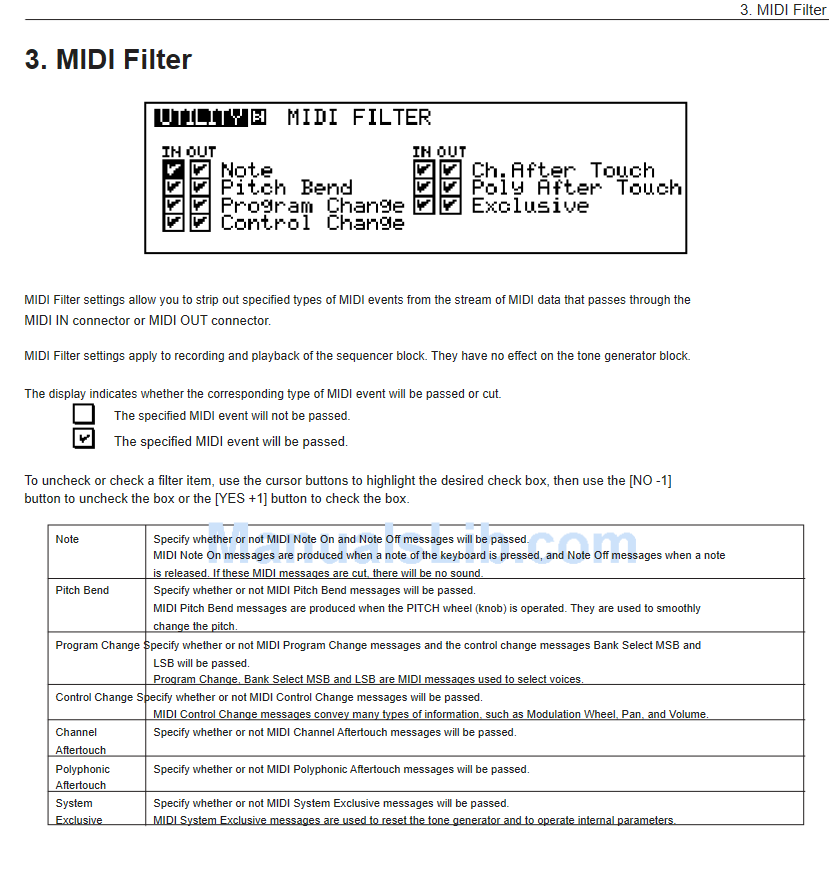
try turning off (unselecting) “note in” and see what happens, if that doesn’t work I’ll have to think about it a bit more.
thanks! that could definitely work I’ll try it and report back 