You just need an APC 40 mk2 to use with push :))) I think it’s awesome combo 
3 Likes
@benway @Gigagar you know what… For some reason using a controller alongside the Push didn’t even cross my mind! That’s actually the most obvious solution, maybe this could change my mind
2 Likes
I can also recommend Push 3 alongside Novation Launch Control XL MK2 
5 Likes
Now I have a Novation Launch Control XL MK2, but I don’t like the faders a lot. I researched and the APC 40mk2 looks like the ideal thing.
You can launch clips from there so you don’t have to switch to clips view.
You have dedicated channel controls there, much better than on the launch control.
You have 8 assignable endless knobs with led feedback  for example for you FX tweaking on the return channels.
And you have 8 channels as a mixer,
AAAND YOU HAVE A CROSSFADER
And it is a native control surface for the Push3 via Push 3S - List of Supported Control Surfaces - Ableton Forum maybe someone here can confirm its working in the new beta.
I need a crossfader after years of djing…
2 Likes
Have you learnt more about this solution for bidirectional control with vst~? I’m struggling a bit with the method ELPHNT used on his wrapper for Polyverse Wider. Couldn’t make it work in Live 11 and only sometimes in Live 12 (I only have the trial). I think I read that there’s a way to update Max even on Live 11.
This is reading the parameter from the rightmost outlet on the vst~ object and using it to set the live.dial that goes to the parameter? That works pretty reliably for me, there’s also this setup from the Max site which also works, I just tend to use the other one.
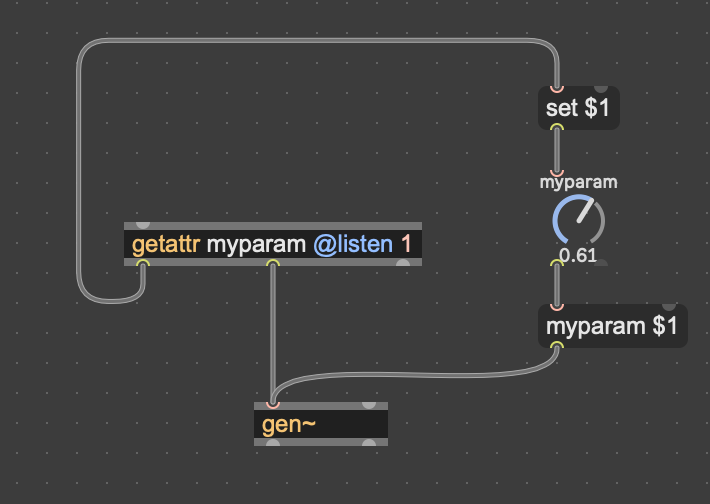
Although, I have’t been digging in to wrappers much further recently because it’s hassle and especially takes time trying to get the parameter units/values to display correctly. I’m hoping that the connect method of doing it will eventually work, right now vst~ isn’t listed as a supplier on that site. But they say they’re expanding it to more objects. Just don’t want to spend a bunch of time on this when a much easier way could be incoming. But others here are possibly way more qualified to comment on this.
Re controllers, I think the thing is that the capacities of Push are way more than just what the interface can realistically deal with. It’s well designed and can cover the basics well, but there are a lot of scenarios where you need dedicated physical controls to hand with needing to do any paging, so I think a controller is pretty much a must.
@Scarsbass, aside from whether/how well it can do the same stuff as Force etc., I’d also check out some of the devices that can take over the pads and take it to totally different places, Fors Dyad is a killer example, but there are a bunch of others like the new-ish sequencer pack - this one Dropseq from @gross is free and illustrates the kinds of things that are possible. Of course, getting into max devices and figuring this stuff out all takes time and possibly Force will still be a better choice, but if you still have time to decide would definitely recommend scoping out some of the unique stuff Push can do that other devices can’t before making a call.
4 Likes
Yes, only that in the example of Wider there is also a subpatcher in front of the live.dial, which seems to have caused my problems but must be there for a reason. So fyi, here’s how that looks:
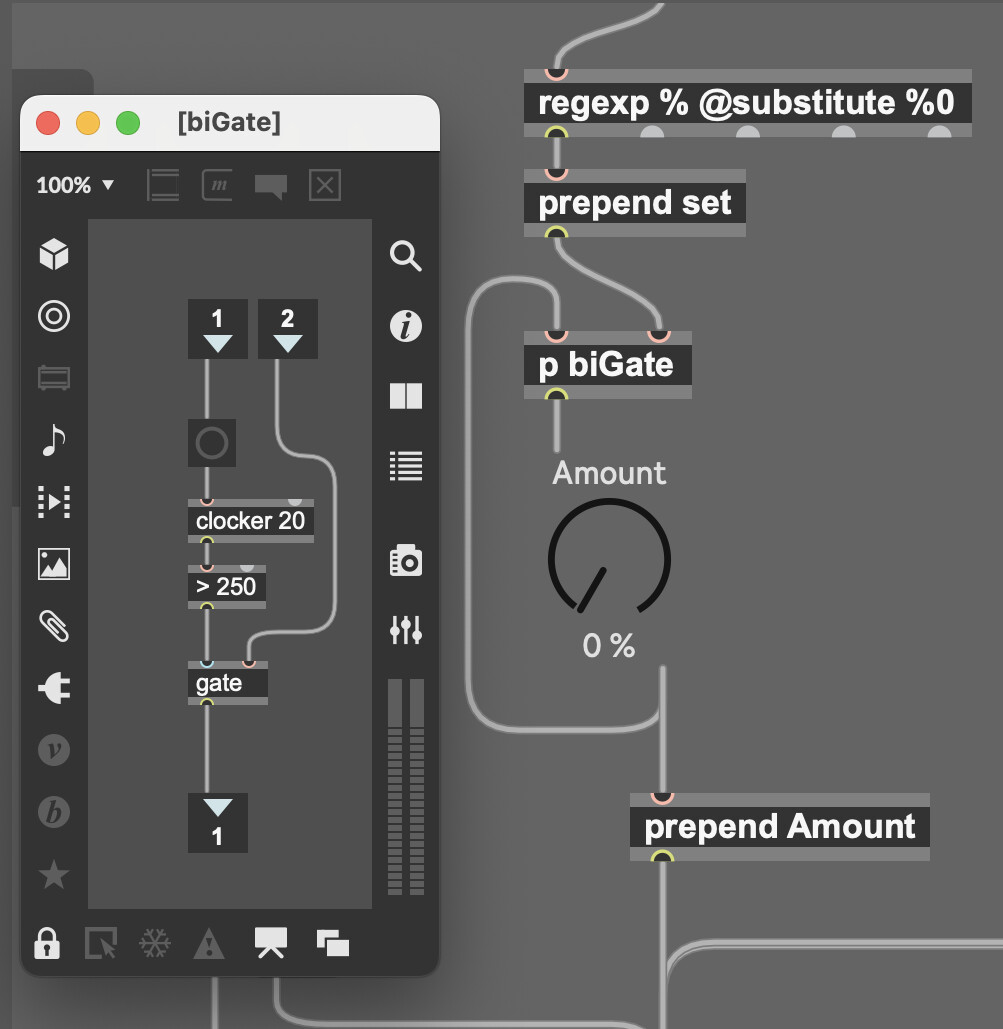
And yeah, it’s a lot of hassle this way.
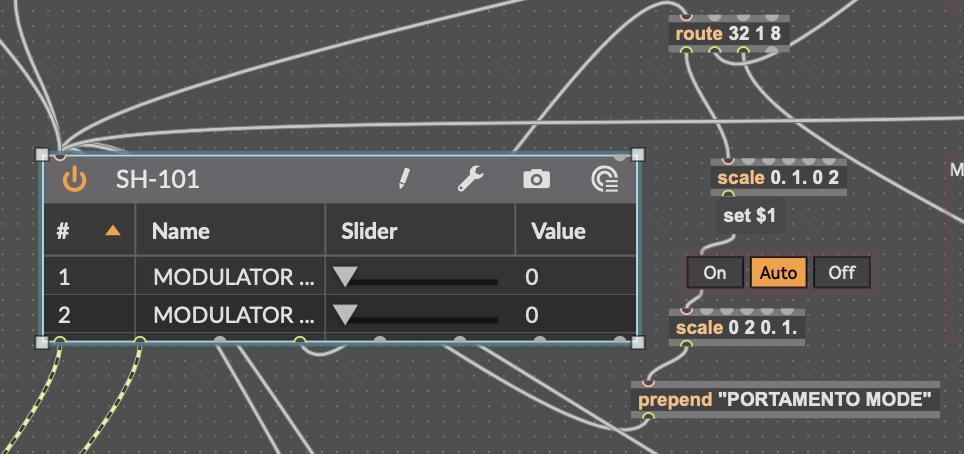
Your patches are definitely a lot more organised than mine lol.
This works for me. Coming out of the middle outlet “parameter index and value when changed”, then using route to unpack.
I’m not even sure how/why/where I landed on this way of doing it but confirm it immediately reflects changes made in the plugin window on Push and vice versa. Probably a bit agricultural looking to someone who knows what they’re doing, but it does the job. I guess it’s not that bad, I just don’t want to commit the time to doing it manually when it looks like there’s a chance that an easier way might be incoming.
2 Likes
I hyped myself so much I just bought one and waiting for shipping…
3 Likes
Maybe relevant - would probably need to be pre-mapped in a template if I’m understanding what you’re going for.
1 Like
I added Push support. I will upload it very soon. (Damn we really need the ability to rename push controls…)
Edit. Done.
CF_16Map.amxd (285.1 KB)
5 Likes
Can the mapping be done on the Push3SA itself? Can this send MIDI out to external instruments?
No. I need to check how to do this. But honestly no promises because I’m not really into Push.
Not by itself but yes if you map it to another device, like CC Control for instance.
Afaik no, but to be honest it’s not anything I’d ever want to do on standalone anyway so I haven’t tried, but pretty sure there’s no easy way. Seem to remember seeing a few hacky ways and there are devices that can do mapping to parameters, but it always seemed like way more hassle than it’s worth vs. just doing the prep in Live.
tl;dr
I’m also not that interested in set-wide macros really, so I haven’t tried this, but you can definitely map devices in a rack to its macros.
So one way I think should work set up a template with as many tracks you’re going to need, put an instrument rack in each with the instruments you’re likely to need - pretty sure you can’t add an instrument into an empty rack in standalone - and pre-patch a device that can map to multiple parameters like the performance pack (there are a bunch of others) to as many macros as you think you’re going to need across all the set. As in map one control to all the macro 1s across the whole set, etc. If you add effects or midi devices these can be added to the rack on Push afaik. You can then map whatever to the macro in the rack and it should be good to go with the other device. To be honest I don’t know if the effort/reward ratio is great here, but again this is not something I’m that bothered with in general.
This prompted me to do something that’s been on my to-do list for a while and build a device taking advantage of how the absolute parameter paths work in Live so things are pre-mapped to my Intech controller. E.g. the first volume slider on the first track of every live set will be “live_set tracks 0 mixer_device volume”. So in my case 8 controls routed that way to the volume sliders will always control those tracks irrespective of whether you move them around or what’s in them or whether they existed when you opened the set.
This also works for parameters, e.g. the first parameter in the first device in the first track will always be “live_set tracks 0 devices 0 parameters 1” so you can pre-route to this, group everything on the channel to a rack and then map whatever parameter to that macro and it will be available in your other device, which in my case will be pre-mapped to my midi controller and saved in the template. So as I create more tracks their sends and a couple of macros will automatically be available mapped to my controller. Just needs to be updated every time a new track is added or moved around, and probably also when devices in a track are racked or changed around, this can be done on Push.
Philip Meyer has an excellent tutorial on this. I basically copy/pasted from his example and tweaked a bit. If you use live.observer and live.object it has the advantage that it doesn’t take over the control so you can also adjust it on the track in Live. You can also name the parameter and set up custom units/scaling/display. So a good option in general over off the shelf devices if you want to customise controls for a set that’s largely fixed and you’re just planning to play and tweak rather than changing around much / at all in standalone - which imho is the best way to use it.
This is quite specific to my own setup, but here it is in case it’s useful to anyone. You can change the mapping by right clicking on whatever parameter and selecting “copy max for live path” then copy/pasting into the live.path object. Also, it’s designed to be dropped into the first channel in Live and treats the next 8 as the channels it will control.
Control Panel.amxd (188.6 KB)
4 Likes
Just wanted to say thanks again for your succinct advice!
I’ve started to move my Sample From Mars collection to the User Library. Then saved the drum rack presets (.adg files) to the library. Now I updated the file references, and was able to move it to the Push!
A benefit of doing it this way is that you won’t have all your samples in the same folder, i.e. Samples/Imported, but can keep a nice folder structure.
glad I could help.
I did the same with all Native Instruments Machine Extensions:
- installed them in Live’s User Library
- used Kit Maker to create adg files for Drum Racks
- removed the copies of the samples that Kit Maker has created within the /imported folder
- run File Manager to update all references within the adg
original file structure of the NI Expansions is preserved (to use with Maschine), but I have Ableton Drum Racks for all NI Drum Kits / Groups pointing to the same samples. And everything ready to be moved to the Push
2 Likes
Really cool device. Really invites you to jam with the Push 3. And visually very attractive.
1 Like
Nowadays I have one powerstrip with all my stuff. When I power it up, my Yamaha monitors are on, and when the PSU of the Push 3 SA gets power it makes an audible pop in my speakers, despite the PUSH 3 is powered off…
If I do the same power on procedure BUT disconnect the power cable from the PUSH and plug it in after the initial powering up, there is no audible pop.
Is this normal for Push 3 SA power brick?
In my experience, a lot of gear does this. I think it’s pretty common to sequence your power cycles. Your monitors are the last to be turned on and the first to be shut down. I have a Furman that does this but you can hack it together with a couple smart outlets.
2 Likes
Same. Some things pop, some don’t. I have a Mackie Big Knob on my desk, so I can mute everything when needed.
3 Likes