Finally releasing the Octatrack Manager in v0.26.0 ! 

It features the new Tools tab which contains the long-awaited copy features:
- Copy Banks — duplicate entire banks (all 4 parts + 16 patterns) to one or more destination banks, within or across projects
- Copy Parts — transfer part sound design between parts/banks, with multi-destination support
- Copy Patterns — copy patterns with configurable part assignment (keep/copy/user selection), track scope (all/specific), and mode scope (audio/MIDI/both)
- Copy Tracks — copy individual track data (part parameters, pattern triggers, or both) with single-to-multiple mapping
- Copy Sample Slots — copy slot assignments with audio file handling: Copy, Move to Pool, or Don’t Copy
cc @Blasted_pingin @phading @Supermows @Kinan @GEISSMANN @rosiusyves @thoughtstarZ @Tokin_Tone @west
And as bonus:
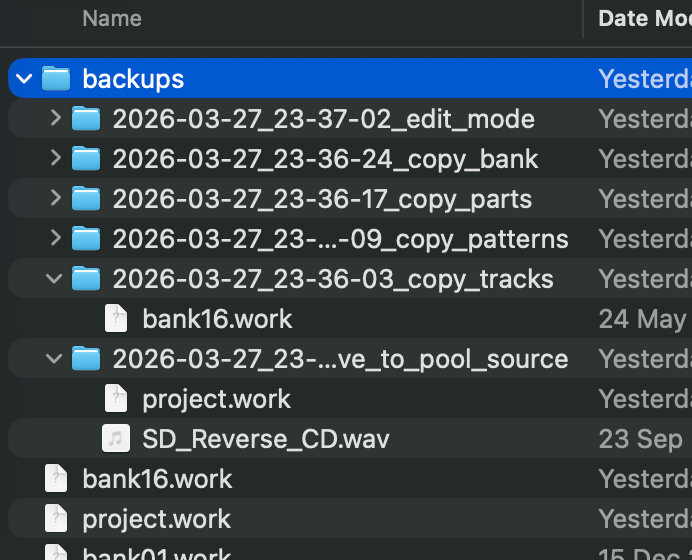
- Automatic backups — timestamped backup of affected files before every write operation (edit mode, copy features)
This release also adds support for older OSX versions
+ Windows / Linux as usual !
The online user guide has been updated to describe all these new features.
/!\ While the app creates automatic backups (see above), no software is guaranteed to work perfectly. Keep your own copies of important work !
You can help the project by:
- Testing the application
- Providing feedback and suggestions
- Supporting development via Buy Me a Coffee
- Helping with macOS releases if you have an Apple Developer account (to sign the app and make the installation process easier)