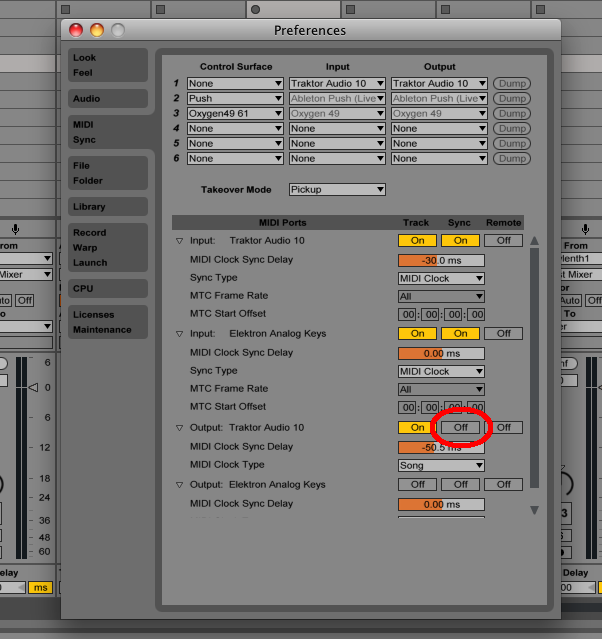
So I’ve encountered a strange bug which seems to be a midi issue.
If I set the Octave on the AK to be Octave 2, the second red light, and press play in Ableton, it automatically jumps to the middle Octave (3rd red light) on the AK. And the same if I’m on Octave 4, it jumps back to Octave 3.
It also effects the VST. So if I’m using Sylenth for example, and say I’m on a certain preset, when I press play and use the AK keyboard for midi, it automatically changes the preset in Sylenth to some random preset as soon as I hit any key on the AK.
So I’m no longer able to specify a set Octave without it jumping, and I also cant specify a preset in the VST without it jumping.
Ok so I’ve narrowed it down to the midi ‘sync’ within Ableton (see image), when it’s turned off I can change octaves on the AK without it reseting immediately to the middle octave. As soon as ‘sync’ is enabled (which allows me to run the external drum machines) it auto-resets the octave.
I need this enabled to sync the drums machines, and I need the AK to receive the midi time signature! Not sure how to get around this one
My problem was sort of reversed - I was trying to record something from the AK into Reaper, but whenever I hit “play” on the DAW, it would reset the patch on the AK back to its default settings. So all the tweaks and edits and so forth would be lost everytime you hit the “play” button.
I didnt have any time available to troubleshoot, so I just turned off CC and kept going. But Id like to figure it out because sending and receiving CC is pretty key for me as well.
That probably means its a bug of some sort, hopefully
do you have chain mode on? it seems to lock (save) the keyboard octave to patterns, even without overbridge connected - which is kind of annoying when trying to write in chain mode
(a4)
Im pretty sure thats the “start” and “stop”… for example, in syncing the sequencers to run at the same time you would need to use it
not sure tho… i suppose you can still trigger patterns via multi-map