Pattern sounds fine in overbridge, horrible out of DT2?

Hoping for some help with my DT2. I’m a noob, and finding this machine quite a challenge…

Current issue is that when I play a pattern from the DT2 through headphones or main out, the sound from the unit is very low, almost inaudible, and sounds like it was recorded half a block away. The weird part is that when I play the patterns through Overbridge, the patterns and samples are fine, sounding normal through the mac’s speaker system. So I know the data is intact somewhere.

However when I disconnect from OB, I get almost no audio (headphones) through the DT2. The sound is super quiet and mangled, like going through a heavy gated reverb?

I’ve changed the system setting from OvrBrdg to USB/Audio, audio routing is set to USB IN - Main, USB OUT - Main, Int to Main - Auto, USB to Main 0db, pre/post fader - Post.

The only other clue is that I was trying out Elk Herd to see how that worked and was able to move a project around etc. It didn’t seem to harm anything, but coincidentally, I now have this problem.

What I don’t get is why any song or pattern sounds fine on Overbridge but horrible directly out of the DT2? Is overbridge using samples on my Mac?

It seems like either the samples have been corrupted, or there’s something in the output audio path that I don’t understand.

I even tried a factory reset, which doesn’t reset anything loaded by user (?). I’ve reloaded the samples from the plus drive to the project, but they load into different locations (AARRRRGG) and sound the same as the originals. Even started from scratch, new project, load samples from Mac to +drive, the to project, same problem.

This thing is almost as frustrating as my Kurzweil (almost). I’m sure I’ve botched something, but I’ll be damned if I can figure out what. Any suggestions appreciated!
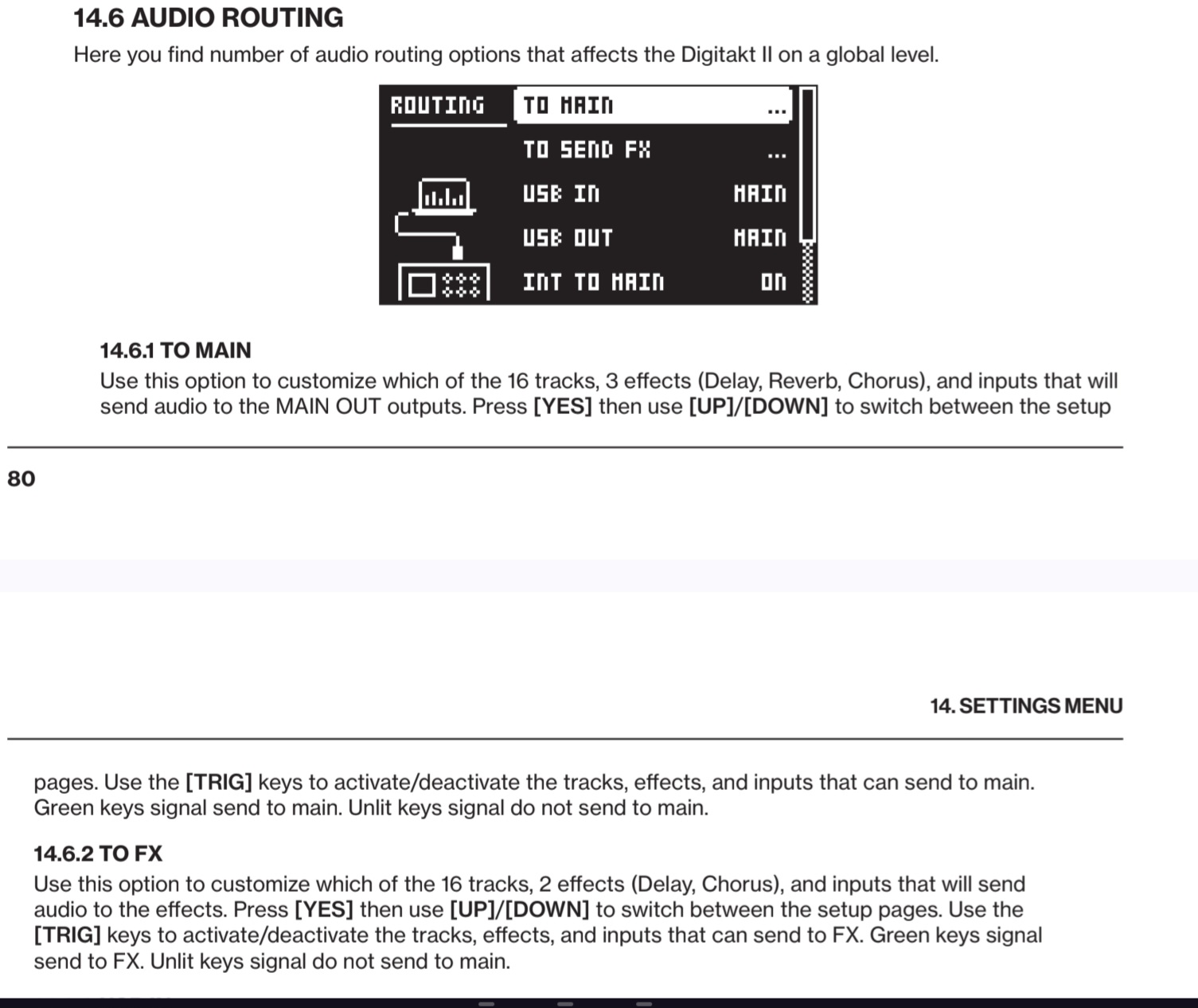
Hmm, maybe this is because overbridge separates the track sounds from the effects.

If you’re listening only to the dedicated stereo track in overbridge (with a mix of all tracks) then yes, that one would have the effects baked in and this theory would not hold, but as the stems have fx removed, then you’re only hearing the samples playing from the sequencer straight to the stem track and not hearing any effects applied within the machine on any track because they record separately to a combined fx stem.

On the DT2 open a new project as a test and when you open your samples, go to the source page and choose them from the sample slot on the D encoder. In the new project, see if the audio sounds better.

If the audio is only impacted on your one project, you probably have some excess of FX applied somewhere. Maybe you didn’t know you couldn’t hear effects through OB stems and it’s sort of like “the compressor is in bypass” joke, where you keep adjusting trying to see if you hear something and either gave up or it just didn’t impact anything until now.

That’s my suspicion, you’ll have to check it out for yourself. On the current project, in the menu, you could even route all tracks away from the FX and see if it sounds better, then (if it does) you need to look at every fx page on the hardware and see what you did.

If it sounds bad in a new project with samples straight from the +drive, pulled up in the source slot, then maybe there’s a hardware issue but i suspect not.

Let me know how it turns out. Good luck.

So disconnected from the mac. Created a new project, new pattern, selected a factory sample, recorded a pattern.

While auditioning the samples, most were whisper quiet, others were the volume I’d expect.

Also noticed hat the volume control gets louder around 2 o’clock then quieter again as it’s rotated counter clockwise.

Not sure exactly how to route all tracks away from FX?

I should note that after the factory reset a pattern created in project zero with the factory samples works fine.

Is there a true factory reset that would clear everything back to base?

Can you confirm whether you’re browsing samples by accessing the preset pool on the left side of the machine? Or are you going into the sample slot on the source page?

In the menu there’s a routing option. I’ll have to pull up your manual to see the path but you can select which tracks are routed to the fx.

Here, in the audio routing menu where it says to send fx.

Anyway if another project sounds fine it’s almost always settings related, but the way you describe the volume knob behavior sounds weird so you’d have to clarify if that’s an all the time thing, because that is suspicious. An sudden level increase as you lower the volume?

I’ve never used a DT but the sound you’re describing, “low, distant, heavy gated reverb” kind of sounds like you’re getting phase cancellation like one of the channels is inverted. Which can happen if you have a bad connection with a 1/8" to 1/4" adapter on your headphones, or something wrong with the headphone cable, or something is not fully plugged in all of the way. Just a thought. If it’s a mostly mono sample with some wide reverb then the sound in the middle would mostly disappear and you would hear just the reverb. And if some samples have a much wider stereo spread that would explain why some are a more normal volume.

2 Likes

If it were phase cancellation due to an incomplete TRS connection at the headphone jack then the primary outs would not be impacted.

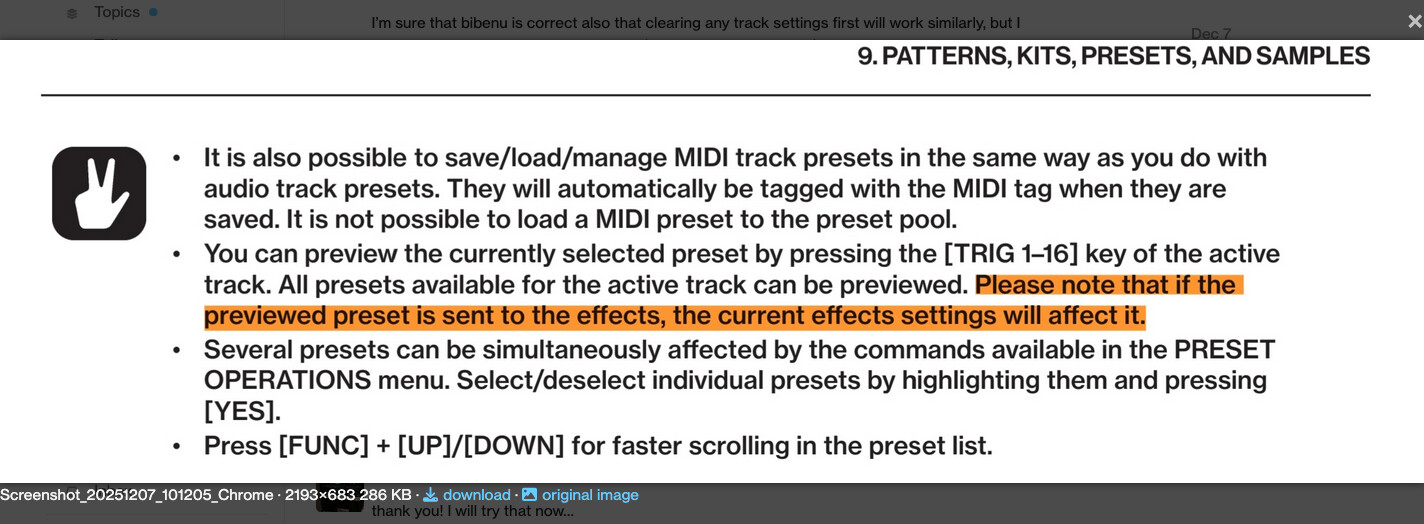
Digitakt has a behavior where when browsing from the preset browser (The preset browser specifically. The one you access via the level knob on the left) that the sounds you audition are impacted by the current send FX settings, if the preset is sent to effects. It says this in the manual in a very confusing way. What it does not specify is that sounds auditioned from the sample slot on the source page are not impacted by this behavior when being previewed.

Opening the factory project, which is locked and where a save cannot be made, then having the stock samples sound fine in a pattern made there where they are already loaded implies that the issue is settings related.

I don’t know that it contributes much to the situation, adding this without further info from OP, and I was trying to avoid throwing more words at this problem than necessary but the headphone sound and main out sound would only possibly be related via the headphone adapter if the main out were not being monitored with speakers but were instead headed into some kind of mixer which was then being monitored by the same headphones.

If that’s how it is, then the headphone adapter is as likely a culprit as any other but since the headphones and main outs were being addressed by OP separately, I took it as that the main outs are not being monitored from the headphones.

Bingo! I swapped out the headphones for another set and the problem was gone. The ATH R50x headphones come with 2 cables and an adapter; the (way too) long cable has a male thread for the threaded adapter, while the shorter one I was using does not. Wiggling it around proved the short cable and supplied adapter to be incompatible.

Thank you all for your suggestions; time not wasted as I’ve learned more and become far more fluent in moving around samples, restoring from backups, etc.

1 Like

So, when you said the sound was low “through headphones or main out,” did you not actually test the main out? Because that should have nothing to do with your headphone adapter.

Glad it was so simple to resolve.

I moved the headphones to the main out jack trying to determine if the headphone jack was at fault. Hindsight that should have been a clue, but since the phones had been working fine the night before, that wasn’t on the list of possibilities. Lesson learned.