Argh, I found one thread referencing this but man… I get that a quick save is only a func +yes away, but I have done this twice now. Shame on me? Yeah but also not the greatest design. Why no undo option for accidentally pressing func+no and losing an hour of work tweaked to perfection? Is there any way?
5 Likes
Pattern reload is the undo function, it’s just a matter of perspective. You can also copy the pattern with FUNC + REC and save it in another pattern slot. And this can also be undone with FUNC + PLAY. The functionality is there, you just have to develop the habits of using it, save often and save multiples. Tweaking a pattern for a whole hour without saving is living on the edge 
2 Likes
ok… yeah i know it was risky but im still in my first week. what about resetting all track macros to default? sometimes its nice to see what happens to a new sample but often i want to hear it blank. I can’t find what im looking for in the manual. So far I’ve been pressing knobs by knob + no… very tedious.
Are you clearing it by page or individual parameters?, hold button(lfo for example) and press no to clear all parameters on that page.
1 Like
I agree that it’s not the best implementation, and I’ve gotten burned a few times but it is what it is. What I do is, if I’m happy with a pattern, copy it to another pattern and tweak there. That way I always know I have a backup of sorts. Might not be elegant, but it could save your DT a trip through the window.
Another thing to be aware of is this: If you tweak a pattern and turn off your DT, lose power, it will save that tweaked version of the pattern. I really wish elektron could implement some sort of, reset all patterns to last saved state function as I’ve messed up songs by not checking each pattern before a power cycle/save.
1 Like
Does this work for plocked trigs? I can’t remember and not nearby  can clear the whole trig by just removing and replacing but wondering if there was a quick way to clear just a single page.
I echo your situation a week ago with a post I made about no undo for an accidental pattern clear… if you spot it quick it can be reversed, which doesn’t help if you just saved the project 
A +1 vote to this feature please! Another usage for ‘Reload PTN - Undo’ is for performance: almost like using the crossfader on an OT. You are playing a pattern, modify it, go back to the original form, play for a bar or whatever, and then back to your new form. A, B, A… etc. Cheers!
1 Like
+1
Something has to be done about this.
I lose patterns this way easy too often.
Why? How?
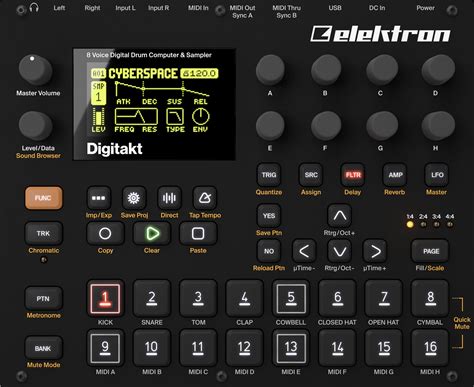
Because FUNC + ARROW keys shift pattern trigs, which I use frequently.
Unfortunately the FUNC + NO combo is right next to it, one small slip of the finger away.
Look at the NO & ARROW spot!
The margin between the two keys is wrong.
It’s arguably the worst / weakest spot of the whole UI.
4 Likes
Seems obvious now that you mention it, I get wanting to keep y/n aligned with the trig button above, but they could easily shift the arrows a few mm to the right without ruining anything
bye bye best pattern ive ever made:

edit: recreated a part and made something even better with it. all good! 
1 Like
Lost an hour of work because of this. Twice. I wish this function never existed 
1 Like
I’ve just accidentally clicked the “no” button instead of the left arrow and lost 2 hours of work. WTF.
I would love to be able to either:
a) have the ability to undo the reload
b) disable this functionality altogether
c) show a confirmation dialog of sorts
3 Likes
I just lost a pattern I’d spent at least 2 hours on because I accidentally pressed FUNC+NO (Reload), I don’t even know how it happened, fat fingered maybe.
But the point I’d like to make to the Developers is that the reload feature is not aligned with Elektron’s own design language they have established. I believe this to be an area for improvement.
Elektron implemented an Undo for accidentally clearing a pattern, by tapping it again, so they understandably acknowledge the danger of that feature. Yet reloading an empty pattern is effectively clearing, yet they omit the Undo feature for this. If clearing makes sense to act as a toggle. Reloading should also make sense as a toggle, since its effectively the same (it’s a bulk overwrite of the current pattern).
I could even make the case that clearing and reloading being an equally destructive action (and unlikely done frequently) a confirmation Y/N screen could be warranted. And for power users maybe even an environment setting in the system for a checkbox which disables that confirmation dialog.
I think most of us would appreciate a “Confirm Clear Y/N” and “Confirm Reload Y/N” dialog. Or at least adhere to the design language already laid out with Toggleable Clear and Toggleable Reload. After all they have confirmation dialogs for Loading and Saving already which are also destructive actions.
1 Like
I disagree, pattern reload is a performance feature and needs to be as instant as pattern paste.
(post deleted by author)
I agree that it is a performance feature and a destructive feature. During a performance you would want it to apply instantly, and during producing you would want a confirmation. That’s why a system checkbox to control a dialog would be a healthy addition.
And as a second point, the undo behavior of the clear command is already implemented, and applying that to the FUNC+NO (Reload) feature actually makes more sense (more congruent) in the Elektron UI design language than its absence.