Headroom is just “gap between the level of your track and 0db”
in most DAWs it doesn’t matter if you go over 0db in a single channel as they use floating-point processing and can go “over” without distortion - but if you go over 0db on the master channel you are probably going to experience digital distortion/clipping on the master channel as it outputs to the DAC and so to the analogue world - which is generally pretty undesirable sounding.
If you have all eight channels of the Digitakt peaking at -6db then when they are summed at the master buss they will be way over 0db - this is (partly) why the Digitakt intentionally delivers the tracks through OB at a lower level.
In addition in the analogue world, a lot of analogue gear “expects” -18 to -12db and behaves differently if overdriven, so a lot of plugins that model analogue gear also mimic this behaviour - if you send them -6db you might be getting completely different colouration/distortion (which you may or may not want)
as for what you can do “bring up the volume” - don’t! turn your amp/speakers up so you can hear everything and mix everything down to match the Digitakt.
I mean, I’m pretty sure most of us end up with everything slamming into 0db on the master buss and have to go back and turn things down with utility plug ins, it’s easily done - but it can be important to have levels right throughout the signal chain (depending what plug ins you are using)
Are you all able to get mono files into ableton from your DT? I can’t figure this out on my RYTM. The only outs exposed from the OB plugin seem to be in stereo.
I just purchased a new Analog Four MK2 a few weeks ago… and the first time I tried to record via USB, my levels were extremely low. Turning up the +18 USB gain did nothing - What is that for anyways?
I don’t know how loud my signals are coming in, but in Logic audio tracks show a scale of 0 to 100 - my main out reaches the 25 mark, and all other instruments do not make it to 10.
Anyways, after reading this lengthy post, I now know that this is the ‘Elektron Workflow’, and I’m going to have to get used to it. I do hope the +6units of gain the above posters mentioned come soon though. That would be nice…
The low volume issue is still on with Digitakt and 2.0.37 when switching to individual Audio/Overbridge channels monitoring. I fix it with applying a higher volume boost with Soundtoys Decapitator (Drive. +6) to get same sound level as Midi/Overbridge channel (with Post fader on in DT preferences),
Just use a utility to raise the volume, you won’t be increasing noise. You don’t need boost or drive or something like that which might color the sound.
Yeah I agree but I find it amazing that the Digitakt is still unable to carry the same Post FX sound level for the individual audio USB tracks. Why the -6db difference vs. main master USB output?
I dunno why but it’s been designed that way, and as you can raise the volume in your DAW with no increase in noise it just doesn’t really matter why. I’m probably too dumb to understand even if someone told me!
true it’s just the same with a utility indeed no big deal but please Elektron fix this in a future update, I see no reason why sound levels should be different
You can also increase the level of individual clips/regions with the slider in the warp panel. I think it’s the warp panel — not at my computer. This has another advantage— the waveform grows too.
Not a big fan of people responding to the original question by saying we shouldn’t want louder volumes because these volumes are fine or even ideal. If that’s your preference, cool. But that’s not what the question was. And if the maximum output of the analog outs were this quiet, you’d be pretty annoyed.
There’s no reason for it to be this quiet when someone wanting it this quiet could simply turn it down that low. Why force that on us? This is simply a mistake. And no, I don’t want to put a plugin on each track to gain it up, because that’s going to change the sound at least a little, and I’m not a gain staging master anyway. I record things and give them to someone who knows how to mix. I’m liable to do something incorrectly.
I don’t know if someone already gave this information for ableton users:
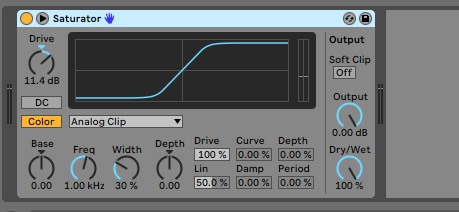
I use a saturator with the “analog clip” setup (see screen below). Gives your group the right “loudness”
Adding utility plugin will have no effect on your sound.
@litu, better to use something transparent like utility plugin. Unless you want the chance of a bit of saturation ofc nice way of doing that btw.
Regarding the reason why levels are so low is because the units have enormous headroom to make sure no clipping occurs when heavily usage of resonance on a filter sweep for instance.
Consider this: without large headroom one runs the risk of clipping the ADC and/or the digital interface limits when lots of resonance and distortion applied. Now if you re worried about changing the sound this is something that will drastically do it, in a bad way.
Gaining up the signal digitally in DAW has zero audible impact on sound quality. Any change is completely theoretic.
I ll take the DAW gaining over small ADC headroom and clipping any day and so should you.
That’s 100% true that that it would suck to have clipping if I wanted hyper resonant filters or in-the-DT overdrive put on there. A very simple solution to both issues brought up would be for Overbridge to have output level control so that if I boost the resonance on the filter, I can then turn it down.
Yes, I can put the utility gain on each track in Logic (not using Ableton) but it’s a step that something as based around control and streamlining as Overbridge is supposed to be shouldn’t force us to use.
the output of the VST plugin has nothing to do with internal clipping inside the machine or headroom. The problem is that the level from the plugin is not loud enough because there is no multiplier at the PLUG-IN output stage (not inside the machine) thus you are forced to use a 3rd party solution.
The other Overbridge plugins are fine, there is absolutely no technical reason it isn’t boosted within the plug-in code. I found it really frustrating and sold it in the end. I’m still hoping one day it will be fixed and I will probably pick up another.
I think you misunderstand the baked in headroom Elektron has applied for OB. If I max the master distortion, filter resonance and unison on all 8 voices, it still won’t clip on recording into a DAW via OB. This is the ideal solution in my opinion, because I never get nasty (unwanted) clipping when I’m recording Elektron boxes into Ableton Live. And if a signal is a little bit quieter than I need, then I boost it with a neutral plug-in like Ableton’s Utility or a coloured plug-in like the Compressor. It really isn’t too quiet – it just prevents digital clipping and has no noise introduced at the bottom end, so boosting within a DAW doesn’t introduce noise like recording directly into a soundcard, etc.