Is there any latency correction for overbridge at all whatsoever?
I’m using a digitone and I love it but I’m at my wit’s end with overbridge. Every time I sit down to write theres always stuck MIDI, latency and sometimes it just cuts out altogether. It destroys my workflow every time. It works fine when I plug directly into my interface but the thing I liked about overbridge was that it just plugs straight in via usb and it frees up an interface input for one of my other synths.
I find it kind of frustrating how a cutting edge modern synth from 2018 is giving me latency when I’m using a Juno 106 1984 model and a bunch of romplers from the 90s and they work perfectly. If it doesn’t work for me soon I might have to sell it.
Any ideas?
That’s a bummer, have you tried mesing with the plugin buffer size in the OB Control Panel? I always set that the same as my DAW and it does the trick.
where can I access OB control panel?
Done, no results. Still half a second of latency. Thinking there’s a compatibility issue with overbridge/digitone with Live 11. Might swap for a DX100. Can’t go wrong with vintage.
Half a second seems crazy to me. I am running on a nondescript 8-year-old PC and my OB round-trip latency is like 30 ms. I wouldn’t give up on checking your settings more thoroughly.
What computer are you using? What versions of DN firmware and OB are you using?
1 Like
I agree with @davestasiuk.
@JonathanFrakes Tell us what audio interface and PC/Mac you use. Also, the audio settings you have set on the DAW.
I assume latency problems are more CPU-related. Also, when you open the overbridge, it’ll tell you what the best buffer settings are for your setup.
I had a similar problem because of a low-end PC, but fortunately, I was able to fix it with the below-mentioned suggestion.
Try to change the buffer size on your audio interface and in the overbridge from 64 to 256, or set it to higher values if you have a good CPU.
I found that 256 was the best for me.
If your audio interface has a control panel, you should change both the overbridge and audio interface buffer sizes to the same values.
I hope you’ll solve the problem as soon as possible 
No idea if this applies to Live, but in Reaper I need to have the track with the Overbridge plugin on “record arm” at all times. Otherwise there is unberable latency irrespective of any buffer settings…
Using a 2022 MacBook Pro M1 with 16gb RAM running Ventura 13.0. I use this laptop for pretty high intensity 3D rendering for work so doubt it’s a CPU issue. Also the fact that it works perfect through the interface.
Currently ordering an 18 input rack unit so I can bypass overbridge altogether.
Yeah with that kind of computer, CPU won’t be an issue.
But the DN/OB/Ableton configured properly just won’t have that kind of latency. Definitely something in the 15-30ms area, but nothing close to 1/2 a second.
It’d be easier to help you troubleshoot if you could screenshot your Ableton settings.
1 Like
@davestasiuk Yeah, I think it’s not CPU-related either.
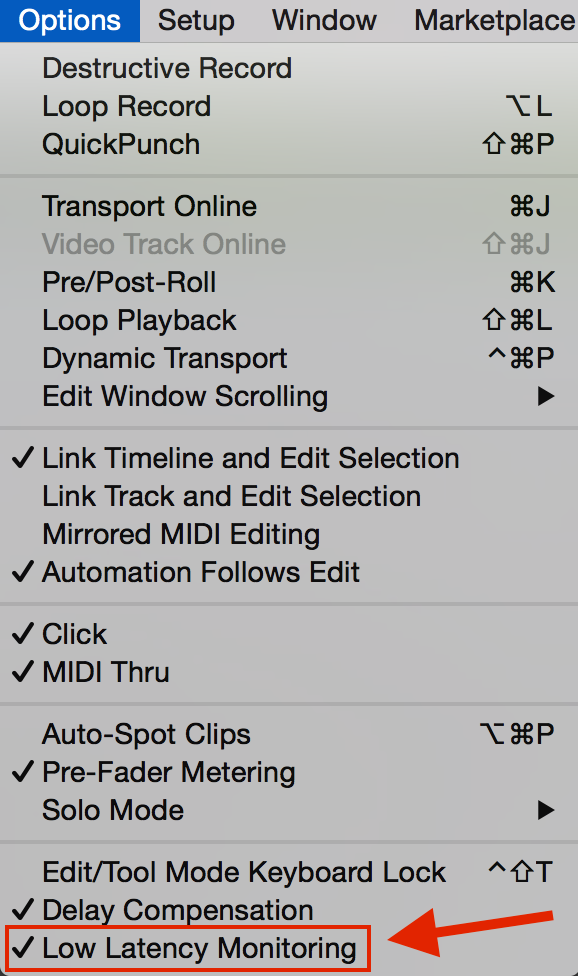
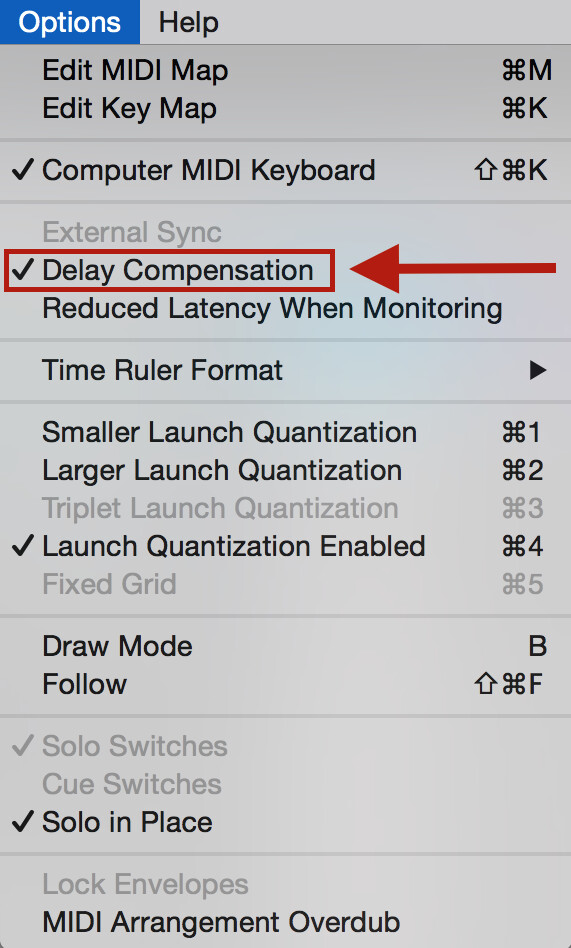
@JonathanFrakes Have you tried turning on “delay compensation” or "low latency monitoring” ?
Some VST plugins are huge and can increase latency.
If you are using many VST’s in your project, try to “freeze” tracks so that they can reduce latency in your DAW.
I’m not a MacOS user, so I’ll leave this issue for experts who use Macs.
sorry what program is this?
However that solves the latency you might as well keep the Digitone and connect it to your interface as you would connect any other non Overbridge type of synth. OB is an option and not necessary.
The most common issue is there is always some kind of latency converting audio to digital and back therefore the frase “round trip” is quite common.
Setting the sweet spot between the minimal amount of latency and a stable system and no audio clicks/hiccups is a very unsatisfying job of trial and error.
Just fiddle around and make screenshots or photos in the process until you hit the sweet spot.
Hooe you can work it out, but i agree that it’s very frustrating a decades old midi protocol and some audio cables just work steady, reliable and fine and as soon you want to enjoy the best of both world and go hybrid you end up drinking and smoking to ease the pain:hear_no_evil: