Does the MIDI auto channel not work for anyone else when using the Digitakt standalone app?
I tried enabling my keyboard in the “Active MIDI Inputs” section and set the keyboard to transmit on channel 10 (default MIDI channel), but the Digitakt is not responding. Strangely, the Digitakt does respond when I transmit on channels 1-8. It seems like channels 1-8 might trigger tracks 1-8 on the Digitakt regardless of the Digitakt’s MIDI channel config.
Looks like the stand alone and the Vst are not released yet. Makes sense as the Digitone is the most recent release to be compatible with Overbridge. Thanks for the info, I’m going to install beta drivers within the coming week and try myself. Can’t wait!
Had a free afternoon yesterday and spend some time with OB and a A4 MK2.
DAW is Presonus Studio One 4.1 on a Win8.1 Dell-Laptop.
Works fine so far, but I can’t select the Analog Four as a soundcard. (DAW ask me to check connection and offers option to retry - driver is not found)
Currently the main-outs are streamed.
Multitrack streaming therefore doesn’t work and I don’t see that it would be possible to stream from OB while using my main soundcard (RME Fireface UC).
Will this be added in the future? Is that even a feature?
Any Studio One users know if it’s even possible to run two soundcards concurrently?
I really thought it would be possible to route the four tracks to individual tracks in my DAW and still use my main soundcard. I see that total recall and the VST-like workflow is actually really great, but if it’s required to do the multitrack recording via my soundcard I think there is big part missing out on OB.
Finally got around to trying the overbridge beta with my digitakt on windows 10. Stand-alone overbridge is all I need and it works perfectly. GAS for an octatrack is also gone now! Thanks elektron!
OB2.0 + Digitakt Latency in Ableton Live 10.0.6
1725 samples / 39.1ms (ouch—almost as bad as my Virus TI 3456 samples / 78.4ms)
Running on a Mac Mini i7 @ 3.2GHz / MOTU Ultralite mk3 @ 128 sample buffer/44.1kHz
It works just fine! I of course have all kinds of other Ableton- and Virus-related timing issues, but the DT via OB is sharp and spot on. Somehow managed to get my MD synced too, though it took a little more effort.
Except that it spies on you and puts advertisements in your file browser and treats your desktop like a mobile phone and reboots when you don’t want it and possibly screws up your system with broken updates.
Hello guys, Does anybody of you have the same issue?
No audio signal coming in the specific midi channel for Analog Four Mk II in Ableton (i.e. no green signal going up & down, despite the amchine is recognized by overbridge and ableton).
The device is not recognized in Ableton, unlike my Rytm MkII which just goes great. It is weird because the machine works in the overbridge control panel, but NOT in Ableton: it just stays IDLE in the engine while on Ableton. Here’s the screenshot.
That’s weird because I’m using the same overbridge for both RYTM MkII and Four MKII, but only the latter is not working on Ableton. Plus, both are updated with the latest firmware made for the new overbridge 2.0.

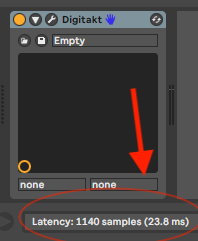
 3456 samples / 78.4ms)