Okay, I decided to try something. Get an EOL controller on the cheap like NI Kore2 and try it with OT. It works great. There were eight buttons and eight knobs (touch sensitive). Had a good afternoon jam.
Here’s what I did:
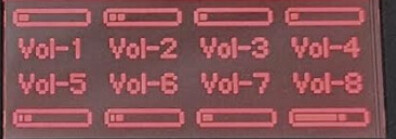
1. Map each track volume and mute state to page 1.
2. Map each track to 8 common parameters to knobs to pages 2 to 8. Here I used Pitch, Rate, RTrig & RTime, Base & Depth [FILTER] and Feedback & Send [DELAY]. Of course one can add/amend parameters to requirement.
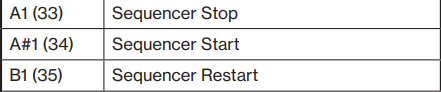
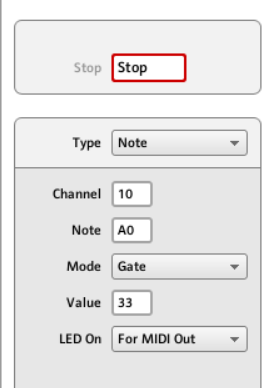
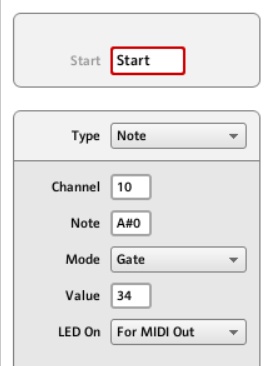
4. Transport controls wise - I was able to map start/pause/stop. The manual’s stated note to be used was off by one step for some reason. However, I cannot find the note/cc to map [RECORD] button - anyone?
versus
Here’s what I hope/plan to try (no idea if they can work properly):
a. Use 8 touch knobs to play notes based on scale using intervals +1, +3, etc., (record on the fly).
b. Use Kore2 Big Knob to cycle through “current” active track in OT.
c. Use a page to transpose tracks 1 -7.
d. Use a page to solo tracks 1-7.
e. Use a page for crossfader + scene select duties.
f. Use a page for freeze delay performance.
g. Think of a use case for those touch sensitive knobs.
I had one of these ages ago… can’t remember:
Does this send midi data to midi out once it is configured? Or does it still need to be hooked to a computer?
I’m guessing so you can have one set open on the OT and another on the Kore, and twiddle both at the same time … and the Kore set could be several presets pages that are a mixed bag of controls, not necessarily all mapped to a single OT view
Unfortunately it had to be tethered to PC, but this low cost experiment made me think why we don’t get a similar sized midi controller that’s highly configurable with a good big display, a swiss army box of sorts where you can can save/share configurations. Most helpful to complement hardware devices that has lots to “dive”.
Lots of standalone midi controllers without a keyboard have knobs or faders (with/without buttons) but usually not both. I had also looked at some AkaiPro, Novation and DJTechtools products but they seemed to be geared for software use. A Faderfox could be an alternative here.
No, you are right. However, I found it useful to avoid press in (click Track #) change the volume, press next (click Track #) change the volume and repeat when one page does it all, i.e. faster and you can monitor the levels in one page (see pic). Same thing for parameters, one can avoid having to press in (Parameter Page A) do the changes, press next (Parameter Page B) do the changes and repeat, etc. - you get the idea. Assembing the most frequently use parameter changes into one page is a plus.
Please understand this is not a superior solution or marked improvement in using OT for everyone. I share his for those who might be interested, especially those with a deprecated Kore/Kore 2 lying around. I also used BT MIDI which worked nice. Hence, with transport controls - you could “almost” remotely jam on the OT without even looking at it.