Anybody heard of this software MIDI clock / sync solution by Rapid Flow. Claims no hardware required.
Keeps popping up on my social media feeds
Anybody heard of this software MIDI clock / sync solution by Rapid Flow. Claims no hardware required.
Keeps popping up on my social media feeds
Appears it is newish. Sound on Sound advertised it on Facebook (found with a quick search)
So I just signed up for the free 45 day trial and it seems to work great on the one bit of hardware I tested.
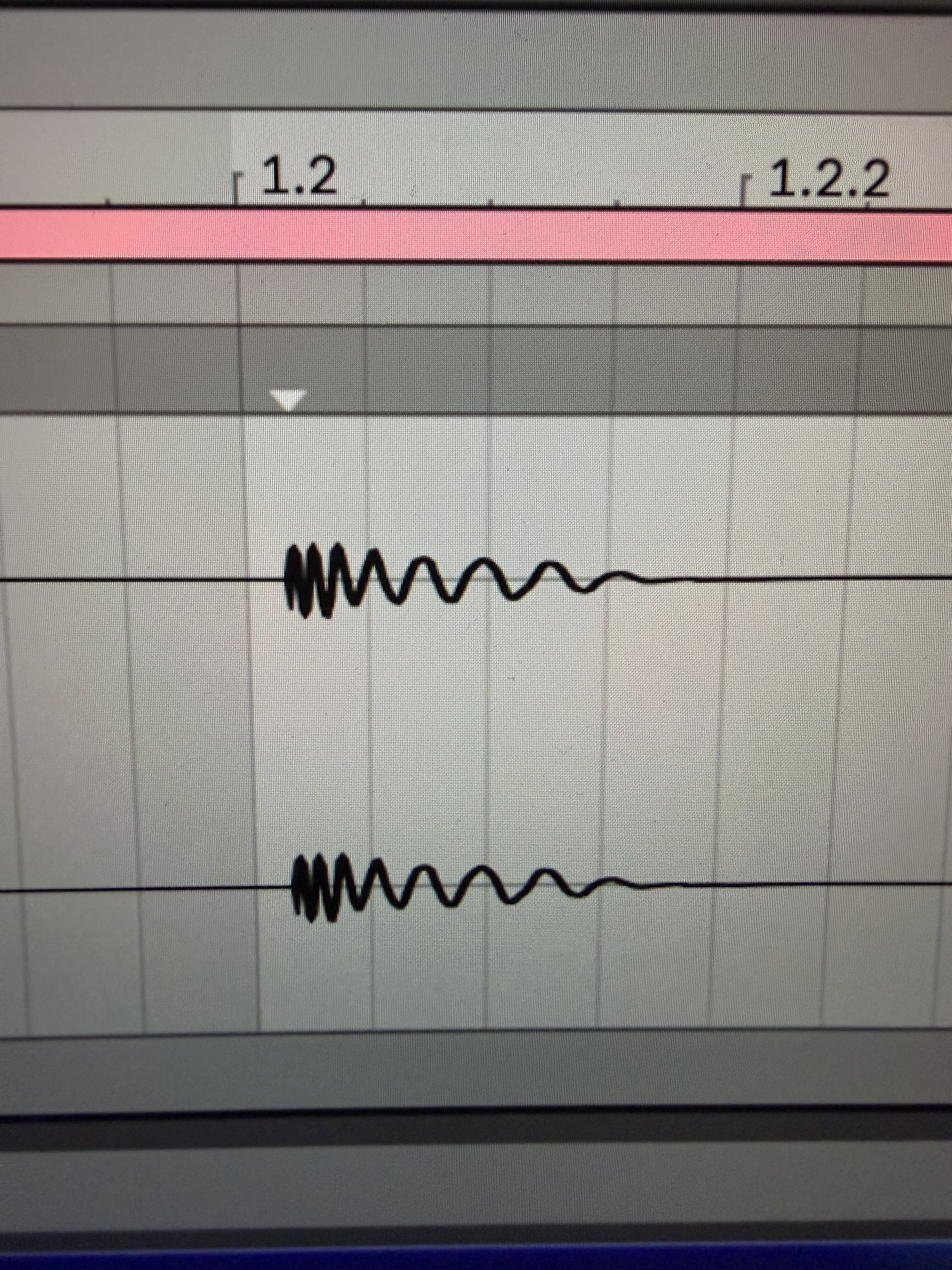
Pic one is the OP-XY synced via USB with no plugin
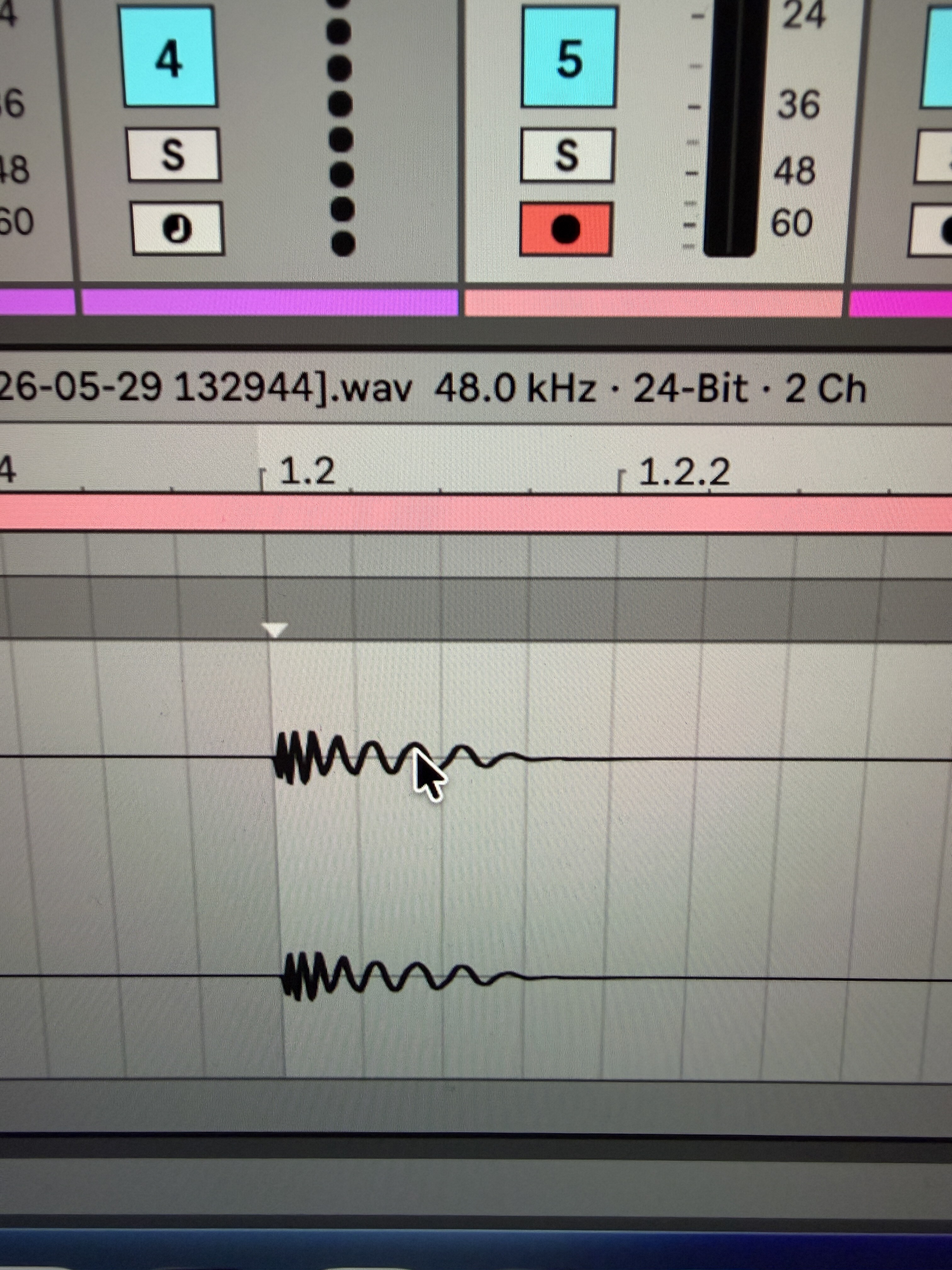
Pic two is with the plugin enabled and an ultra quick. tweak
My only concern would be if the Ominclock settings require change with the more instances of the plugin used (since using CPU)
Interesting anyhow
Wrapping my head around how it works since we all have been using hardware sync clocks for this task. The hardware is required to send the corrected/ more stable clock out to the hardware. So somehow this bypasses needing the hardware? I saw how it claims to replicate old school drum machines feel. It’s very interesting but also a bit suspect, especially when I see AI wrote the product copy. Anyway, free trial is appreciated, if I get a chance I will try it. Use my Nome2 for now.
The fact that you are saying the settings change if you add to the project is interesting. This can be a feature or a bug, depending how it works. Most sync clocks do not adapts to plugin latency and track count so if this does, that is pretty cool.
Yeah I am not sure if more tracks and instances of the plugin has a knock on effect on the plugin timing settings as I only had 5 mins with it. Will test further tomorrow.
I prob haven’t looked hard enough but I don’t fully understand this thing yet.
Is this plugin taking over a midi port and sending an independent latency compensated clock out to that port?
Yes - from my brief 5 minute go at it you choose the MIDI port via the plugin itself not from the Ableton MIDI device settings in the main setting menu. The advantage of this is you can tweak it into time whilst its playing rather then trial and error and also you can use it for spicing up rhythm with the addition of shuffle also.
Similar to Multiclock hardware / SND-4 etc however I have only tried it quickly on one USB midi device (OP-XY). Seemed to work well on a one device experiment like my hardware clock on initial play. Will have to try with a more complex setup - hardware sequencer etc.
Hi, very interesting! Do you use it in Ableton on Win 11 or on macOS?
I quickly tried it on MacOS Live 12.4
I see. I’ve got Midronome / Nome I.
On Win 11 there is still no U-SYNC in comparison to macOS. U-SYNC allows a tight clock sent from Ableton to Nome however on Win 11 there are still complex MIDI challenges to be solved.
Give it a go anyhow. Free 45 day trial etc
Do you need to disable a MIDI port in the DAW for this to work? Or can it share with the DAW?
I kind of understand that MIDI isn’t really the problem with sync (beyond the usual jitter, etc) But somehow DAWs don’t consider accumulated plugin latency when sending clock? I guess?
So having a plugin that does consider session latency, etc makes sense even if don’t really understand it.
I’ve got 2 of the little Usamo units. (2 because I wanted to offset one of them for my slow-to-respond MPC One.) They definitely do the job but I’m still interested in this plugin.
I think you have to disable it in the DAW MIDI settings otherwise they conflict (well certainly MIDI sync)
Posting again because I just saw a post from Expert Sleepers saying the opposite of what I posted above, hah. I won’t derail this further… 
Rapid Flow answered my question on FB about multiple instances of the plugin and they answered as follows. I will give it a go tomorrow with multiple hardware devices as didn’t have any time today. Not quite sure they understood what I asked (I knew each device needed its own plugin instance and offset but wondered if the more you added the more CPU used etc resulted in the timings going pear shaped) but anyway…
" hey , great question. Yes, each instance of Omniclock does need its own shift settings configured independently, but this isn’t really “rebalancing.” Here’s the key context:
Omniclock supports per-output clock shift, meaning each output can have its own timing offset.  The idea is that different hardware devices have different latency characteristics, so each one may need a slightly different shift value to sit perfectly in the pocket.
So practically speaking:
• Each instance you add lets you clock a different device/port
• You set the shift for that specific device , it doesn’t affect the others
• You’re not really “rebalancing” existing settings; you’re just dialing in the new device’s offset"
That’s a pretty nice feature. I can send clock into my hapax and it can compensate from there. Still a cool feature. The appeal for me is I can send clock to the hapax on its own midi track and still have 15 more dedicated virtual din cables all through one usb connection.
They told me that it does not auto adjust for higher latency plugins so it’s worth monitoring that stuff if you add a lot of plugins to a session and still want to record some gear.
My Hapax had arrived today but missed the post so will wait until Monday! Will try similar and send it clock from the plugin to distribute! Either that or send the plugin clock to a MioXL and distribute to the Hapax and devices via that method.
I did suggest to them that a cool feature I liked on the ACME SND-4 is the switch for half tempo and double tempo feature which can be fun
One annoyance of Omniclock is that when I power down the hardware device and then power it back up etc you have to re-select the device from the Plugins MIDI list (it forgets it)
Not sure if that is something that can be fixed by Rapid Flow or if its more a DAW issue / limitation.
PS / tested also in Bitwig - works nice.
Edit: if you save the DAW project, turn off the hardware, power back on etc and reload the project then it does remember the hardware in the plugin. Its just if you power cycle with the project remaining open that it needs to be chosen from the plugin menu again - so not really a problem
Testing Jitter this morning with 3 Devices simultaneously (Bitwig 6 and Live 12, Mac OS, M1 Studio)
OP-XY - USB MIDI
Rytm MKII - USB MIDI
OXI MKII - USB MIDI
OP-XY and Analog Rytm native clocks show no jitter. As soon as it initially locks to the DAW during the first second it locks in solid and no fluctuation on the device clocks.
Oxi One has 0.1 jitter in both directions. eg for my example I have the DAW project at 111BPM. when I hit the spacebar the Oxi shows 110.9 / 111.0 / 111.1 . Will hook up multiclock again to compare to see if same behaviour
This is cool.
I’ve been using a software clock, it’s on version 3 now : CLOCK v3 – Professional MIDI Clock & Sync Solution by TOOLBOY
Game changer, especially for getting my TR-1000 tight.
Looks like similar feature set, but Clock V3 is focused to Ableton Live.