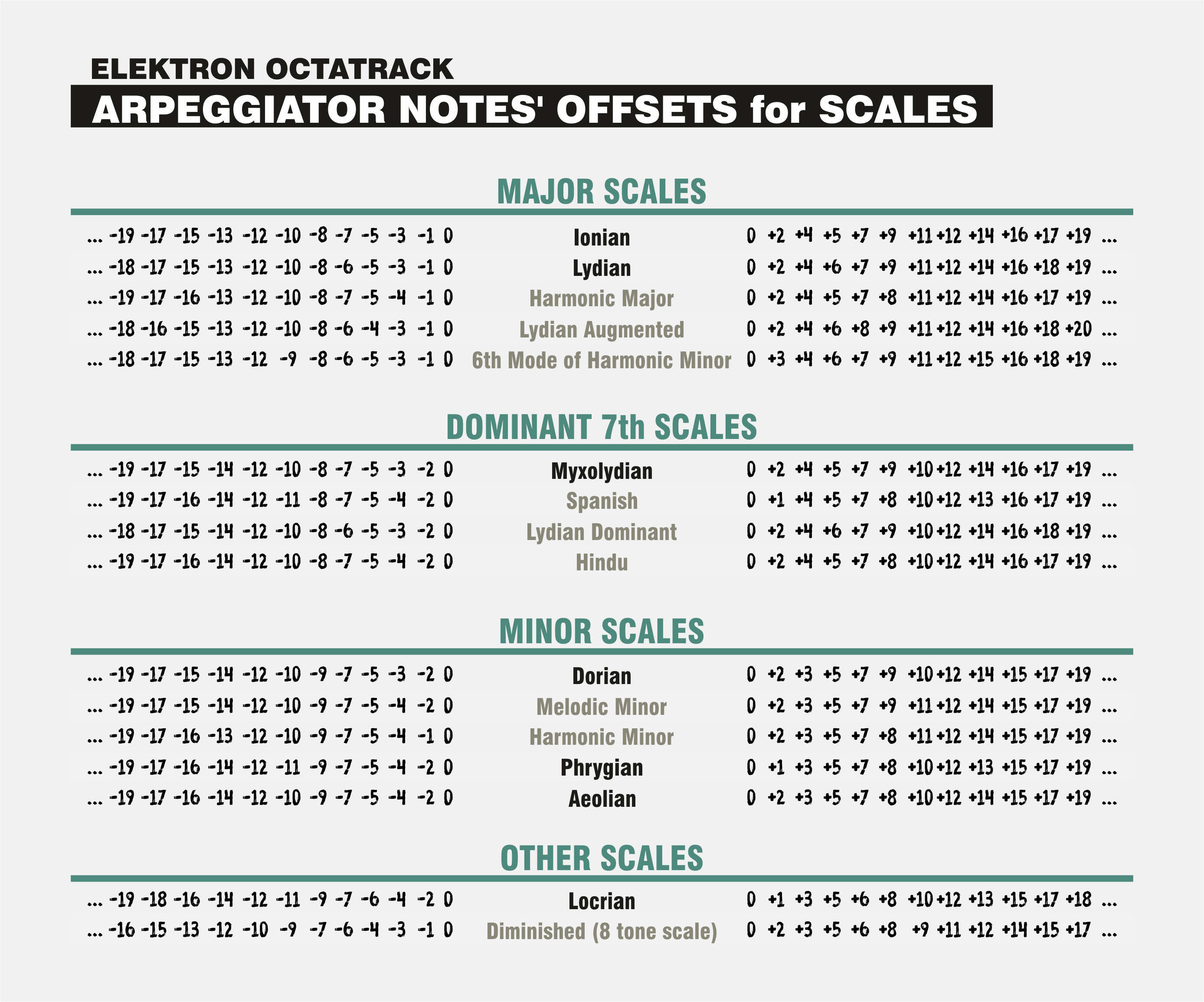
HEllo guys ! I want to ask you if you have some ideas or skills to automatize other scales than minor and majors ?
As adding +1 or +2 notes in the arp design ?
Because I’m inuping random notes in the arp and I want to play in other scales, as for example minor harmonic …
Do you guys have arp setting skills to play in minor harmo or other scales ? Thank you
Here’s the chart that the above linked post points to to easily use any of the seven modes in any key… (Bb=A#, Eb=D#, Ab=G#, Db=C#, Gb=F#)
Just find the mode and key you want on the chart and set the arp to the major mode in the corresponding key shown on the left…
-I copied this chart from the Internet, It shows several flat keys at the bottom left, on the OT the key can only be set in sharps so I listed the equivalent sharp keys at the bottom just in case…
Where are the pentatonic scales?
Just had an idea, not sure it would work : use a midi track with a scale, pass it thru another midi track (midi loopback) with another scale to reduce notes…
I do it sometimes for audio tracks. For midi tracks, I’d rather set the notes per alternative steps, arp on.
A Minor Harmonic Scale :
Step 1 : A C E G#
Step 2 : B D F A
Step 3 : A C E G#
Step 4 : B D F A
Etc…
for other scales, arp setup, key=off, select Len and edit each Trig (press Trig and move up-down that arp step). Design the scale you want.
15.4.4 of the Manual, Arpeggiator Setup.
Interesting but you can’t use it the same way as scale mode, playing from an external keyboard or OT random notes…
The arp sequence is always played in the same order, different note transpose it…
Btw, the arp designer can be hacked holding Func + left/right arrows : you can have random notes of from a scale, sending a note or its octaves.
Yeah, it works for inputting one midi note and running the scale from the custom arp which is great but if you change the note or add not2, not3, not4 it won’t conform to the scale as it’s always adding or subtracting the same amount of semitones instead of restricting notes to only certain ones that would be in a scale…
You can always treat banks, patterns and parts or tracks as preset memory.
Name the part so you know whats going on and/or keep track of presets on a text document/notebook.
Then just copy the pattern, part or track.
In case of arps scales, the few characters we get for part names might even suffice
Very true but when it comes to optimising workflow the problem is not the knowledge but the tedious process of creating the arp itself. Plus imagine the creative output of being able to browse through dozens of arp presets on the fly. I know that the Octa is all about freedom for the user to create what they want and I can respect that, but both options are not exclusive.








 but when it comes to optimising workflow the problem is not the knowledge but the tedious process of creating the arp itself. Plus imagine the creative output of being able to browse through dozens of arp presets on the fly. I know that the Octa is all about freedom for the user to create what they want and I can respect that, but both options are not exclusive.