the nord drum is a sound design beast, but the interface is slow for exploration and performance. here is my ideal controller idea for it, would you use it?

9 Likes
I’m working on a Faderfox EC4 script/mapping for my Nord Drum 3P, should be as extensive but a bit more compact than this beast of a concept midi controller 
I’ll share it here and in the Faderfox thread when I’m done with it
8 Likes
Not really but it looks like you want a Faderfox PC12 : Faderfox PC12
2 Likes
Is this hardware or software?
The above just assumed hardware.
Going down the rabbit hole of building hardware controllers, I’d recommend having a long talk with yourself and asking “has this problem already been solved previously in an easier way”
3 Likes
Would it be compatible with nd2 as well or are the ccs and sysex somewhat different?
I’d love if they just made a midi cc for the shift / 2nd buttons. Then you could connect a foot controller for the second params and all would be well.
1 Like
Stereoping also have a faceplate for their smaller controller the the nd2/3. It’s only voice-at-a-time, though, but that seems fine, honestly — if I’m editing multiple voices at once, that feels more like cc macro territory via a midihub or something.
1 Like
cmon. let me have it. 
my reply wasnt to be discouraging or mean.
nws i just got stuck thinking about building it. i’m not planning to, but i wish i could order it.
i did consider it, but i would need 2 of them, each track has 27 params!
But do you need access to all of them at once all the time? On the PC12 you could have 2 setups to switch between mapping to different CCs/channels. It wouldn’t be as immediate as a huge controller for everything but probably still easier than creating a MEGA controller 
1 Like
software, for both Nord Drum 2 and Nord Drum 3:
3 Likes
hardware, but for Nord Drum 2 (was mentioned above):
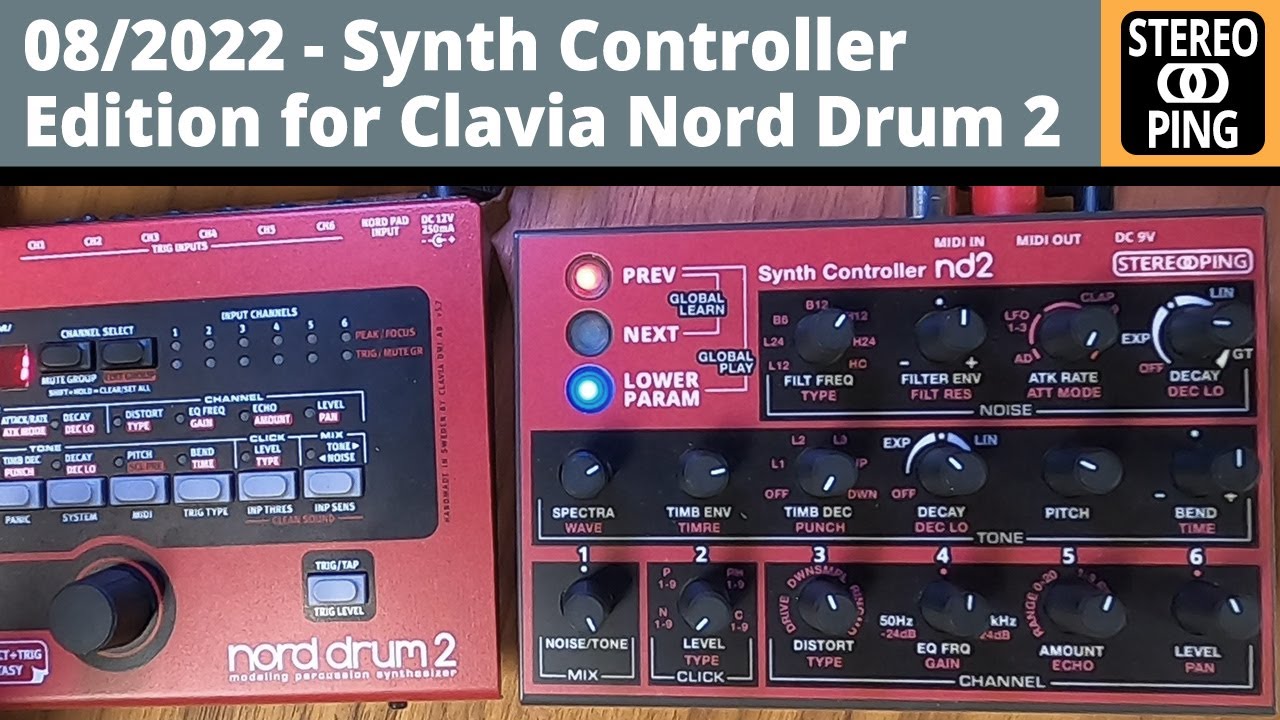
2 Likes
EC4 preset is basically done. I’ve made two versions, one where each voice has two dedicated Groups, one “synthesis” group and one FX/Mix group…in this setup, each pairing addresses the specific midi channel of each voice on the ND3P (in my case midi ch 9-14), so 6 x 2 groups in total. Though I’ve had troubles using that myself because of my rather complicated midi setup and the EC4 going through the computer via USB from there to the DT out to the ND3P. I’d need a midi merge box to test this one properly.
The other preset consists of three groups, a Tone group, a Noise group and an FX group. In this one, the controls address the global midi channel of the ND3P (in my case set to midi ch 16) and then there’s a dedicated knob on each page (always the same knob) to select the pad that should be affected by any knob twisting (cc 70 does that).
I thought I’d prefer the first layout/preset but I actually prefer the second one somehow.
That said, I haven’t worked out the right acceleration curve on the EC4 for the ND3P controls yet…somehow it just doesn’t feel right yet. Will experiment a little more and then post what I have here.
In all honesty though there are not thaaaat many parameters to map and it should be fairly easy to extend controls of the ND3P with any half decent midi controller. I have a Midi Fighter Twister and a UC33e lying around somewhere, might give it a shot with those as well and see if they feel any better (personally don’t love the tight feel of the knobs on the EC4 in general).
I’ll also post screenshots of the midi CC mappings when I finally upload here, so people can copy the layout to another controller quickly.
3 Likes
Yaeltek might get you close Maybe a 12-24 knobs short if you do a build with just knobs (not encoders)
I haven’t had experience w/ yaeltek, but it will be kinda pricey.
But what is your time worth to build, troubleshoot, etc……
Hey @hausland - I’ve been setting up the EC4 with my Nord Drum 2 and have come across an annoying issue that I can’t get around (yet).
My set up is:
- EC4 connected via USB to computer (running Live as DAW)
- E-RM Multiclock - midi out into Nord Drum.
- Channels 1-6 of Nord Drum have Midi Channels 11-16 respectively.
- I’m using an external instrument in Live to route the EC4 midi out to the Nord Drum 2 midi in.
I’ve got the various parameters mapped, and I can control them. However, when I switch group on the EC4, it temporarily kills the audio on the Nord Drum 2 until I move one of the encoders… I’m continuing to investigate, but no luck yet. Do you know what this might be due to?
BTW - in the Set up menu - do you know what the ‘Misc’ option relates to? Can’t find any info about this online - it has options after it of S00- S99 and a musical note symbol which can also be appended.
Would you share it? Would like to try it at home 

@hayk You can use MIDI CC 70 to switch between pads (pad #1 = 0-21 / #2 = 22-42 / #3 = 43-63 / #4 = 64-84 / #5 = 85-106 / #6 = 107-127).
So you would basically only need 1/6 of the potentiometers, plus 6 buttons sending a specific CC 70 value, making your controller much less cluttered and confusing. Add a volume fader … or 6 for some added fun (see below).
I’m using a Faderfox EC4 with my NordDrum and easily managed to get the most important settings into 16 knobs. And I programmed a MIDI Solutions Eventprocessor Plus to map 6 faders of an AtoVproject 16N to switch the pad and send a CC 7 for volume at the same time, depending on which of the faders you move. So now I can drop the kick with a quick fader move, love it!
@stayhome The Nord Drum only executes Bank Select via MSB/LSB after a Program Change (the Nord Wave 2 has the same problem, terrible MIDI implementation on Clavia’s account).
I don’t know if this is what you meant with group select, but if you want to change from bank A to bank B, the Nord waits for a PC message. This could explain your drop.
I asked the Faderfox developer Matthias Fuchß for help as I tried to achieve stuff forever with NRPN and my settings are now as follows:
-
Bank select CCAh lower value 0 upper value 7, display 9999 (this is important, if you set this to 127 as you only want to select banks A-G and display 0-7 anyway, the CCAh message gets crippled and is not transmitted fully, doh!).
-
PC change value 0-49
I would use it. I have been using the DT1 with its 8 assignable controllers like Red Means Recording, but its all pretty flawed. If you change the 3P preset, then start the DT1 sequence, it pushes all the controller data values turning everything into a total mess. DT1 sends all its controller data values out on restarting the sequence. Make sure it doesn’t do that! 
I would like to see some colour, sectioning things up better for each sound and section, some subtle colours perhaps or dividing lines?
Regardless, a midi controller would be so powerful for it.