midiamsterdam might have a few in stock
This box is so cool… here are 3 short videos, the first 2 show 3 tracks with different engines routed to the same ableton instrument. i just demonstrate, how quick musical versions of a chord pattern can be generated. The third shows a request i made about modulating the SHIFT parameter, which would create something similar to the METROPOLIX Accumulator.
Uploading the videos seems no to be possible here, but just replace the XX with a “.”
then you can watch them online
https://streamableXXcom/8gjt0v
https://streamableXXcom/z2ds69
https://streamableXXcom/d2zsbu
1 Like
I’ve been pouring over details of this thing for like 24 hours now haha it looks awesome!
The only concern I have, is track length limitations. The documentation is a little vague here, the only thing I can see is that if you want to manually input a midi sequence on to a track you are limited to 32 steps.
Are all tracks limited to just 32 max steps? How long can the various Midi generator sequences be? (Seems like maybe only 16 steps/one bar for those?) Are the overall patterns also limited in this way?
I would love to see a “master track” in which by using squares as simple symbols for the bars then transpositions, chords and variations could be set. I made a drawing what it could look like
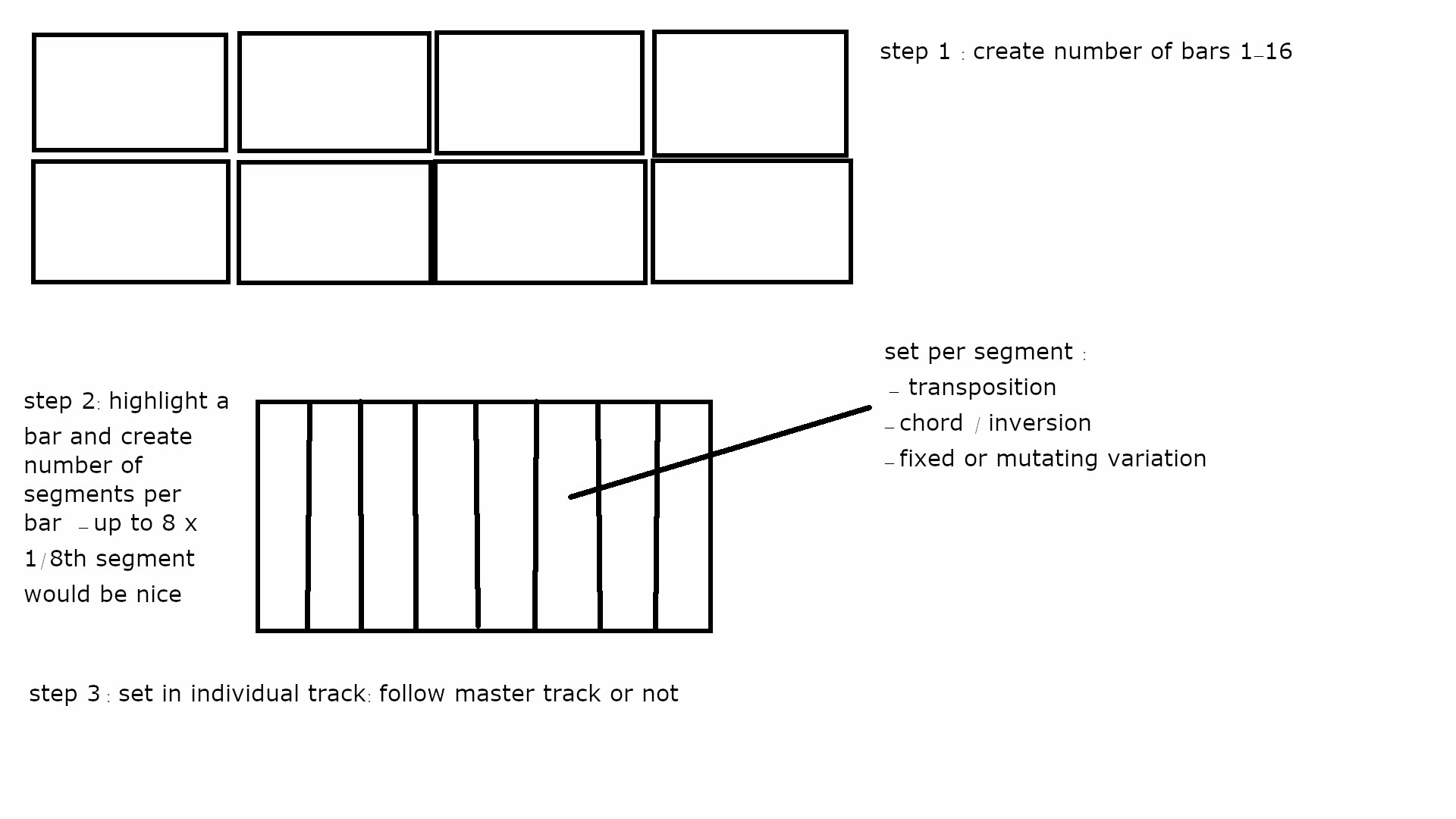
1 Like
nice update
still would love to see something like i suggested in the previous post;)
Is anyone using this M4L on Push 3? If so, what’s the experience like? I feel like I’ll end up with this either way, I’m a junkie for generative/algorithmic sequencing.
I love the NGEN, but please give us ANY steplength and not just 1,2,3,4 and then 8, 16, 32
What about a 15 step track? or 11? Come on, it’s 2025!
3 Likes
I like it:
5 Likes
Nice one. Picking one up next week. How has the ngen been for you over all?
I’ve been carrying it around with me and my MacBook Air for two months. Making ITB Great Again.
I’m really looking forward to 1.4, which promises adding key and scale changes to song mode.
Can anyone recommend a case for this that is a pretty snug fit? Thanks.
1 Like
I 3D-printed this cover and have used it to port the NGEN everywhere:
NGEN-cover.stl (226.4 KB)
How do you get the mircosd card out? It is not spring loaded making it a pain in the ass.
Pliers?
I finally got it out with some fine tip tweezers. They should warn about that in the manual.
1 Like
Yeah, I leanred my lesson by breaking a micro-SD card. Now, I flip the unit over so that the micro-SD card’s ridge is facing me, then I work it out by catching the ridge with my thumbnail. That’s reliable for me.
In the other direction, I’ve accidentally “inserted” the micro-SD card into the inside of the unit instead of the card reader slot a couple of times. You then have to disassemble to get the card out.
1 Like
great update ,)
4 Likes
I ended up trying the force usb flash drive boot option for the latest firmware (silly problem, I was using a USB-C cable without data) and there’s definitely easy access to the card if the case precludes easy removal.
1 Like
Any new users feedback or videos on the latest 1.4.2 firmware? Would like to get some before purchasing one.
Its a very tempting box for people who just want to do some random endless jam without taking it too seriously.
1 Like
1.4.6 is out
changelog:
4 Likes