I couldn’t believe it when I hooked mine up. I had the Virus Filter EG controlling the Peaks filter and a knob combining Peaks fabulous Reverb with a Bandpass delay from the Virus. It can basically do everything I want it’s like Christmas come early haha 
3 Likes
Sold already 

1 Like
can you apply discreet curves to each of the 8 cc’s per knob?
I believe it’s curve per slot as shown here in the picture attached from page 29 of the user manual.
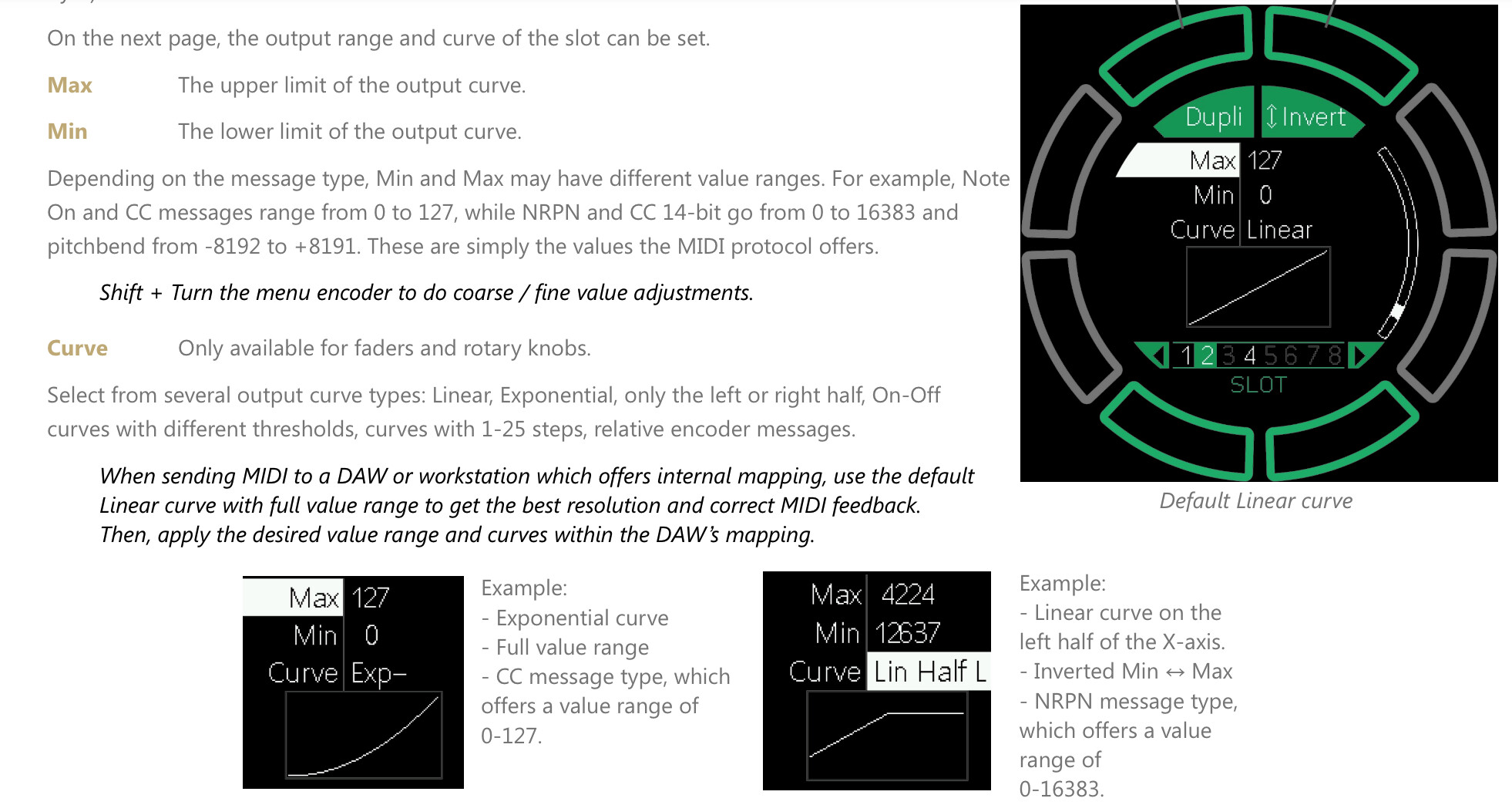
So each slot looks like it can be assigned a curve there’s 8 slots per knob/fader which can also be inverted. I’ll test this out later should be fun. 
2 Likes
Yes, as above it’s at the bottom of each midi setup section. You can set range and curve for each. So like an immediate reduction of half the range on one and a linear or exponential curve of the whole range on something else.
2 Likes
I’m using 1 knob to open and close the filters of 6 synths, setting ranges, curves etc as well as having separate knobs for controlling their individual filters and I’m only on layer A here lol
1 Like
Well I’ve run into problems here trying to use the drop with my oxi one. Anyone else here got the same setup that could advise? So…
I have the drop connected via usb to the oxi one mk2. I’ve connected all my synths 1-6 to the oxi split v2 all good and working perfect but the only way I can get the drop to work is if I connect my synths to it using the x4 trs midi outs, heads battered lol. So I’m thinking it’s a no deal using the oxi split with the drop? I’m sure I’m doing something wrong but is a simple fix. I had planned to just use the usb in oxi to get the data to drop but it’s a no no.
Hmm I better read some manuals tonight then 
I’m pretty sure you can have the drop send the oxi’s sequencer data out of its trs ports
1 Like
Yeah i hear you however I have all my synths already connected to the oxi split v2 so I’ve nowhere to send the midi from drop to all the synths. I had thought i could setup the oxi on the drop and get the midi all over usb lol
I’m sure there is a way. Message Thomas, he’s super friendly and helpful
1 Like
Does Oxi let you merge? I never used one.
Can you connect Oxi to drop with usb or separate TRS cables and midi merge the sequencer data?
Drop has 4 midi trs in/outs. Are there some synths where drop may be less required than others that you could just run straight from Oxi?
1 Like
Hi mate, you can merge stuff from within the drop however so far what i’ve tried is that in order to control stuff you have to have trs and usb connected to the drop itself and the oxi is connected to and powered by drop.
With the oxi split i could have my 6 synths connected and playing no problem at all however removing split and connecting synths via trs to drop i only have 16 midi channels in oxi 1a-16 whereas before you’d have like…
1a - 16
1b - 16
1c - 16
1d - 16
1e - 16
1f - 16
Was trying hours last night to figure a way but no deal ha. The oxi only has 1 midi out hence i use the split which is perfect but when connectinh synths to the drop lose all those midi channels. I’ll try again later after work I’m sure i must be doing something wrong but have tried all sorts mate.
Forgive me if I’m not following but you can have access to and can merge all 16 midi channels on each individual in/out on Drop.
I’m thinking if you went, say, Out C on the split, into TRS1 in on drop, then out of TRS1 to your synth?
You can send clock to Drop from Oxi along with one of TRS inputs if needed or the other way over USB.
2 Likes
Your a star mate…
1 - Drop midi out trs 1 to Virus Ti2 midi in
2 - Oxi split v2 midi out A to Drop midi in trs 1
repeat for all synths 
4 Likes
 . Happy tweaking!
1 Like
Thanks mate love it
New video going over some use cases for dawless setups.
Looking forward to one dedicated video for dealing with program changes and multi pattern sets with Elektron gear.
3 Likes
What’s the build quality of this like? How tight are the fader? Are they well suited for fast cuts?
It’s excellent. Built like a tank.
4 Likes
Hi everyone, I got the device and about to start integrating it into my setup with DTII, DNII, and Dreadbox Typhon. The primary reason I was looking for a controller was to be able to control levels across all devices conveniently, and the immediate thought I have is to assign all the knobs to levels on each track, and faders to group of tracks (e.g. kicks, bass, pads, HH, percussion, leads, textures). However, it kind of feels like a waste, especially considering snapshots functionality.
What I’m thinking in terms of assignment is:
- Knob Row 1: Tone (filter cutoff / base filter upper frequency value)
- Knob Row 2: Space (delay / reverb or both)
- Knob Row 3: Motion (LFO speed or depth)
- Knob row 4: Density (AMP decay)
- Buttons: Mutes (not sure as muting is quite convenient on DT/DN already, but what else can a button be used for?)
- Faders: Track level
I’m curious how everyone assigns the mapping. I’ve read the messages above but hungry for more info  Would appreciate if you could share how your mapping looks like. Thanks!