You mean to say that you could use your OT without looking at the screen? Well, I can’t do it. I need to see the parameter values, and the names of the samplebuffers/samples etc. Furthermore, I cannot see anything on the OT resembling a clear “workflow”… Guess these things are subjective.
2 Likes
Well yeah, half the buttons are on the screen 
Dunno if I’ll buy/keep one yet, but it is what it is - a touchscreen/physical hybrid UI… Obvs you’re gonna have to look at the screen
Agreed OT is amazing the way they crammed so much in to a small box with minimal menus/super fast workflow, AFTER you have the shortcuts in muscle memory. But I’d guess the Live is equally easy to navigate once you’ve learned what’s where. People in vids havent had that kind of time for something with so many different paths inside. TBH the UI seems the least of the worries atm 
Hoping they nail it tho. It’s pretty admirable to see Akai being so ambitious and ‘trying’ to get all those features in a portable box. I’m just increasingly doubtful that their dev team is up to the task of making it work like most of us imagined/hoped it would…
1 Like
1 Like
The users that have it are happy with it. What is missing from the promised features is the warp on drum programs. They are working on that. It’s not like half finished or something. People are crying in mpc forum for features that are not promised or for things that work different then they expected. Everyone have different needs and no matter how they solve a problem there always gonna be people that are unhappy. They will work on that for years, that’s for sure. But even now it have all you need to produce music.
In fact, there so no other standalone box in the moment with more features and they will add more in time(wifi, bluetooth …).
Imho the touch screen is a big improvement compared to previous versions. In older MPCs you use a soft buttons. Here you tap the button directly . They removed the cursor buttons witch is great. Why you should press multiple arrows to select a field to edit. Tapping on a field you want to edit is faster. And we are all use to tapping on screen these days.
And the screen is as big as half the OT. It’s not like seeing things clear on screen is making it worse right?
4 Likes
You are right.
But: There is a difference, using the screen for information purposes and doing endless touching on the screen to get … somewhere…
Maybe the larger akai is the better choice as it has a lot more knobs but again it is built around a touch screen.
In my definition a hardware device should not use analogies to computer use. And as I understand the akai they stripped away the mouse and keyboard and replaced it with something worse, the touchscreen.
But then again, it’s just not my cup of tea and I see that a lot of people will put it to good use.
I bought an external batteriy for my OT  I can play in a car too
Yeah it already doesn’t look too shabby Just the small details I’ve been reading about make it seem a little too rough around the edge for me atm. Like the lack of copy/paste in obvious/needed areas, the way you cant just add samples to your general sample folders without adding a ‘Program’, only being able to use the weakest timestrech algo in standalone (yet to really hear this in vids tho), just a bunch of little things that would add up to annoy me in day to day use. It’s all fixable tho, I’ll keep an eye on it for sure.
I have a battery now too so I can rock my rytm in the forest like everyone else.
But looking at these videos makes me feel like most of the cats who got their “early bird” units are just clueless on how MPCs of old are used, so they’re not only getting used to the new UI but to the og MPC OS paradigms etc as well. And all MPCs have menu diving, nothing new there. You either get used to it or you don’t (I have).
And OT doesn’t have them lovely fat pads - the most important element of any MPC are the pads, and these are supposedly awesome.
4 Likes
get an LPD 8 … sets you back 50 bucks and you can drum your fingers off 
and it’s from akai too
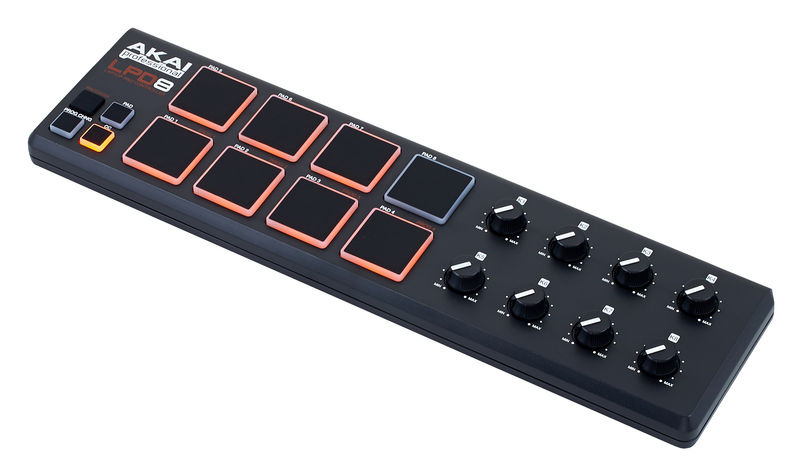
ok, yes
A USB Midi Host is required… I have an iconnect audio 4+… great for the road as I can manage several devices audio and midi… and it runs on the same battery
With all due respect, the pads on that LPD are not the same quality. plus no note repeat, no pad banks, no 16 levels…
I bet you never used MPC right?
What they stripped is soft buttons and cursor buttons for touch screen(MPC-X still have them). 
- Record sample in the record screen
- Edit sample(trim, normalize, pitch shift, time stretch…)
- Assign to program
- Assign program to track(if you didn’t already)
- Record playing…
The workflow is the same as the old ones. Maybe MPC2500 is PC with stripped mouse and keyboard too(if it had color screen)?
I don’t see the whole iPad/PC connection here. It have color screen? Cool!
4 Likes
There’s always the X if you want the full experience and all the buttons.
1 Like
as I wrote above
OT just doesn’t do the things I’d want to do on the MPC. No other current standalone unit really does. Polyphonic + linear + timestrech + multisampling… So I can’t really compare their UI’s for which I prefer, it’s kind of moot. I have an OT but I need/want something like the Live, if it has to be touchscreen ill have to deal with it as no non-touchscreen alternative exists atm…
I don’t love touchscreen either but it doesn’t look that bad for the things it’s used for on MPC. Knobs and pads are physical, that’s the main thing…
2 Likes
MPC x have the SOFT buttons the CURSOR buttons so you can navigate without tapping on the screen. But again, pressing LEFT, LEFT, UP, UP… is slower then tap the field you want to edit. But maybe it’s just me.
You keep comparing it to OT but OT have wayyyyy less options to tweak. It’s impossible to have button/knob for every menu 
Take a look at the X.
Yea its just not your cuppa, it’s not inherently worse than a mouse/keyboard, just different.
on a different note: The mpc seems to me to be pretty useless (or limited) for jamming unless you’re into finger drumming. (I personally can’t stand it).
neu mpc reminds me of my bro’s home studio I used to use in the 90’s that consisted of Cubase on Atari, akai s3000 and a bunch of synths n fx. really good, straight up production setup for recording and producing music, but pretty inflexible for live use / jamming.
with elektrons you can jam away and create something new on the spot n be expressive remixing live, mpc it’s more finger drum and juggle the structure slightly, but not much more you can do live.
it’s a pity they didn’t develop some kinda p-locks. it’s the 1 thing that puts me off, that lack of live manipulation.
the 3 new upcoming synths by malekko gots p-locks n probability. good to see it’s catching on
sometimes less is more as it is faster - imho…
and the X is just too expensive, it might be worth it, but that is too much money… imho…
You can use an MPC like a MIDI looper pedal, as long as you can overdub/punch with a footswitch. I’d say that’s useful for jamming live.
2 Likes
I cancelled my very early pre-order about a week ago.
AKAI demos look pretty promising, but I’m still on the fence regarding whether my existing laptop/maschine/op-1/push II/elektron/iPad options really need another family member vying for my attention when i’m travelling and want to take someone with me.
For months now, op-1 always makes the travel grade for sheer size as a laptop midi controller and standalone. iPad and laptop are always coming anyway.
I don’t yet have an urge to take an mpc into the forest, on the train or to a coffee shop.
That the Live apparently has a rock solid complex linear midi sequencer and can be a single input multitrack recorder are the most interesting features, such a shame it doesn’t appear to have an expander option to take in multiple recording tracks at once though, nor a mic pre-amp.
I agree on that. Everyone have different needs. If you want to trigger a few samples then there are other options.
Not sure if anyone else has had this problem but just got my MPC Live today and when I load a SD card into it it just constantly mounts and unmounts the card. Also have had audio problems. Might have gotten a bad unit but it seems pretty buggy all around to me. Might be returning it.