I’m trying to connect my RYTM & DT to my MPC 1000 then into my interface and record those three devices as a song into Logic with everything synced.
I don’t want to control RYTM with the MPC, I just want them all to be synced together as if I was in a DAW and each of those devices were tracks in that DAW. You know what I mean?
Or do I need to connect DN to RYTM then to MPC or each into Mpc?
So yeah that’s my current dilemma.
Greatly appreciate any help in getting me to understand where to start and why, into connecting this gear.
(why meaning, why am I connecting a midi thru and not out or channel 1 to so on, etc)
Forgot to mention my audio interface is an AVID Fast Track Duo with 2 inputs and 2 outs on the back and 2 combo XLR inputs in the front.
No midi connections.
If you could add a short description why I’m connecting this to that it would help me tremendously.
Just trying to get to where the basics click I guess.
Hi, you have bought some pretty complex and deep boxes, so take your time.
first of all: (simply put)
MIDI only sends note and sync info
connecting audio is a DIFFERENT TASK
midi in and out are clear?!
a midi thru just copies all the signals from the midi input and routes it forward
(for example you could send midi from any midi keyboard to the rytm. if you want to play the digitone from that keyboard too, you simply connect the rytm midi tru to the digitone midi in, and set up a specific midi channel - the channels are like different lanes on a highway, so to speak channel 1 on keyboard could control rytm, channel 2 could control digitone)
in the setup menu of rytm and digitakt you would have to tell the rytm to respond to midi channel 1 and in the digitone menu you should set midi channel 2 for example
for sync, you could daisy chain your three boxes and go:
from rytm midi out to digitone in
and than from digitone midi tru to mpc midi in
as midi works on a (one) master and (several) slaves basis, the first device would be your master tempo and the others would follow
i would suggest, you make a little drawing, where you have your 3 boxes and your pc and draw lines / make notes what you want (you have to split it up abit)
on the audio side it would also be possible to daisy chain with your hardware boxes, or you take all 3 audio signals to a sound card with 3 stereo inputs, dont know what you have…
also maybe it would be good to just reduce it to rytm and dn at first, get that to work and later add the other things… pretty messy post, sorry
I updated the post with my audio interface towards the bottom.
Really great advice/ help. I will be going over your response in closer attention soon but wanted to give a quick thanks before I do.
Not having any midi on your interface is real tricky… I would invest in one. The general idea when recording your midi devices to your DAW is to sync everything up. So you press space bar to play on your DAW, and all the midi information is being sent to your boxes, which send audio back in to the DAW.
Thats the gist of it, which is as far as I’ve gotten so far. Having different midi tracks open, sending to different channels and all that stuff is the next step.
I would highly recommend recording each box separately, too, since you only have two inputs. Unless you’re super happy with your mix and processing of the boxes the way they are, then go ahead and route one box into another, into the next. Or if any of those have multiple stereo inputs, route two boxes into that one.
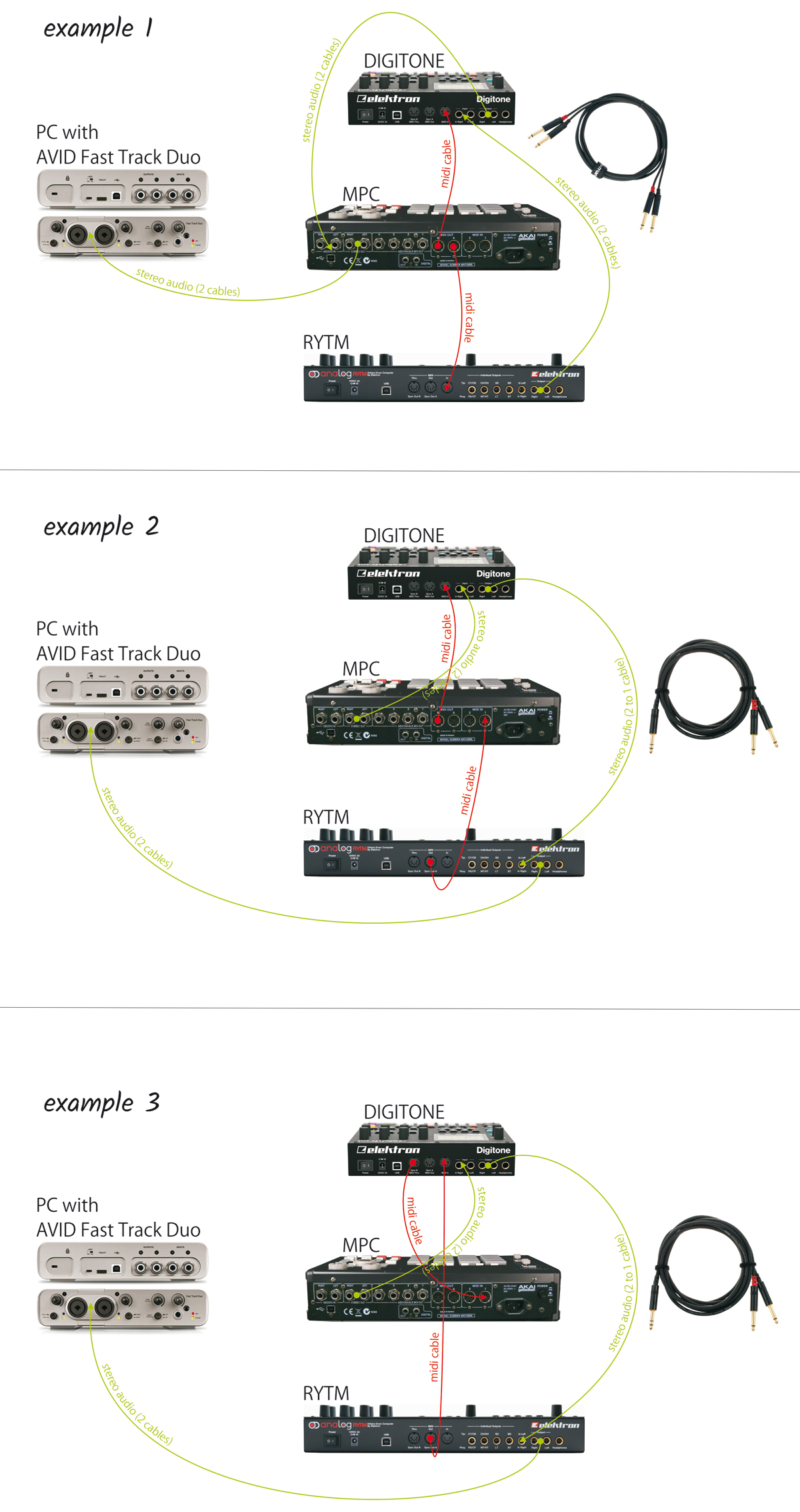
in example 1
rytm audio will go in to dn and from there to input of the mpc- from mpc to avid interface
midi goes from the mpc to the dn and to the rytm - mpc would be midi master
in example 2
audio from mpc goes into dn and from there together with dn audio into rytm input
(this way you could use the rytm master compressor for the whole signal)
from rytm to avid interface
rytm would be midi master and feed the mpc with clock signal, than mpc will forward midi to dn
example 3
not sure if that midi tru-routing (from example 2) is possilble in mpc - alternatively midi could go from rytm out to dn in and from dn midi tru to mpc midi in
for now, if you go with example 3, for instance, your pc would only be like a simple tape recorder with one track, not synced to the gear at all.
but when overbridge becomes available at a later date, you could easily multitrack at least the mpc, dn and rytm on 3 seperate tracks, synced to your daw (even more tracks would be possible) so i would suggest figure out the hardware setup first and try the sync with daw stuff down the route…
@nionmu props for going out of your way to make that diagram & explanation!
Later today I’ll be going over it and trying the examples. I’ll get back to you if everything goes ok. thanks again.
@GirTheRobot if I can’t get the setups running that nionmu mentioned I’ll try just recording them separately as you mentioned. Thanks for the advice dude.
You should 100% look into a midi interface, or a way to sync logic and your hardware. Otherwise it will be super annoying to track the stuff you are doing in the hardware.