I’ve got a serious problem regarding my MNM.
After several minutes from switching on, the edit menu, start and stop buttons do not respond to commands, which is quite annoying since i cannot switch edit pages and/or stop the machine.
It could be that the flat cable between the UI board and the main motherboard is a bit loose.
It’s easy to fix. Of course the following should be done with the PSU unplugged.
Use a pair of guitar picks to gently remove the knob caps
Remove the screws of the faceplate
Remove the screws of the UI board
Now gently take the UI board, remove the flat cables and put them back.
You may fix the UI board with 2 screws rhen plug the PSU to ensure it works correctly.
While you’ŕe doing all of those above steps, it may be a good idea to clean the copper part of the cable ends and even the receiving terminals (if it looks tarnished) using high percentage isopropyl alcohol, then let it dry and reassemble. This is reportedly what elektron support does.
Thank you guys for taking care of my issue, truly appreciated that!
I’ve already tried all the suggestions you wrote above,unfortunately nothing as changed, same as before.
I’ve now got in touch with Elektron support and opened a ticket, hopefully they may repair it.
Let’s wait them
Ok guys, as i was thinking Elektron does not provide reparations on monomachine mk1 and machinedrum mk1.
Sadly i live in a small city and there aren’t much technicians to solve my problem, I’ve already tried to explain to them what’s the problem but no luck at all.
One solution could be to send the unit in Germany but they ask around 600 euros to repair it, which is over my budget atm.
I was wondering is some nerdy guy may build a Max for live device only to switch edit pages via pc. There are tons of max for live for monomachine but only for tweak parameters, change patterns and so on, but i didn’t find what I’m looking for.
The idea is to have a max for live only to change edit pages (like a would see the red and green lights moving while i click via mouse the button on max for live) and then tweak parameters physically on the machine.
Play and stop isn’t a problem since Ableton do it by its own.
We no longer repair Machinedrum MKI and Monomachine MKI/Keys devices in our workshop. Unfortunately, diagnosing the issue without inspecting the device is difficult. We recommend contacting a local repair technician who can help identify and resolve the problem.
i managaed to find a local electronics repair person when my md mk1 went down - he had no clue about the nature of the machine but could repair a tv or stereo or whatever so he took it apart reflowed the solder and put it back togethr again and its been fine since although now and agina i have to reseat the pin connectors as suggested above
When I used to have one I got some weird issues when my power supply started to go bad. Not sure if it will be tje issue you have, but I would suggest to at least check if the power supply is fully functional before you go through a lot of trouble trying to check for other faults with your machine.
Thanks guys, i appreciate a lot, I’ll keep you updated <3
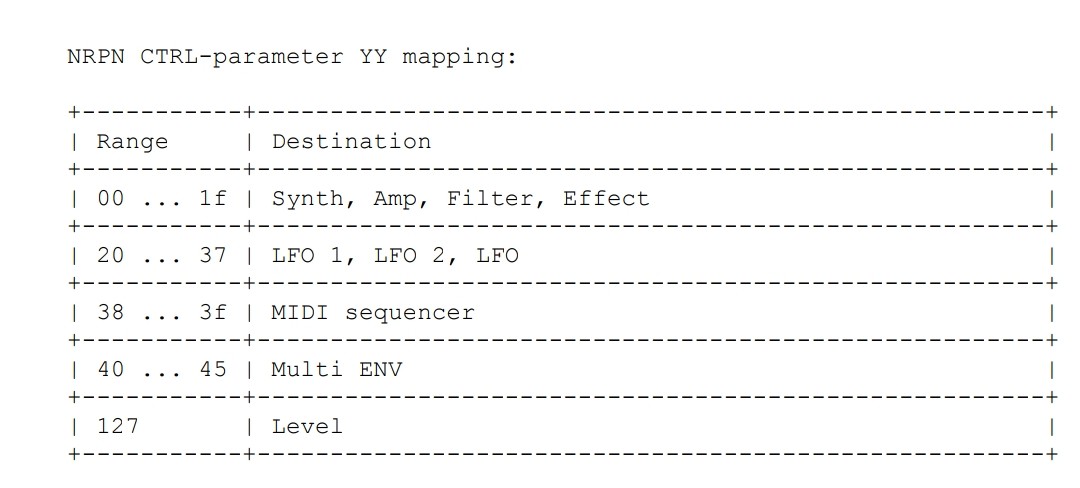
Today i was scrolling thru the midi chart looking for some midi cc to control the edit page, i found something but didn’t work.
Later on I’ve found also some “electronic language” but i haven’t figured out how they work.
Can anyone explain a bit more please?
those are midi NRPN (non-registered parameter numbers). they allow for you to send messages to the machine outside of the 128 parameter range. those MAY work for changing pages, judging from the screenshot. Google “midi NRPN” and watch some of the tutorials on using it. you shouldn’t need Max or anything too deep for that. Ableton may work (I’m not sure).
I’d also like to say: don’t pay someone $600 to repair this and don’t ever hire a tech who blindly quotes you on repairs, without knowing what’s wrong with the machine. a “bench fee” to assess what’s wrong with it is standard (usually one hour’s worth of labor; which should be much less than $600) but a flat fee to repair it, sight-unseen…? walk away.
I hope you find a way to get this fixed. I can imagine how frustrating it would be.
Appendix B of the MM’s manual gives some information on what can be controlled using MIDI Note messages (triggers), Control Change (CC) messages (sound parameters), NRPN messages (which are just fancy CC messages), and some others.
Appendix C describes MIDI System Exclusive (SysEx) messages that the MM can send or respond to that perform various functions like transferring data to and from a computer.
Very few of these will be helpful for your desired purpose.
However, it is known that the Machinedrum has some officially undocumented capability for remote control by SysEx message:
It could be (I haven’t tested it) that the Monomachine has similar undocumented capability to use SysEx messages to move around its user interface.
Lots of inputs and precious feedbacks guys, it’s already too much “math and programming” to me, i just can control midi cc and nothing else, that’s my max point i can reach
If someone is able to build a patch to control exactly what i need would be a godsend!
Anyway i hope to find some solution in order to get back to the grey beast
Talking with other people suggested me to try downgrading the machine with older firmwares, otherwise i can go back to 1.32b.
Back in the days stupidly i upgraded it to the current 1.32b without saving an original copy.
No big issues on the machine, but sometime after long use suddenly all sounds are gone, i ve to restart the machine and everything goes back to normal (which lead me thinking that this kind of behavior comes from unstable firmware).
Now my thoughts are that perhaps the 1.32b is not 100% adapted to my model, and switching to older ones could fit it.
I don’t know, i want try guys