I’m struggling to find a way to persist ableton midi sequences into my digitakt.
To give you some context, i have worked on a live in ableton, respecting the constraints of digitakt 64 step sequencer. My idea was to then play from ableton through the DT then press the record button in order to persist the midi into the DT (without having to write all the MIDI manually through the DT).
My issue is that even if it sometimes works when i press the DT record button at the exact same time i start sequence in ableton, but most time there is a desync making the midi start a few steps before the first one.
Hence, I’m wondering if it is a way to do one of thewe two things:
trigger DT record from ableton when i start sequence (I dont think it exists)
launch ableton sequence from DT when i press record+play.
If you sync the Digitakt via midi clock you can press play in Live and it will also start the Digitakt.
Go to Ableton´s preferences, under the Midi Sync tab go to the Digitakt output and activate Track (so it Live can output notes, you already have this active I guess) and Sync (so that clock and start, stop messages are output to the Digitakt).
Also possible, you have to activate Sync under midi input for the DT. Then when you press start on the DT, Ableton Live will also start.
If midi clock sync is not working well enough for you, you can also use Overbridge to sync the Digitakt to Live. The procedure is explained step by step in the Overbridge manual.
Schnork, Thank you infinitely for time and your quick reply.
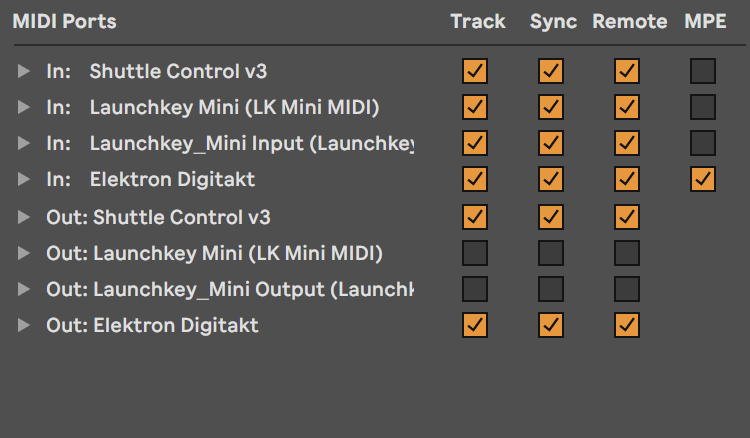
Considering the first option, it’s already what i have: when i press play in ableton, the DT plays, but that doesn’t solve the issue I have which is about recording when I press play, not only playing. Here is my current MIDI config in ableton:
Not working in overbridge mode either, i must be missing something because when i tweek the config in digitakt and i press play i see ableton reicives a midi information but nothing else.
Back to the starting point.
Thank you for taking the time to reply. I ended up finding the same workflow a couple of minutes before reading your message. For the record, this is what happens:
i start sequence in ableton, triggering the DT loop which respects the signature of a ableton loop (eg, 64bars each).
then, at any point, as its a loop, i’ll press record on DT and midi will start to write down.
after a full loop, never mind the starting point, the midi will be on DT and I just have to play DT to check if the result is the expected one.
Curious if anyone has an update to this process? Is this still the only way to transfer MIDI from Ableton to Digitakt? i.e. Play Sync and then enable record the next pass through?
It seems pretty straightforward…
I’ve not seen a better way … or different way ( eg export midi clip , drag it onto digitakt via transfer , import onto pattern )
I recommend utilizing pattern chaining to automate the process, rather than having to record each segment in starts and stops. I note the amount of bars in the project and set up the same combined length on the Elektron across my preferred amount of pages & patterns. Elektron syncs to DAW, pattern chain is set up, then REC+PLAY on Elektron. In my experience near flawless transposition every time.
The problem I was running into is that when I press REC+PLAY it starts the seq vs the DAW starting the seq. And when I hold REC and press play on the daw it doesn’t enable record… I might be missing a step here?
Yes that’s why I sync the DAW from the device. I.e. pressing REC+PLAY on the Elektron will enable recording on the Elektron and simultaneously trigger the playhead of the MIDI sequence in the DAW. It’s not possible to remotely trigger recording on the Elektron from anywhere other than the device itself.
Like I said, in my experience it meets my expectations without any shortcomings. Even in situations with multiple MIDI tracks being transposed at once. I don’t have scenarios with major latency, but if I did, I would likely quantize the recorded sequence after recording in each pattern. And on that note, I think it is also important to gauge the sequencer resolution depending on how intense the MIDI pattern you are transposing is. Digitone II is really tight with microtiming recording, but if the source is something fast with a really high note count that exceeds the steps in the Elektron that needs to be accounted by increasing the resolution, i.e. upping the scale settings from default 1x to 2x (and then remembering to adjust the M.LEN for the pattern appropriately as well.
In other words, if my device has a working 128 steps from 8 pages x 16 steps but my source has say 256 steps in the same amount of effective time and I am missing notes in recording, there are situations where I would opt to run at 2x scale across 2 patterns to ensure each note is captured to its own trig. The same 8 pages at 1x scale are effectively 4 pages at 2x scale but double the space for additional note capture.
Stumbled on this thread while looking for comprehensive directions on how to go about this - can you share all of your settings for a digitakt/digitone (I have a Digitakt 2), the Ableton session, and the midi track you’re feeding into the Elektron device? I’ve been troubleshooting but I can’t figure out how to get this to work. Thanks!