That’s great to hear, hopefully you can figure it out. From what I understand, the .adg file format is just a wrapper on a plain .xml so you hopefully should be able to get some straightforward assistance from your coding agent of choice.
Here are some existing open source tools that’s can read/write the format that could be worth poking around in:
We do know that an elektron staffer publicly commented in a sweetwater video that loop points are coming so… Eventually they will have an editing solution for this.
There are a lot of UI quirks & rough edges indicative of vibe coding but everything seems to work very well on my first set of tests. the helix engine is really great like many others have already said. For the price, I hope you plan on cleaning up the UI and addressing some of the inconsistent behaviors. Expert mode is functional but it leaves kind of a weird first impression. I don’t even really see a point in the “easy” vs “expert” modes at all. You pretty much need to set the release tail slider to dial in good results.
Here are some basic features I think would make this a more complete system:
An option to choose exactly what notes are recorded rather than it being completely automatic
Stereo controls on the export window: Stereo / Left Channel / Right Channel / Flatten to Mono
ask the user “are you sure?” when clicking “new upload/autosample” after they’ve started a new multisample so they don’t accidentally lose progress
Stereo L/R control sliders for plugin Dual Layering
more plugin layering channels, ideally at least 3
for the price, a written manual on how everything works feels like a necessity
Issues / other feedback:
There is some kind of subtle distortion happening on playback of multiple notes at max velocity. I made sure all of the recordings are clean. They all sound fine individually but when i strike a chord during Live Play, I get weird distortion. For checking hardware samples, clean and undistorted audio playback is crucial for error checking.
The tool doesn’t proceed if you have dual layer on and no second plugin selected. It should still run in single layer mode in this scenario
There is no clear indication of how the export will be affected when disabling a sample with the “export” toggle. With this, a samples waveform preview should be collapsed when export is toggled off.
Like the loop detection system, the trimming system should be non destructive. Right now it seems like the tool commits trimming changes and there is no way to visually see what you’re doing to edit the waveforms.
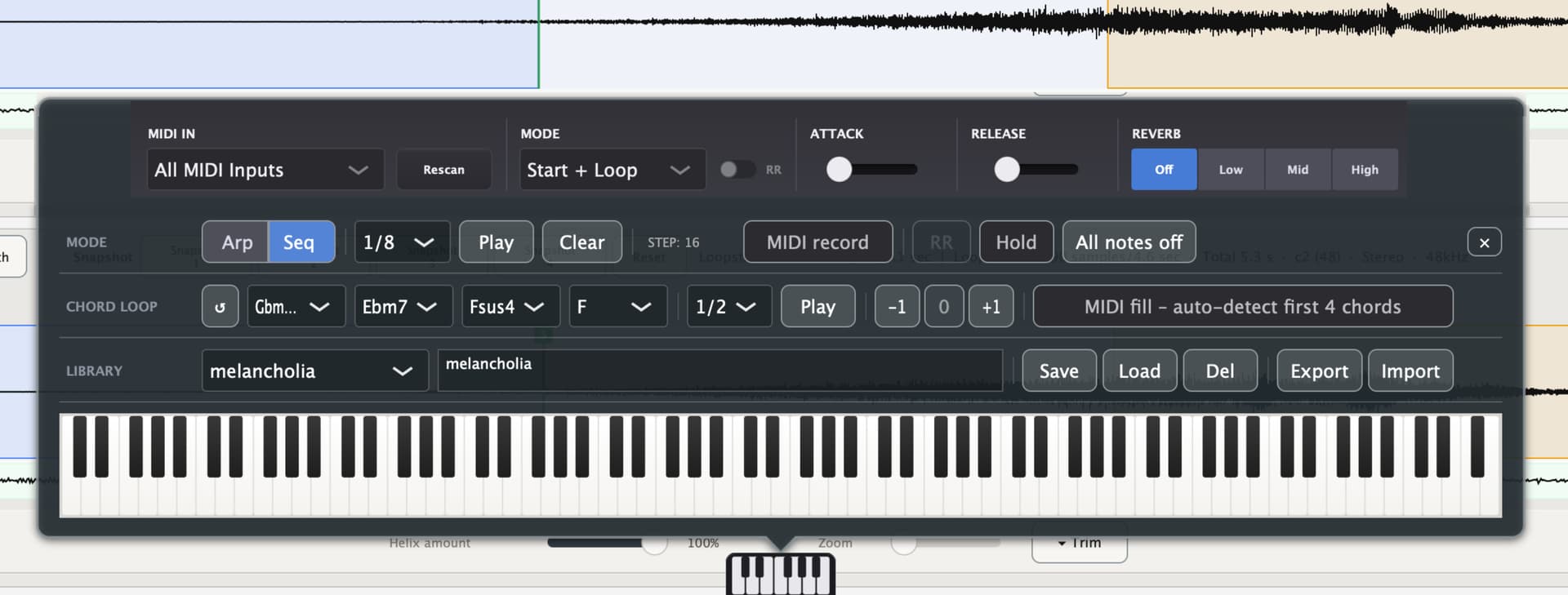
The little MIDI piano at the bottom of the sample viewer screen should show what note is currently being pressed. With this, it seems a little clunky to have this and the Live Play sub menu. They should really be one menu?
The arp system doesn’t seem to work, or at least I can’t figure it out. What value do these and the chord playback buttons really offer also?
Thank you for taking the time to provide such detailed feedback.
The Easy/Expert distinction is intentional. Easy mode is designed to provide a streamlined workflow where sampling can begin almost immediately with minimal setup, while Expert mode exposes the additional controls for users who need them. This separation keeps the default workflow simple without sacrificing flexibility.
That said, the release setting may be worth adding to Easy mode as well, since it can have a noticeable impact on the result on one shots Multisamples. In many sample players, release is less critical for looped material because of loop-on-release behavior, as also seen in instruments like Tonverk, but having basic access to it in Easy mode could still be useful.
Regarding manual note selection: the current automatic note distribution is an intentional design choice and follows the workflow used by virtually every modern autosampling application.
It has become the industry standard because it keeps the process fast, simple, and predictable. Allowing users to manually select every individual note would add considerable complexity to both the workflow and the interface for very little practical benefit in most use cases.
Dedicated left/right export options are a fairly niche requirement. For most workflows, exporting in stereo is sufficient, and channel extraction or mono conversion can easily be done afterwards in any audio editor.
Adding dedicated controls for this would increase UI complexity for a relatively uncommon use case.
A confirmation dialog was included in an earlier version. Based on beta-test user feedback, it was removed because many users found the additional prompt unnecessarily interrupted the workflow.
Separate L/R controls for plugin dual layering are a reasonable suggestion and are already planned for a future update.
More than two internal plugin layers quickly become impractical in terms of both routing and UI complexity.
For more advanced layering setups, using a DAW together with the BlackHole driver provides a far more flexible and scalable solution, without imposing additional complexity on users who only need one or two layers.
A comprehensive written manual is a fair suggestion and something that is planned to improve over time.
The distortion during Live Play with multiple notes isn’t something that has been observed so far, but it will be investigated. If there’s an issue, it should of course be addressed.
This behavior (second layer) is intentional. If Dual Layer is enabled, the expectation is that two plugins are being used. Running in single-layer mode despite Dual Layer being active could easily hide a configuration mistake. If only one plugin is required, simply disable the second layer.
Disabling a sample via the export toggle already excludes it from preview playback and from the final export.
Automatically collapsing disabled samples is a good usability suggestion.
It’s not entirely clear what is meant by “non-destructive” in this context. Trimming is intended as an editing step before export. More detail about the expected workflow would be helpful.
The current layout is intentional. Live Play, Loop editing and Export each have their own dedicated workspace to keep the interface in expert mode manageable. Combining all of these controls into a single view would make an already feature-rich interface considerably more cluttered.
The arpeggiator currently only responds to the built-in on-screen keyboard and does not yet support external MIDI keyboards with the arp function. Support for external MIDI input is planned for a future update.
I see what you’re saying but all of these “Expert” features could just as easily be collapsing menus whose headers say things like “Variations (Advanced)” and so on. Pressing the expert button only adds ~7 controls to the recording configuration menu. All of which are very straightforward in functionality. Rather than complicating things with even more buttons (the Easy/Expert toggle buttons) in an entirely different part of the UI, you could just work on making the UI more user friendly overall. With this, losing access to useful export controls for things like the OP-XY and Tonverk is another reason Easy is essentially useless. A feature rich program doesn’t inherently have to be hard to use and creating multiple workflows like this just adds complexity rather than decreasing it.
Fair enough. Really all you need to add is the option to shift click notes to force them to be recorded, not much UI needed. This is a useful feature and there’s a reason Sample Robot allows you to do it. There are plenty of good reasons to sample specific notes namely drum machines & asymetrical synths like Synplant.
I disagree, there are plenty of good reasons you’d want to control stereo on export, another thing Sample Robot does easily. The OP-XY only has 8GB of memory. Let’s say I’m sampling 2GB worth of drum machine VSTs, 95% of which the samples are nearly mono. Flattening them all to mono on export would save 1GB of storage, 1/8th of the OP-XY’s storage. With this, lots of older SF2 players some users may be targeting have even tighter space constraints. I don’t think this is as niche as you think it is.
You easily can make this a pop up dialogue box with a “don’t show me this again” flag, like you have for the startup tutorial guide. This is how most software tools handle potentially annoying fail safes. The idea that user could lose hours of recordings & work in a single keystroke is really bad design. At the very least, you should make it so that clicking these buttons add to the undo history.
It only seem to happen when playing several notes at 127 velocity, so perhaps the internal output volume needs to be turned down just 1 or 2 dB. I can send a video if that would help.
Sure but the tool should at least throw a warning message to the user somewhere they they need to add a plugin to the second layer. I got confused for several minutes trying to figure out why the export button wasn’t working until I realized i left the dual layer mode on.
Okay but how does the tool decide which keys fill in for the disabled note? There isn’t any clear way to see which samples exactly are corresponding to which keys. you could add zone mapping highlights to the pop up keyboard.
when I make changes to the loop using the Helix engine, the changes are non destructive. Meaning I can make changes to my loop ranges or click on another loop type and the changes Helix made are automatically undone and I can start fresh. Trimming the start/end points should be just as dynamic so the user can change them later on and also see how their edits are affecting the waveform in real time. This is what I mean by “non-destructive” editing. Right now you just have to repeatedly do trial and error when editing a waveform using these sliders, and it’s even more tedious in batch mode. And there’s no way to go back if you realize you trimmed too much and are past your 5 steps of undo history. With this, being able to see how Fade affects the waveform in real time would be a useful byproduct of this change.
sure it’s intentional but it’s pretty confusing. I’m not advocating for combining all 3 menus, I’m saying you should combine Live Play and the keyboard pop up menu into one given they are for the same purposes:
With this, I just don’t see the point in all of these arp and chord player controls. Maybe a few buttons to play 2 or 3 predetermined sequences would be good but an entire suite of playback controls seems very bloated. These are thing’s you’d find in a creative MIDI plugin tool, not a multisampler.
I understand your point of view. At the same time, since the launch of LoopSeek I’ve received a lot of feedback from users who specifically mention the clear separation between Easy and Expert, and the overall simplicity, as one of LoopSeek’s biggest strengths.
The Expert Autosampler will also receive additional features in the autumn update. If all of those options were moved into collapsible “Advanced” sections, it would quickly turn into an interface full of expanding and collapsing panels, which is exactly what I’m trying to avoid.
Personally, I use Easy mode very frequently myself. I only switch to Expert when I need features like velocity layers or other advanced options. Even in the Sample Editor, you can switch between Easy and Expert at any time if you find that you need the additional controls.
Regarding note selection via Shift + click on the autosampler keyboard, the option to export in mono, and zone highlighting in the Live Play keyboard, I’ll give those some more thought. They are all valid suggestions, and I may be able to implement some of them in a future update.
As for non-destructive trimming, that would likely require much deeper changes to the underlying editing system. It’s not quite as trivial to implement as it might seem at first glance.
Regarding the Live Play keyboard features: yes, for an autosampler they may be a bit over the top. On the other hand, just because those features are available doesn’t mean anyone is required to use them. They are simply additional tools for users who find them useful.
Hi, thanks for this tool. I bought a paid licence and it works really well.
The only thing I’m struggling with, which is not specific to your application, is finding loop points for instruments with vibrato (or PWM by LFO, for example) - loops don’t sound good when the cycles don’t match.
I wonder if there any suggestions for success with these type of sounds?
My idea for this application is to implement something like a button or keyboard shortcut which, for example in Flux loop mode, when you press TAB it moves loop end point to the next zero-crossing in the wav.
That way you could press a few times and find the one where the cycles match. At the moment it’s a matter of trial and error which is very slow when you have a lot of samples.
I’d just say if it’s vibrato or something simple like that , remove it and do it on device instead of baked into the sample
Similar with long attacks for pads , it can be done simply on device .
As for pwm… try each loop algorithm ? Though I’m sure you’ve tried .
I ran into this same issue, it’s part of the reason I didn’t end up purchasing a license. While the looping algorithms offered are really good, they don’t really cover this edge case where you need low frequency movements to be automatically identified.
Anything involving modulation, such as vibrato or PWM, will likely require a fair amount of manual adjustment, since it’s very difficult—if not impossible—to automate accurately for every note due to differences in waveform periods and other factors.
As has already been suggested here, I also wouldn’t bake this into the samples. At least in the case of vibrato, it’s something that can easily be implemented in the sampler instead.
Thanks for the response. In the case of the vibrato, it’s just a really great Juno organ sample from Samples From Mars that I can’t easily recreate. But there are lots of examples of samples which have some timbral movement that are hard to loop perfectly.
Did you think the idea of tapping through zero crossing points was a bad idea? It seems like it would be quicker than randomly picking loop points until one finds a good one
I think it’s actually much more difficult than it seems at first. Zero crossings by themselves don’t really solve the problem—they only help avoid clicks caused by amplitude discontinuities. The Flex algorithm already searches around zero crossings anyway, so that’s already taken into account.
The real challenge is finding loop points where the waveform, phase, harmonic content, and overall timbre all line up well. Even if two points are both at a zero crossing, they can still produce an obvious loop if the spectrum or phase has changed, which is especially common with vibrato, chorus, or analog drift.
Another complication is that you’re usually not looping just one sample. A multisampled instrument might have samples at C1, F#1, C2, F#2, and so on. Since each note has a different fundamental frequency and waveform period, the “best” loop position is naturally different for every sample. There isn’t a single rule or fixed offset that works across all of them, so every sample effectively has to be evaluated on its own.
I’ll definitely take another look at it to see if there’s room for further optimization. That said, the easiest case is always a sample without any modulation or time-varying movement. Once you’re working with an existing multisample—like your Juno organ example with built-in vibrato—it becomes a much harder problem, because that movement is already baked into the recording.
Truth, eloquently put! This is why it’s so much easier to make multi-samples from mono rather than stereo sound sources, because all the difficulties of locating perfect loop points introduced by the likes of zero crossings and vibrato are doubled in stereo. Sometimes, the perfect loop point is so far into the sample that you’re better off re-recording and trying for another roll of the die.
Anyway, I’m really keen to try Loopseek, looks brilliant. Will give it a shot today.