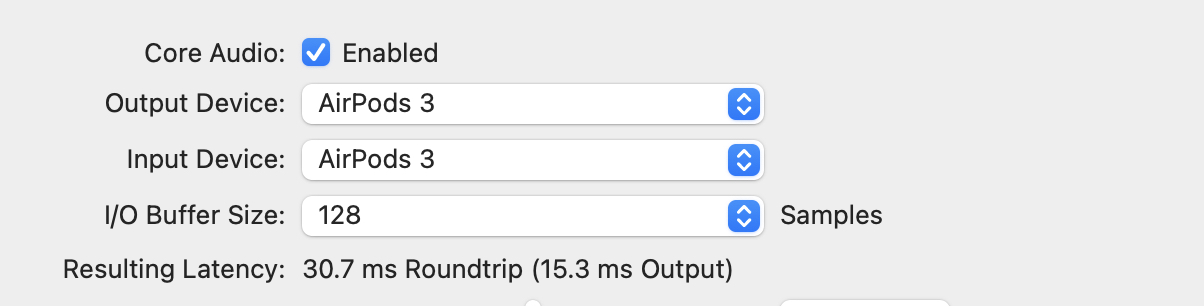
Here’s a great tip for massively reducing latency when using AirPods with Logic. You just have to set the AirPods both as audio output, and also as input.
The input part is the key. This seems to force the AirPods to use the HFP (Hands-Free Profile), which is worse quality (a 24kHz codec) but has much less latency.
For me, it’s good enough that I can mostly track a piano in time with the song. Obviously wired headphones are better, but if you’re traveling, AirPods are hard to beat, plus they have that sweet noise-canceling.
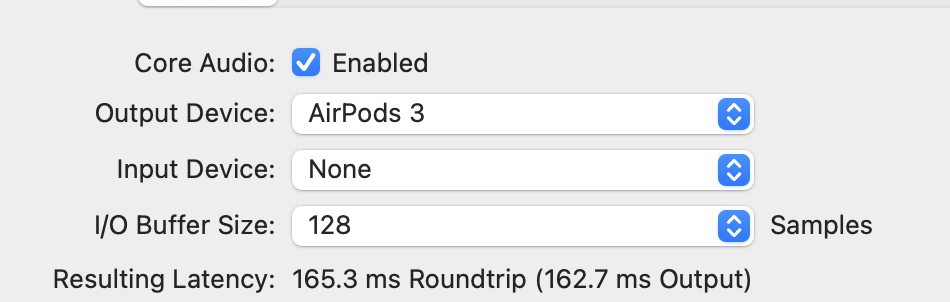
Here are the numbers:
Before—162.7 ms delay on the output.
After, just 15.3 milliseconds!
Make sure you also set the Mac’s system output to anything other than AirPods, as sharing them with Logic seems to ruin this trick.
Gonna try this with the iPad version too.