I don’t think they are compatible with nts kaoss pad, I have several of the sinevibes effects and the nts1as well and was told that somewhere - haven’t tried myself though so would be happy to be wrong!
1 Like
Thanks for sharing! Ordered one for use with my decks at home, hopefully it’ll do the job 
1 Like
I think some have been remade/ported, which is why this idea popped into my head in the first place, but I also can’t get on board with the build quality of the NTS-3 as a Kaoss Pad.
I wish Korg would make a proper one.
4 Likes
Ah fair enough! Yeah, I actually really like the sound of the nts1 but the output has become very picky about when it wants to work now so pretty frustrating!
2 Likes
It was a great concept, but I think they would have been better served by putting it in a Volca-sized box, or something along those lines, rather than what seems like a disposable product. The DSP available for it costs a lot more than the hardware itself! 
3 Likes
Can this detect tempo from incoming audio? It sounds like some of the other Kaoss Pads could do this (though how successful it was I don’t know!).
I got mine today and it’s all good fun and sounds decent.
I might be mistaken, but I’ve not found a way to set a totally wet signal out, for use as a send FX. Anyone found a way to do this?
The only 3rd party patches I’ve found are here on gum road: Vocoder for NTS-3
There is also the Loopop phase looper on gum road too.
1 Like
Mine also arrived today but not got to constructing it yet! My assumption was the dry/wet parameter of each effect would allow this - at least I hope it will! See the manual for the parameter listings.
3rd party patches
There are a few examples from Korg employees here KORG Examples | logue SDK
2 Likes
So this sort of works but seems a bit annoying its implementation. To set it up for a given effect:
- Go to edit mode for FX slot in question: Edit + FX1/2/3/4
- Scroll the knob as far to the right as it will go, to Dry/Wet
- Press the knob in
- It enters setting the “Assign” for this parameter. Press on the left edge of the pad to set it to “None”, which means Dry/Wet will have a fixed value independent of the pad.
- Turn the knob 1 notch right, to “Value”, and press the right edge of the pad to set this to 1024 = Dry/Wet is always fully wet
- Press Perform to go back to the “home screen” (you can also save this as a preset from the Edit screen)
Now when you touch the pad, you’ll hear the fully wet signal only. The annoying thing is, if you don’t touch the pad, you hear the dry signal rather than silence.
If you “hold” the effect on, by touching the pad then pressing Perform while it is held, it will lock the effect on full wet, but will also lock it on at the place you touched, so you can’t e.g. tap the pad to add a little burst of reverb then go back to silence. You can move the held point around though. This is workable if you’re using a DJ mixer where you control the send level on there, but a bit annoying.
I’m going to reach out to Korg to see if I’m missing something and there’s some way to have it always fully wet!
3 Likes
I did email them so let’s see.
I also had a slightly weird idea that might work here if it’s not (yet?) supported… I could code a simple effect which is silent when the pad is not being touched, and lets the input through when you touch it.
Then you can place this at the start of a series effect chain with all the other effects set up 100% wet per my post, and when you aren’t touching the pad you’ll hear silence despite the other effects letting the dry through because this effect is “blocking” it, and when you touch the pad, this effect will start letting the sound through, but the other effects will be in full wet mode so you won’t hear any dry signal and e.g. a reverb will smoothly fade in from the new input signal. I think it might work? Going to try coding it tomorrow!
8 Likes
Early days for me, but already this is by far the best Kaoss pad I’ve had, build is ok for me, bit flimsy but ok for a home gamer like me.
The fact that it has editing and sync makes it incredibly useful where previous ones were less so for me. Most of the preset fx seem actually pretty good, some sound really nice. I might look into modding it at some point.
But yeah, like it.
7 Likes
Just got mine and played around with it, found you can get just the wet output it you press the mute button as well as touch the pad. Really pleased with it.
4 Likes
Can you latch it?
The KP3 has a Direct/Send switch, for running inline or on a send.
Anything similar on this?
1 Like
A sidekick box would be nice with knobs to adjust the parameters for the (active) FX unit.
The Midi implementation looks pretty good.
I’m sort of expecting this might be a big hit if DIY developers get onto it. 4 units each with 8 params, in various routings and 5-8 times the power of the prior version.
The next Zoom CDR… could be nice in a microcosm sized pedal enclosure with a battery, firmer ports, teensy controller and small oled etc
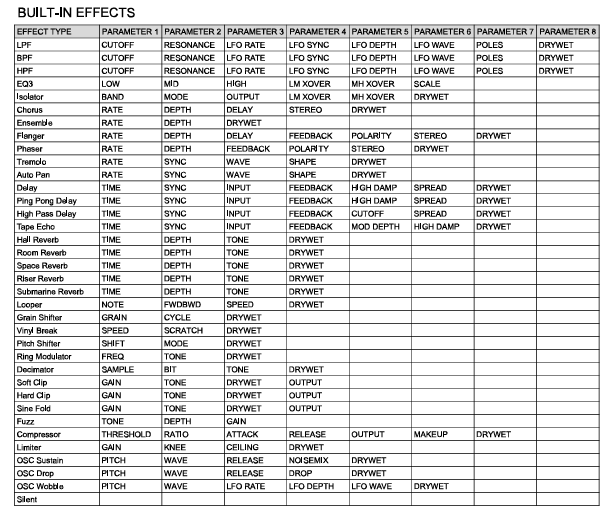
1 Like
I reached out to Korg support and they said you could do the following to get wet output but it didn’t seem to work for me, let me know if you have more luck!
Select the program you would like to use and change the routing to 1 PARA
Select the SILENT effect for the FX4 slot
Select the other effects you would like to use in series for FX1, FX2 and FX3 and adjust them to be fully wet (ie no dry signal)
The result is no signal when the touchpad is not being operated. If you are happy with it, save the program
I assume when they say “fully wet” in step 3, they mean what I describe with Assign: None and a fixed full wet value for wet/dry.
I got back to them so will keep the discussion going if I can and if this isn’t possible yet, hopefully it will be in an update as seems like essential functionality.
Interesting about the mute. As far as I know from the manual, there’s no way to latch this. I’ll ask Korg about this.
2 Likes
Grrrreat, I’m planning on automating the hell out of it with CC’s sent by the M8 
2 Likes
Ooh, didn’t realise it received MIDI. Cool, looks like you can control X/Y/Depth for each effect, which while not every parameter, is pretty good!
You can also trigger input mute with a CC so this could be a way to get fully wet effects based on what @Fatbenjamin said (map a button to this and latch it on)
3 Likes
like that idea a lot!
Since the knobs are so small - and I know from my S-1 that it doesn’t work for me - I would like to only use the strip and touchpad (and maybe the 4 buttons) as performance surfaces. And automate the rest with the crazy possibilities the M8 offers in this respect.
I’m pretty new to both the M8 and the Kaoss nts3, but do you know if it’s possible to run specific tracks of the m8 (using commands maybe) through the kaoss without the use of an external mixer? I’ve got the output of the m8 going into the input of the NTS atm, but it would be cool to treat the NTS like an AUX on a mixer somehow… thanks
2 Likes