Hi, I’m trying to back up project from Digitakt to my computer and it won’t work because of certain samples in the project. The samples are one shots from the Løstlvls Machinedrum pack. I’ve tested backing up with other samples from different packs and no problems. Anyone had this issue or knows what’s up? Any help appreciated, thanks.
Hey! Not sure what could be causing the issue, but I hope I can help. Could you send me one of the samples so I can check the formatting etc?
2 Likes
Hi, can you add whether it’s a Digitakt 1 or 2? Also, it would be good if you open a new project, load only the problem samples and then try to back it up. If the new, test project has a problem, I would say that there’s probably a data error in one of the sample files.
It would be helpful if you also add the other details like your firmware version. What version of the transfer software and also what your computer and operating system are.
Claid makes the lostlvls packs so I think he can help us get this sorted.
3 Likes
Hi, it’s Digitakt 1 and Windows 11. Tried creating a new project using the Løstlvls samples and also didn’t work. I’m gonna send Claid a copy of the sample, see what he thinks, cheers
1 Like
Digitakt is latest version I believe, 1.52A and Transfer is version 1.9.5 which I think is latest as well
Hi Claid, I’ve tried backing up the samples alone inside of Transfer and they back up fine but for some reason cause an issue when inside a project.
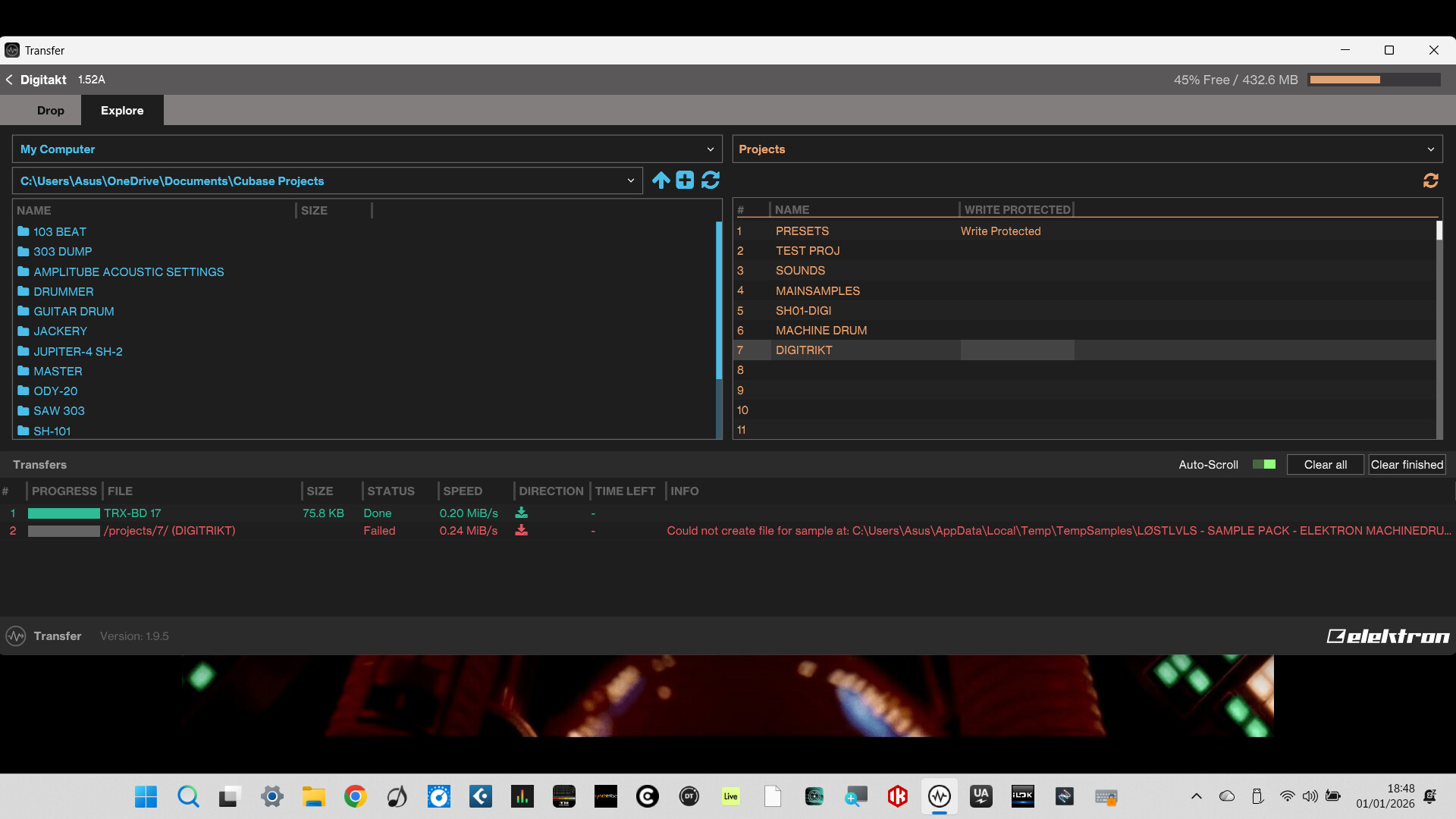
Unfortunatley I can’t send you a copy of the sample as I’m a new user and it’s apparently not possible
1 Like
Hi Joe, will it let you upload a sample to the media section? Look at the upper right side of the screen where it says news, forum, talk and files. If you click on “files” I believe there’s an upload box.
The forum software might not allow a new user to upload a file in a P2P message, I’m not sure if that’s a safeguard type of limitation, but I’m pretty sure you can upload to the site resource under that files tab.
Give it a try and then you can just send Claid a link to that if it works.
2 Likes
hi, unfortunately it wont allow me to attach a file but they’ve allowed a screenshot that i sent earlier as a post
Is the file over 10mb in size? I believe the person to person limit (or even uploading into the forum itself, like in a reply box) is 10mb on audio files. If it’s over 10mb it won’t upload for anyone regardless of tenure.
If it’s a one shot, probably not, but thought it was worth mentioning.
I’m not sure if Claid has a website set up but when he checks back maybe he can provide an alternate means of sending him the file. I think that’s the only way we’ll get to the bottom of this and we can do some more troubleshooting from there. It does sound like the file is an issue though, based on you trying it in a second unrelated project and having the same result.
1 Like
yeah, its less than 10mb, just wont attach the file
1 Like
Ok, let’s give @claid a minute to check back as it’s new years and he’s probably got things going on.
I’m not sure what’s going on with your project at the moment, but I can see from your screenshot that it does not seem to be able to identify the location of (or maybe it’s just unable to back up) at least 1 file from your machinedrum pack.
There’s nothing outwardly which appears amiss, but it’s difficult to know why it’s giving an error. If the sample itself has an issue, like the data has been corrupted, then it could definitely cause issues when trying to backup or restore.
In the project, does the specific sample play ok? I saw you mention that you can back these up independent of the project which makes me think it might be the unique version of the sample which is stored as part of the project file that is the actual issue.
I think the way the elektron machine’s file system works is that it keeps the original sample clean and then it creates a copy in the project which has some sort of numeric identifier in their system which links it to the original sample file. I’m really not clear on how it works but I’ve seen someone describe it so I know that the original samples exist as duplicates within the project file.
1 Like
Strangely, i can back up the sample by itself using Transfer just not when It’s being used in a project
1 Like
Yeah, it works fine in the project. Bit of a puzzle but I reckon you’re on the right track, something to do with how the machine has treated the sample. I’m new to using the Digitakt and first time using Elektron gear but i haven’t used the samples or set up the project in any different way to others that are backing up fine with different samples used. hopefully Claid can shed some light on the sample if i can ever get it to him 
1 Like
Does it completely fail at backing up your project which has these samples in it, or does it back up everything except for the lostlvls samples?
1 Like
Hey guys, I’ve used up all my reply’s as a new member so I have to wait 21 hours now to reply anymore. I’m editing this previous reply in the hope that it works and you get to see it. Thanks for the link to the discourse page, I’ll see what I have to do to speed up the process.
Claid, I downloaded the samples on 1st Nov so do you think that’s the issue?
If you read this then I’ll keep replying by editing this message lol
Ok well if it comes down to it I’ll find you a link to the thing that gives instructions on how to get your account promoted from new user / basic user to a member account. It’s like an automated process that has to do with reading X number of posts and completing some menial tasks.
First thing you have to do is complete the site tour with the discourse server robot character “disco-bot” so if you didn’t already do that, go ahead and let it give you the site tour to run you through the features of the discourse server and that will take you like 80% of the way to being able to send files lol
Ok if you go to this link, about halfway down the page it explains trust level 0, trust level 1, etc.
For trust level 1 basic you have to do a few things but it will let you upload files after you get “promoted” by the system so in the event that it’s necessary or if you want to try and speed things up as far as site permissions you can check out the link.
2 Likes
Did you download the latest version of the pack from Bandcamp? If so, I’ll check those out as they’ll be the same files. Otherwise, could always send some via WeTransfer or somesuch.
I remember for a while I was uploading weirdly-encoded versions of samples by accident - I fixed it but of course if you downloaded them before the fix, they might be causing the issue.
Let me know.
1 Like
That looks like a really long filename and you might be running into maximum path length limitations on windows.
You could try renaming the sample on the digitakt and seeing if it then allows you to transfer it.
Edit: and while you are at it remove any special characters in the file name, only keep a-z,A-Z,0-9
1 Like