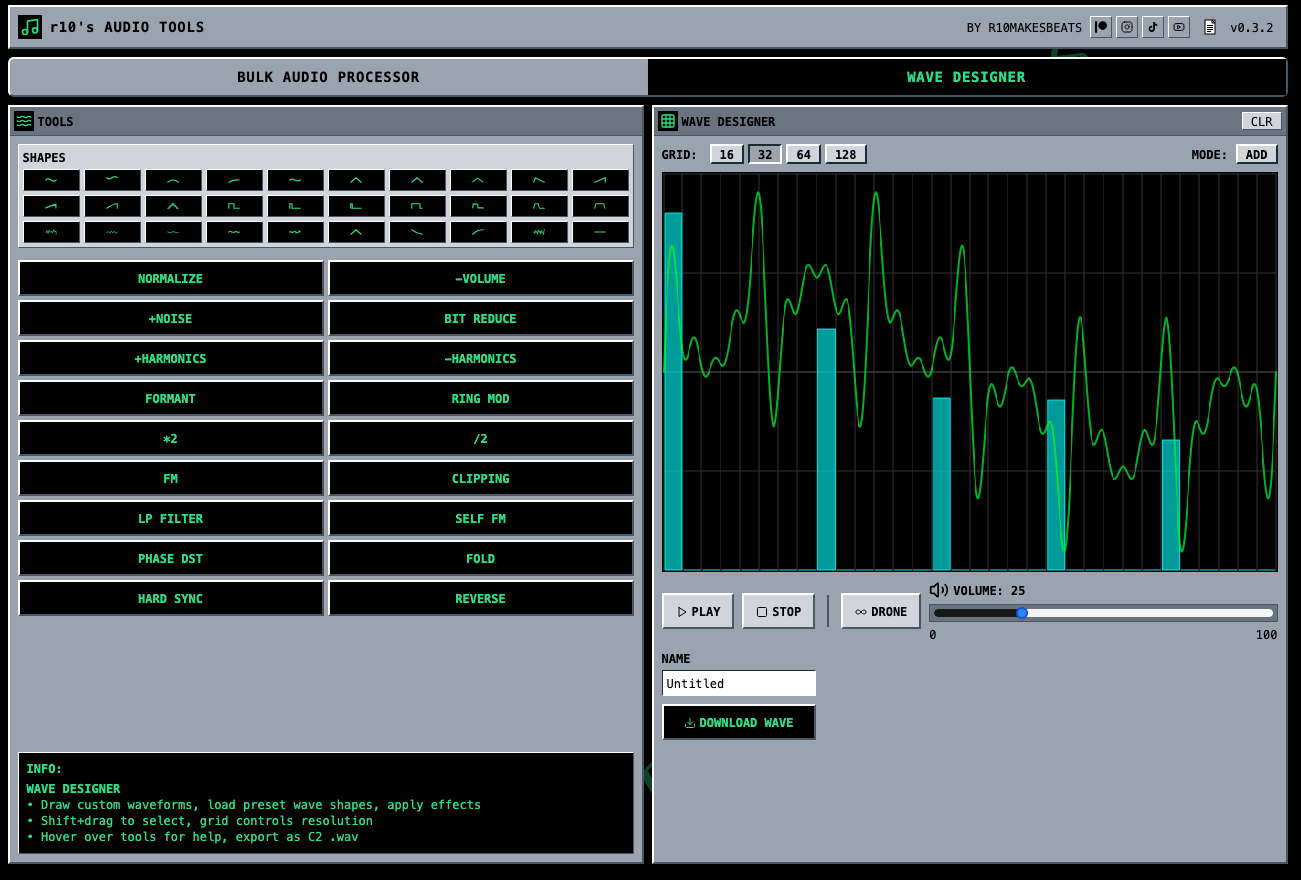
My imagination + AI coding tools are back with something useful I’m calling Wave Designer. Wave Designer is a single cycle waveform editor and generator that lets you draw your own custom waveforms then download them tuned to C2. It’s also completely free.
Here are some of the main features:
Pencil tool to literally draw your own waves (if you want)
Basic shapes you can insert then tweak
A bunch of different effects you can mess the wave up with - like bit reduction, ring mod, positive or negative harmonics, etc. The effect intensity is tied to the grid size.
You can select parts of the wave and apply effects or change the wave shape for only the part you selected. You can also duplicate the selected area, or copy it, then slide the selected area around and paste.
Anyway, there’s more stuff in there (and enough help text to explain things).
Try it out, and lmk how you do / don’t like it, and/or if there are any other features you would want to see. I’m excited to keep AI-ing my way through more useful audio tools and sharing with this community!
The single cycle wave generator is incredible, thank you so much! It would be cool to create SCWs from existing samples but I’m not really sure what the point of this is in reality… A while back I made a bunch of Moog Model D SCWs which sound cool but don’t exactly capture the source material.
I love the tools available in the SCW generator such as the ring mod, odd/even harmonics etc. gonna play around and see what happens if I run the SCWs through the batch editor. Speaking of which…
I recently purchased a batch converter solely for the purpose of converting audio files while retaining their original properties - ie, if I’m converting files where some are stereo and others are mono and I want to ensure they’re all 24-bit/48kHz, I can choose to retain the channel properties while only changing the rate/depth. Can this tool be made to do something like this?
Glad you like it! I was actually going to make a SCW generator that slices up samples, but I’ve tested some code out that does this and the results are really hit or miss, so I pivoted to this idea instead. It’s a lot more consistent (and fun!).
The batch editor by default only normalizes your sound to -.1 db. It should only change the sample rate, bit depth, add fx, etc. if you explicitly make changes and process the files as such. There’s also analysis text that tells you the sample rate, bit depth, channels (e.g. 1 for mono, 2 for stereo), so you can validate it’s not downsampling or changing bit depth. But yeah, feel free to test and let me know if you run into any issues
Niiiiice, thanks for the info! are you able to add batch processing to Microsoft PCM encoding? Sounds incredibly niche but I’ve spent about 70 hours working through endless samples that I didn’t realise had weird encoding thanks to Ableton Live not conforming to the Microsoft PCM specification. This leads to samples not working on MPCs for example.
Is the problem that you need to change samples so they do have the microsoft PCM encoding, because if they don’t then the samples don’t work on other devices reliably?
Exactly, and only changing the encoding. So I could convert say, 500 samples, all a mixture of mono/stereo and sample depth, and only change the encoding to Microsoft WAV.
I bought a piece of software called Switch which does this, but it took a while to find!
Curious what you’re able to offer in the way of support/bugfixing/updates if this was created using AI? I’ve vibe coded stuff before too but always hesitated to share it for this reason
The wave designer is rad! I was hoping I would be able to draw the wave on my iPad with my finger and/or Apple Pencil, but that doesn’t work. So consider this a feature request!
Great question! I typically do a lot of testing and bug fixes while building features, and only deploy if the thing is working well for me.
There’s also no server side (yet), so there’s not much that can go wrong - all of the processing happens locally so it’s pretty simple from that POV.
My plan is to keep updating, fixing bugs, and testing w/ Claude Code for now, while slowly learning to actually write javascript and typescript.
I’m also in no rush to add server side features - e.g. cloud storage to save your work, ability to share your saved audio as links, etc. I’m trying to get as much of the processing to happen on the user’s own device, so I don’t have to deal with storage costs and more complicated server side features (e.g. auth, sharing your work with others, saving and recalling presets, etc.).
I did some digging and the way it should work right now is it will always export whatever you drop into it as a pcm encoded 16 bit wav file. So you could certainly try using it for that
I need to fix the bit depth parameter - right now it only simulates bit depth changes via quantization, but still outputs a 16 bit pcm encoded wave.
New update coming soon with UI tweaks + a brand new harmonic editor. The harmonic editor is a LOT of fun. You can very quickly make a lot of organic sounds with it, and also use the functions on the right to mess things up.
Should launch it sometime in the next few days I’m hoping.
If y’all have any feedback in the meantime let me know! I’m going to also implement a feedback / feature requests form soon.