Good thing that I checked an e-mail, otherwise I could come back here a lot later.
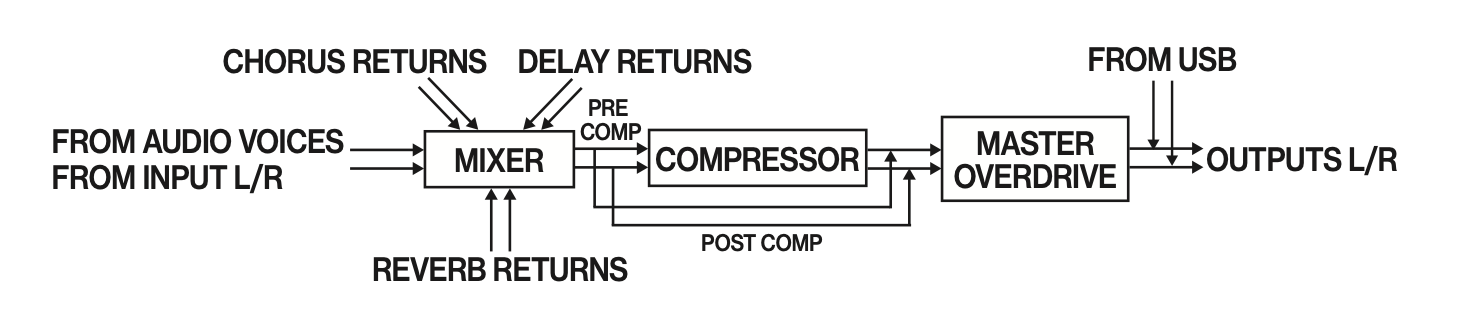
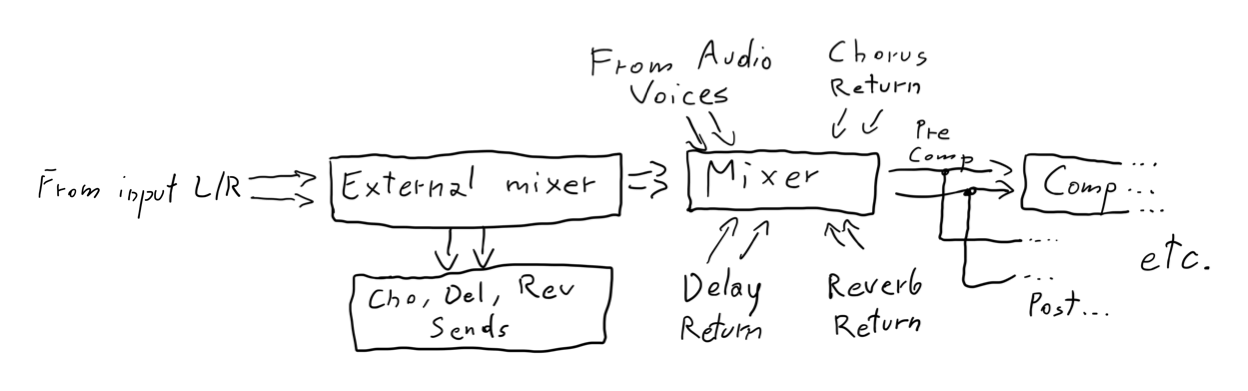
Let me explain. In diagram there is no evidence that external signal can be routed to effects. While internal tracks are shown correctly, but that’s part of different diagram. Let’s focus on external signal.
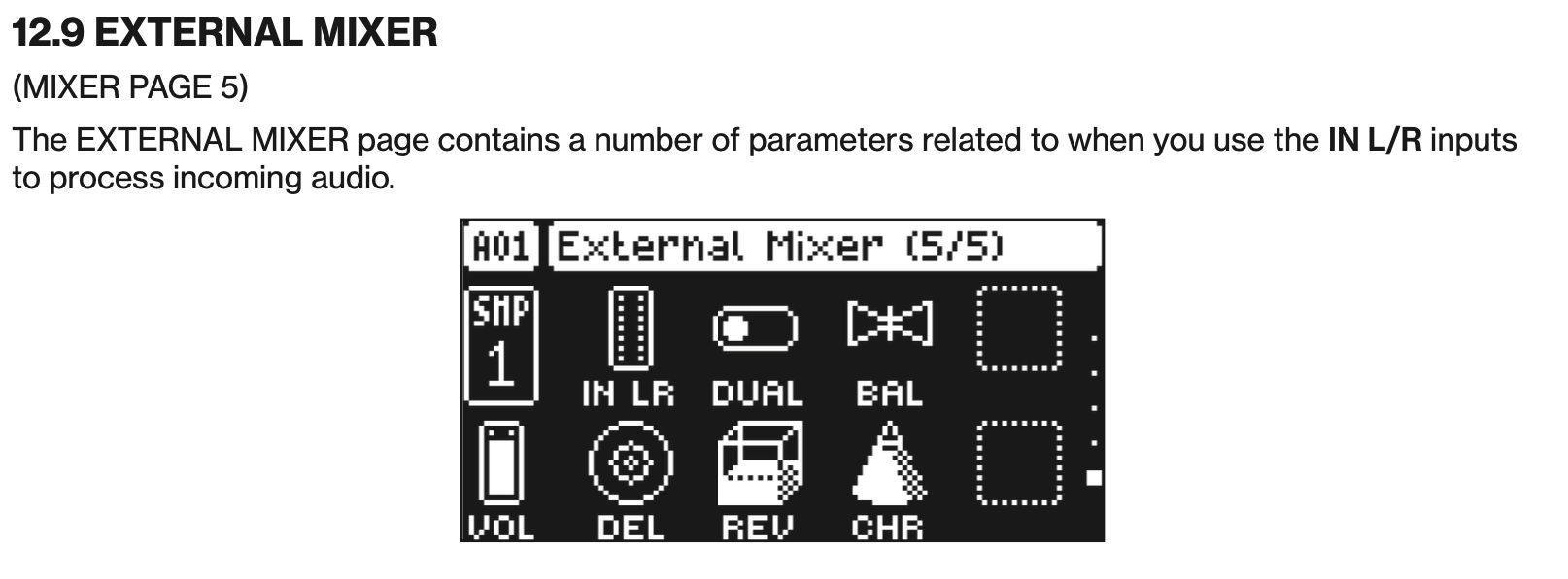
The only thing that is shown here are effects returns. Now I think that there could be another block that would reflect the name from the manual - “external mixer”.
And furthermore, to be consistent with stereo signals being drawn with two lines, I think it could be drawn like this (I will sketch something in iPad, but I have no steady hand nor good character, so sorry for lack of aesthetics):
I also looked into Digitone manual and it has same misalignment. BUT, you can see that in DN’s manual there are four arrows on the left of Mixer, to show signal as two stereo streams. :]
Right—but what I’m getting at is if you are modulating the slice number, does it wait until the end point of a given slice is reached before playing the next, or will it potentially jump mid-slice, creating discontinuity in the waveform?
I would expect the latter, though prefer the former, but this would only apply to wavetables, or single-cycle chains. I may be wrong but it seems like a special wavetable machine or mode may be needed for this sort of behavior—because it would be great for stuff like wavetables, but not sliced breaks.
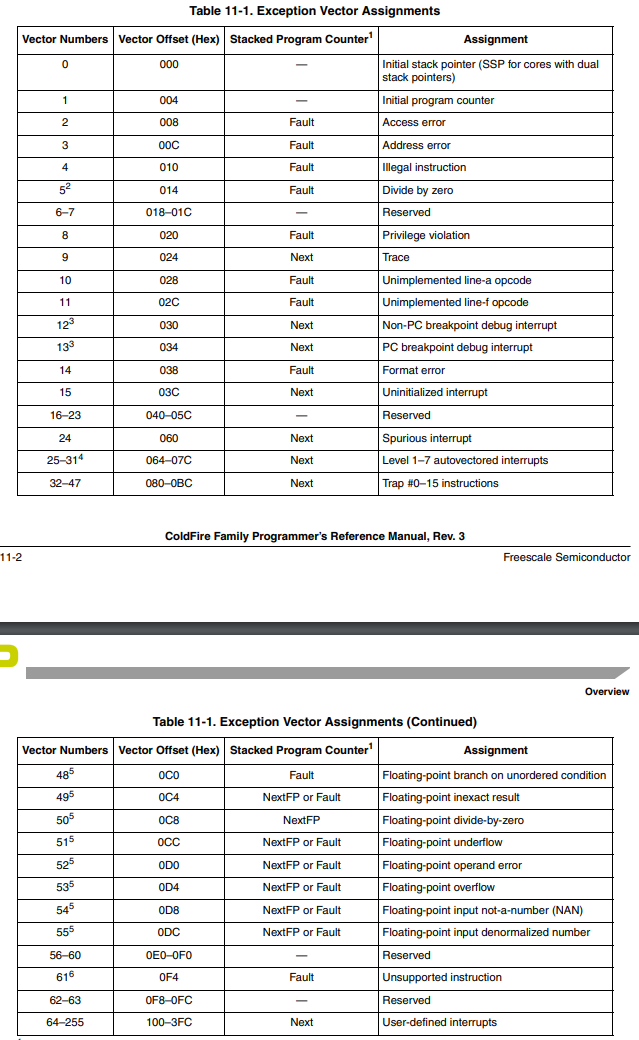
Yikes. That looks like a memory access exception with the DMA lol. I’m trying to look in the Coldfire documentation to decode what it means, seems to be an access violation
I would try a factory reset or reflashing the updated firmware. Best case it just had a bad write and a sector is messed up…worst case the actual memory die is faulty, medium case there is a firmware bug that causes this to happen, in which case good find and hopefully it is patched
Thanks! Happened during transferring many samples. That alone slowed down the DT2 randomly to freeze and sometimes unfreeze. Right now it works. Hope the memory has some controller software that just marks bad sectors as not writable.
Yeah the DMC should be able to handle that no problem…usually bad sectors in RAM are cause for replacing the IC, however if the issue is storage/recall from the NVM it is always possible to “blacklist” those bad sector at the DMC level.
(makes tracker style mono drum lane with choking the previous sample easy)
first hand experience
from my POV somewhat indeosyncratic implementation:
you save the current sound in the preset pool
by entereing the pool and then clicking arrow right and “save here”
as far as I see, it has nothing to do with the other presets one can save on the +Drive
you save a preset from the +Drive (FUNC + dial Level/Data) by clicking arrow left (!), then arrow up to select the “add to preset pool” menu item and then yes
if you click yes in the +Drive preset screen, it copies the preset to the track DT1 style
and I did not find out how to load presets from +Drive directly to the pool (only into the pattern and from there: GOTO10
then it is easy:
call preset pool via FUNC+arrow down (trig mode)
play with the now yellow pads
it records them to the sequencer track (at least in live recording)
What happens when you save a new preset in the same position
it replaces the sound in the sequence
that way it is easier to change the sound of let‘s say the filter of a hihat for the whole pattern (and I guess all patterns that use the pool preset - that’s very deviating from DT1 tradition and may be risky - if you don’t know which patterns are using this slot)
downside - no changing of filter, fx etc for that track because every trig reloads the settings of its preset…
comment/opinion
great for choke groups (CHH/OHH), complete tracker style drum lanes or changing infinitively repeating drumloops or call the same sound with different settings
works a little like OT
love that feature - no matter how cumbersome to reach
would have loved the same on a far lower level (just with sample slots, not whole preset settings)
have to test what happens if one saves a new preset to the same location
I guess loading from +drive and maybe saving whole kits to the project pool will come later (after all, it is a very new and very great feature
wishes (or not yet found options)
option for change of only sample slot with this recording mode (no other parameters)
option to glue down preset trigs into p-locked trigs
options to exclude parameters from being affected by the function (like filter, fx (single or all), LFOs
different version of the function that works with sample chains
save rows of 8 or 16 presets at once to 8 or 16 pool preset slots
edit: you can add presets of whole kits to the pool (kit manager, left arrow, add to preset pool)
Has anyone in Canada/Montreal heard anything from Moog Audio if you ordered there? Requested an ETA a week ago (just before placing a pre-order) but haven’t heard anything.
No worries, this is our regular exception log screen - which is showing up if the software detects an issue it can’t resolve. It is basically an indication of a bug that we need to fix, and it has a lot of information that is useful to us. So it has nothing to do with hardware, bad RAM or sectors etc And no need to do any factory reset or reinstalling firmware.
Would be great if you could send a support ticket about this @Elekktrikk with what you did, and we will look into it. Thanks!
Judging from the image you posted, we have the following info to work from:
DS0024 (6 hex characters, 24 bits)
V03 (3 hex characters, 12 bits)
M0 (2 hex characters, 8 bits)
P40005A34 (9 hex characters, 36 bits)
40005A36…(first 8 hex characters, 32 bits)
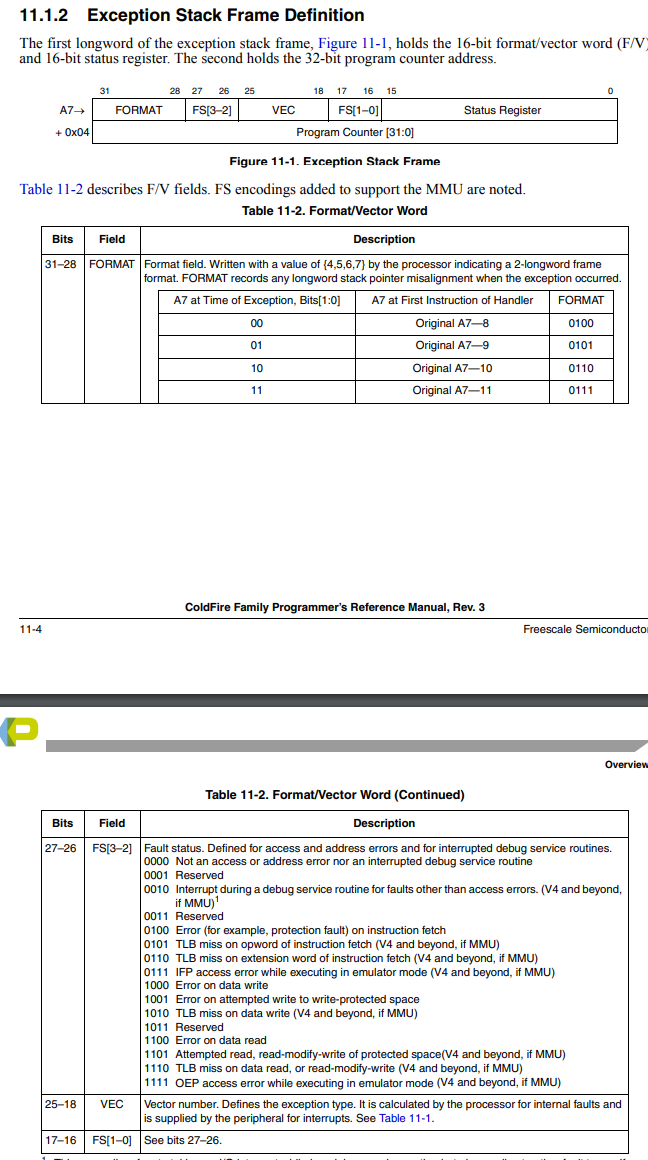
If this is coming from the Coldfire, we can attempt to decipher based on the possible codes. We know the exception stack frame definition is 16 bit format/vector word followed by 16-bit status register, followed by 32-bit program counter.
Bits 31-28 can be 0100 0101 0110 or 0111, which is {4, 5, 6, 7} in hex. The only string we have that makes sense would be 40005A36 or P40005A34
So, we know the next 3 hex bytes should be “000”, or “0000 0000 0000” in binary. That means FS[3-2] and FS[1-0] are both 00, indicating “Not an access or address error nor an interrupted debug service routine”
Finally, bits 25-18 are also “0000 0000” for the VEC field, indicated “Initial stack pointer (SSP for cores with dual stack pointers)”. If the remaining 5A34 or 5A36 has any meaning, it would be the vector offset, this either indicates “Reserved” (unlikely), or “PC breakpoint debug interrupt”. This one is a bit less clear to me.
I could also be totally wrong, but this is the only sensible interpretation I can see from this. Maybe someone else wiser than me sees something different.
Awesome! That is very good to hear it is not a hardware issue Very glad Elektron is quick to tackle these issues, it is cool to see this type of community interaction
 Happened during transferring many samples. That alone slowed down the DT2 randomly to freeze and sometimes unfreeze. Right now it works. Hope the memory has some controller software that just marks bad sectors as not writable.

 And no need to do any factory reset or reinstalling firmware.