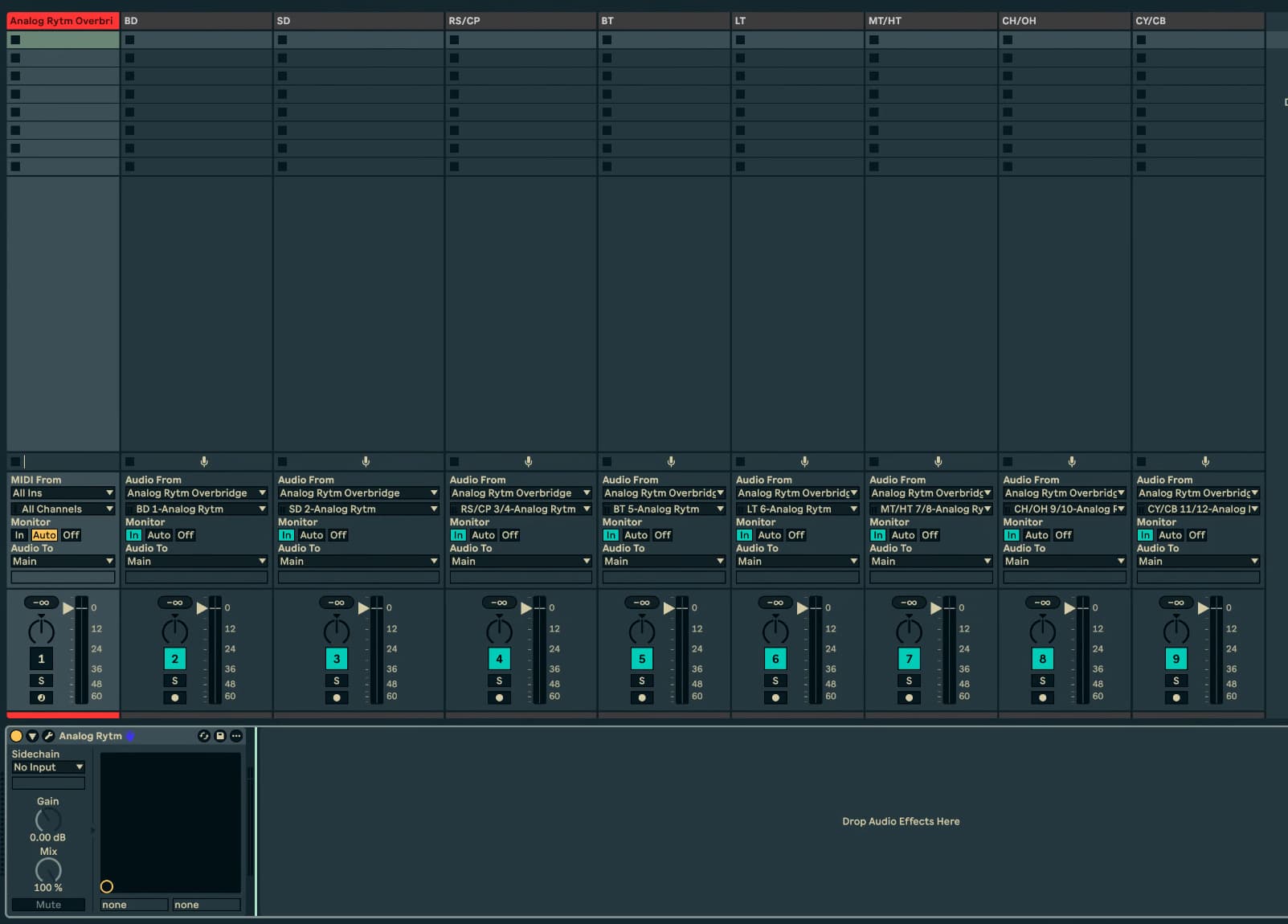
I’m having an impossible time recording my Rytm and Digitone in Ableton.
I’ve got an analog rytm mkii (slave) chained into a Digitone 2 master. It’s got the digitone midi out plugged into the rytm’s midi in. The rytm then has its audio out jacks plugged into the digitone.
Both units have usb ports plugged into my Apple MacBook via usb. With Ableton running. Overbridge recognises both Elektron devices, but I can’t for the life of me record multi track into Ableton via both devices.
The best I’ve achieved in FOUR DAYS of trying is separately recording each unit. Plugging and unplugging into my laptop one by one. Whilst those units are completely unplugged from each other. But that seems mental!
Is there really no way to click record in ableton, and jam on both my units at the same time whilst multitrack recording the output??? Maybe I need an audio interface or something?
I want to do this so that I can go back into the ableton file and make edits/change arrangement so that I can build tracks there.
I dont think you need to mess with aggregate audio devices. You have a track with the Overbridge VST. Then you have audio tracks that “listen” to each output from the VST.
Yeah, so this totally works when I try for one of the instruments alone. The issues begin when I try to create ableton tracks for both the rytm and the DN at the same time.
Ive removed the midi cable between the Rytm and DN to see if that works.
I’ve also noticed that although the DN matches abletons tempo to its local tempo. The Rytm defaults to 120bpm once connected to ableton. Even if the ableton project isn’t at 120.
All sorts of glitches are making me think - am I incorrect, or going about things the wrong way, when I’m assuming it’s best to record multitrack for both instruments whilst playing around? From what I read on the internet some people record one track at a time. That seems mental to me, and so far away from the fun I have with these machines…. But is it perhaps the norm?
Weird, that isn’t what’s happening for me. Having a tonne of glitchy issues like the rytm having all track velocities turned to zero. No sound if the two boxes are plugged into Ableton at the same time. And the second machine staying as ‘idle’ on overbridge when it eventually is plugged in.
I managed to record just the digitone
Then I restarted my laptop and both instruments
Then I plugged in the rytm, and managed to record. But the tracks were slightly off grid in ableton, so won’t match up in time without some editing. Which is incredibly annoying considering the boxes stay perfectly in time when they are connected via midi cable.
Make sure the Elektron USB midi ports are disabled in Ableton and you aren’t sending track / sync / control etc to it. Sounds like you might be getting some conflict somewhere and CC’s are getting to your Rytm and changing the velocities.
In Ableton you should also have Delay compensation on to get as close to the grid as possible when recording.