Hello!
I need your help.
Can someone explain to me in the simplest way how I can connect my Digitkat to an external Synth (Waldorf Streichfett) and my music system?
Which cables and settings do I have to make? Sorry for the stupid questions, I’m still new to this area.
Thank you so much.
For connecting to Streichfet you’ll need a midi connection. So 1 midi cable. Set Digitakt midi track to Streichfet midi receive channel (probably ch 1)
As for your music system it’s hard to say as I don’t know what system you have.
I suggest checking the manuals and other resources
2 Likes
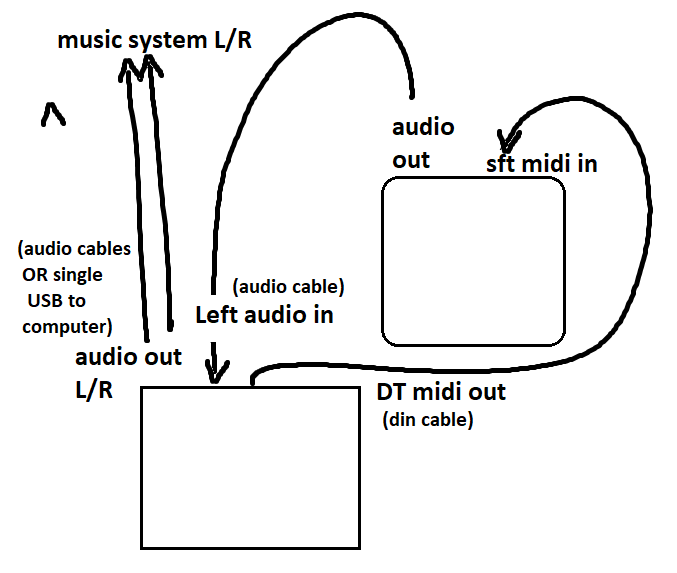
You’ll need to apply settings as they are shown in the manuals. If you want to use the computer for audio over usb, it’s a USB cable, if you want to go into a stereo or other physical monitor system you need audio cables. Should be pretty easy, but you need to set the Digitakt and Streichfett midi channels to match, you’ll have to make a blank pattern which has the midi settings so you can copy that for new patterns so you don’t have to keep setting it up again. In the mixer you’ll have to make that left mono input come down the middle of the DT mixer, and for the audio to work you’ll need input monitoring enabled. You need to check the manual to see how the port settings and midi settings should be, overall it’s pretty simple though. This is the physical routing.
Also, my Rocket is very noisy (as in ground loop noise in the audio channel) because of the USB power, so I would recommend putting the audio of the Streichfett through an in-line ground loop isolator before entering the DT otherwise it will be noisy (my experience at least).
3 Likes
Thank you very much, that helps me a lot. I will test it.
1 Like
If you have trouble with the settings on Digitakt let us know, but it should work as described in the manual. Only thing that is not obvious is that when you hit the trig for the midi bank you want to use (bottom row 9-16) and it brings up the screen to assign channel and settings, you have to press the encoder corresponding to the channel position to set a channel in place of the X. Otherwise not too complicated.
1 Like
Did this work for you? Can’t seem to get my s1 working with this DT correctly.
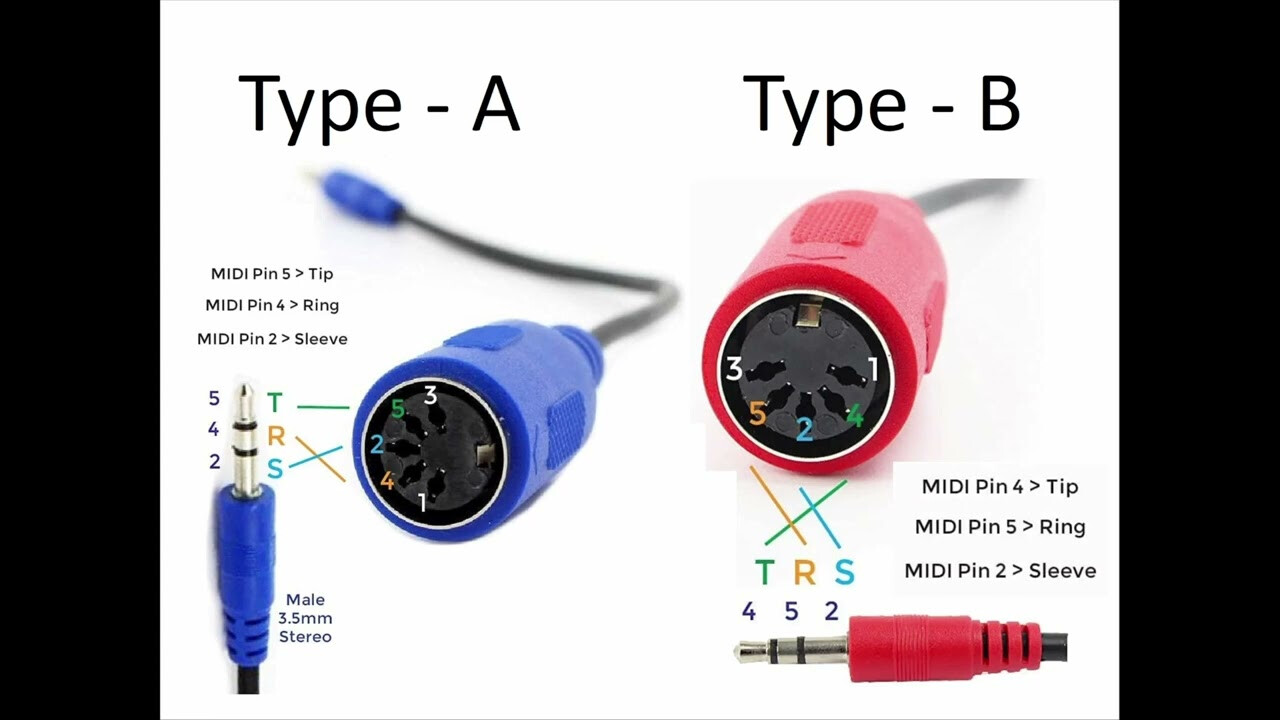
Make sure you have the correct type of TRS midi cable for the S1, Roland uses type A while Arturia and a lot of other companies use type B. So if the cable came with something else, or you didn’t specifically buy a type A you will have to start there.
If that’s not the problem, you’ll have to be more specific about what isn’t working, then we can at least try to help.
edit: ah, I see in the other thread you said you have the S1 controlling the DT but not the other way around. In that case what are your settings on both devices? I don’t know much about the S1 but I’ll see what I can figure out.
Is there a reason you have the midi going in both directions? If your goal is to only control the s1, it should only need midi going into it and not out of it. Again, you’ll have to be more specific about your goals on this.
1 Like
Currently:
I am able to play the Roland S1 synth notes on the digitakt. My secondary issue, is an audio one. I can hear this through my headphones by routing the headphone out from the DT into the S1 audio in, and plugging my headphones into the S1.
I’m trying to connect the DT to my pair of monitor speakers, and also hear the S1, but I’m not getting any audio into the DT when I plug in the audio out from the S1 to the L channel in on the DT. I’m sure I can use my PC and Focusrite to make it work, but I’m trying to have a Dawless etup.
Edit: definitely an audio IN problem from the S1 to the DT. I can’t record audio when I route the mix out from the S1 to the L channel IN on the DT.
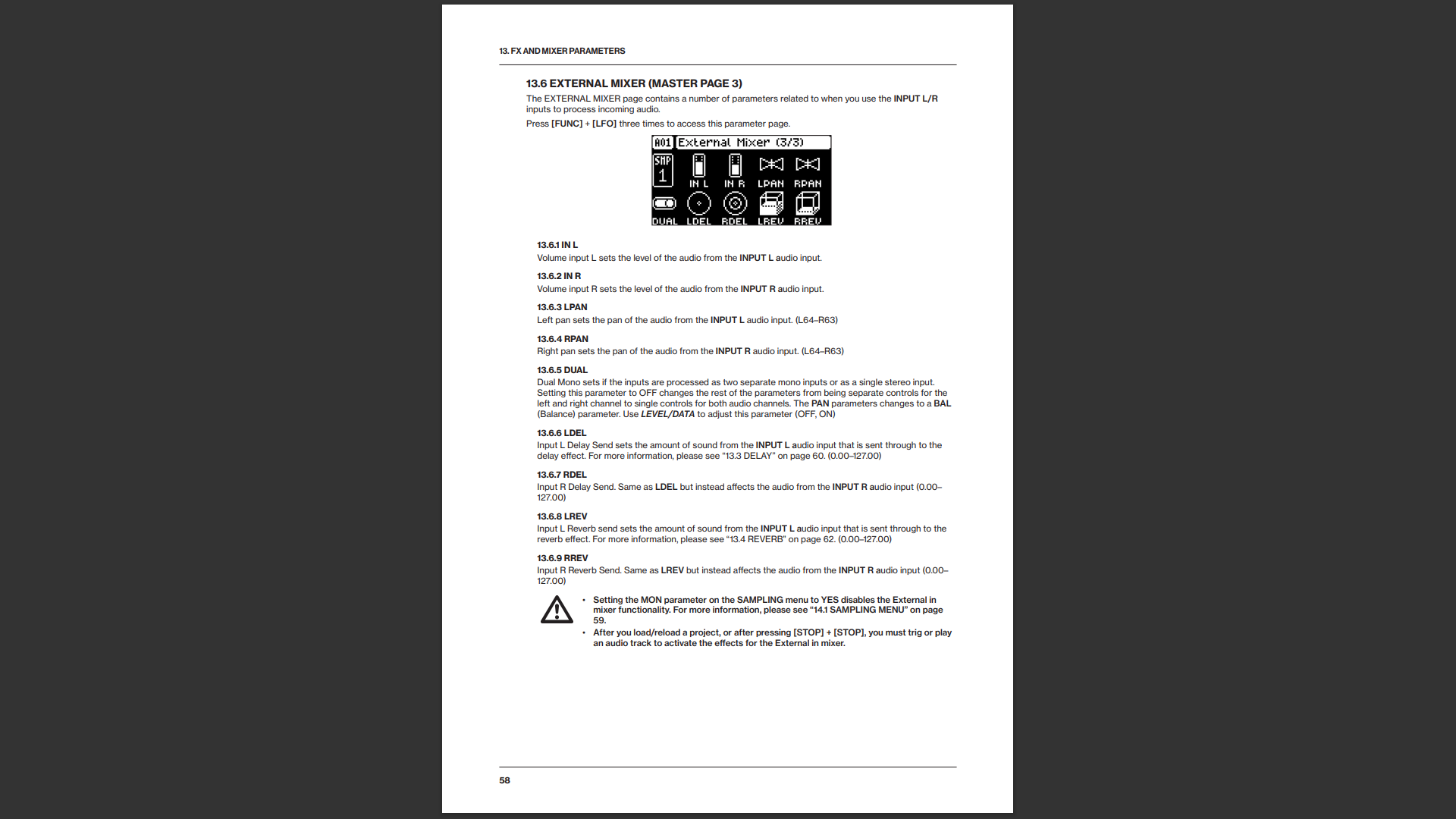
What are your internal mixer settings for the audio in on the DT?
When you say you’re currently able to play s1 synth notes on digitakt, does that mean you press a trig on the DT and you hear it played from the s1 synth engine and through the s1 headphones? If that’s the case then midi is fine, audio is the issue as you surmise.
Check out page 58 of the manual and see if that helps, if it doesn’t get you sorted, then we can confirm specifically what might not be set up correctly.
1 Like
Internal Mixer Settings: IN L and IN R are set to 0, in DUAL Mono mode.
When I press a trigger on the DT, specifically the keyboard and Sub Banks scrolling, I can hear the different soundbanks in the S1 play and individual note.
AND… yes, that was it! I just disconnected from my PC and it’s working perfectly fine without the Focusrite.
To verify:
- Audio out via headphone jack to the S1 mix IN.
- Mix out to L IN on the DT
- Midi OUT from DT o Midi IN on the S1 (yes, I had the right Midi cable from Boss.
- In the internal mixer submenu, as stated above, I had to turn up the volume channels, and DUAL mono works great.
Thanks! This was a headache tonite but well worth it.
And it recorded a sample! My first one 
1 Like
Ok great, glad it’s working for you and that it didn’t end up being anything crazy! Hope that will help you have some fun.
1 Like