I am very happy with my black GR-MEGA and honestly … I love it to bits. It’s pretty much my dream machine.
Maybe granular synthesis and similar more experimental approaches to sound are just my kind of thing … I also have the older GR-1, and the GR-Mega really feels like its bigger, more refined sister. It’s a substantial upgrade: now we have support for stereo samples and stereo inputs, more LFOs, 5 engines instead of one, 4 Layers … the GR-Mega is also about three times as large.
The build quality is excellent, it feels solid, well thought-out, and just enjoyable to interact with. I can’t directly compare it to the Tempera since I haven’t owned one, but from what I’ve seen it definitely looks interesting and capable … and very different. I have the Vector Synth from the same company and can say only good things about it. I hope that this info helps.
So yes! No regrets on my side at all. It just clicks with how I like to work.
Unpopular opinion! I find the UX absolutely sub par, not a joy at all let alone flow. The square push buttons are rough for navigating menu’s. Apart from the strong clicky noise they make (up and down!) they are not quick like the Elektron buttons. They need a firm press, not a “brush over” if you know what I mean.
Then there is the layout of the buttons, they don’t make sense to me and therefor take a long time to become muscle memory.
Then there is inconsistent navigation patterns. Sometimes you need to use the left arrow for navigating up in the hierarchy, sometimes you need to press “escape”. You can get stuck going sideways and have to press up or down. It’s a lot of clicking around.
Then there is the operator menu, in there hidden are among others sample start end and loop points. My god, this should be instant dialing in, but in stead you need to click, turn, search and EXECUTE the command. I mean, man! This is lack of intuition and skill for interaction design. This is pure friction. It reminds me of those old parking meters that ask you to input your license plate and you get all frustrated because that is not fun. I might be exaggerating a bit here, sorry for that.
That said. It’s one of those machines I will probably never sell. It has so much creative depth. And the sound quality…
Beetlecrab thing has another layer of abstraction on top of a granular engine block that allows creation of complex, polyphonic patches. Basically it’s designed to be a playable tactile instrument with programmable color-coded “performance” on one virtual “page”.
Behind the each “block” the granular engine is more or less standard and in some way not far from GR-MEGA’s core engine. Maybe less parameters here and plus one more option there.
The complex patch/performance structure is the benefit, you can program very complex evolving sounds.
Tasty Chip’s is more a big hardware Granulator from Ableton, with obviously more defined and clear sound (than the plugin) and some extra features on top. It shows the waveform and even singular grains clearly and thus is more controllable. It’s structure is more like a traditional multi-timbral synthesizer. You can also program complex performances as well with 4 timbres, but the control is via traditional MIDI/keyboards.
upd: both have basic sound shaping tools, like filters and effects, basically they are comparable, just organised differently. Modulation routings are different too
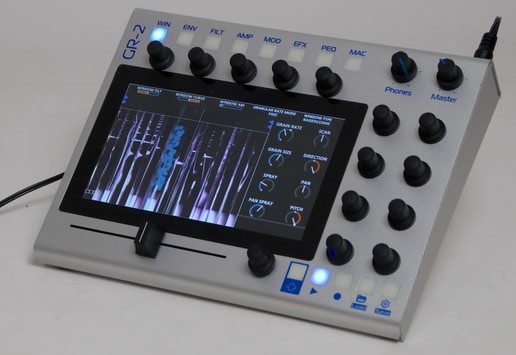
First GR-MEGA 1.7 beta firmware (+initial GR-2 firmware) has been publicly released and it is a big one. So stoked to try it out.
GR-MEGA firmware 1.7.0 release notes
Granular engine rework and optimization. True multi-layer presets. First GR-2 firmware.
Date: XX June 2026
new features:
new tile menu (replaces tab menu on the GR-MEGA)
7 x 3 tiles that lead to short menus
max 2 levels deep
top of screen always shows where you are
back button always takes you back to top
preset, mtpreset, template menus
(granular) engine update:
#796 pan spray distro : [Shift] + (Pan Spray) → pushes grains towards to edges of the stereo field. use in conjunction with (Pan Spray)
grains visible in all layers
#1557 pitch spray : [View] + (Pitch) → randomizes pitch for each grain. turn up to increase range of randomization…
pitch quantization in voicing, user and non-western tet scales supported
“patch spray”: spray grains over multiple layers. [Shift] + [Layer mix] to visualize. [Amount], [A], [D] faders to control parameters.
#233 “granular filter”: [View] + (Filter cutoff) → toggle granular filter. Grains will now be spawned in areas of the sample based on frequency content and filter settings.
#1614 Akai/90’s jungle time stretch. press [Grain Ratio] a few times to arrive there.
#1691 grain clock retrigger - turn OFF to reset grain clock on NOTE ON. turn OFF to have all notes synclock their clocks.
slice mode now supports samples longer than 350s
better utilization of CPU cores: 30% higher polyphony in multitimbral.
#726 ability to disable grain “compression”/“normalization”. makes it louder at high density. menu → grain → compression ON/OFF
#1451 Sampler and Tape engines: poly phase interpolation (better anti-alias)
file system
true multi-layer presets
can now contain 4 full patches, including samples
can be set up intuitively by just switching layers to presets, and then tweaking them.
copy and paste the layer in focus between multis or to patches
copy and paste multi presets between projects
#1786 reset tweaks when switching between multi-layer presets
contextual saves, what-you-see-is-what-you-get… reboot and you always start where you left off, no matter if you were working monotimbral or multitimbral.
normally only changes to visible patches and samples are saved.
when having recorded audio to buffer, and then saving → save dialog shows, and it default to type SAMPLE
turn context saves off, and get the full savedialog with all the options:
menu → I/O → Expert save dialog → ON
[Shift] + [Save] will have same effect
recall - project data like global bpm, rate are always saved.
#1724 firmware dropbox: using file sharing, drop firmare zip in /media/internal/firmware_dropbox to upgrade
Load Soundfont (.SFZ) multi samples → slices. in the file chooser, select type “multispl”, or just press [Load] on an SFZ file.
Load cue points in .WAV files → slices.
Load .flac samples
loading or modifying sample shows asterisk (): patchname → patchname
templates:
load, save, rename and set a default template
default template is used when you initialize a patch
GR-2 features:
master eq
touchscreen voices
xy modulation drawings
keytrack → cutoff
layer mute/solo
effects:
Multi Band Resonator (MBR), 48 bands, including scales, (de)tune, filter modes, physical models
Saturator effect.
audio prefs menu → FX buffer reset ON/OFF (turn OFF if you have a more fx / groovebox driven setup)
#1460 Factory FX and user FX Settings. This goes for FX and for entire FX chains.
#1758 large reverb runs a lot faster, and all memory based effects (compressor, flanger, etc) also run a bit faster
#1558 Shift + FX Select = Changes Currently Selected FX Type
drag and drop support in fx menu - drag and drop FX titles to swap their positions in the chain
graphics:
orange loop “bar” (visual hint)
spectrogram + [Shift] + (hor. fader) scrolling at 60 fps
DSP metering - GR-2 Hold [Shift], GR-MEGA Hold [Feel] : orange = fx, purple = usb audio processing, grey = housekeeping, blue = voice rendering
#1763 dotted and triplet rates and note lengths. enable them in the system menu.
sequencer - when sequencer is active, press [Seq] to toggle preset select / step select
tooltips for all menu options
#1774 GR-MEGA: - Macros - [Invert] button now works in macro menu
#1775 [Macro Assign] followed by [Delete] now also possible. (reverse button order)
name of imported sample in presets
#1784 record with LL, RR → should duplicate the recorded channel to both stereo channels.
changes:
simplified save dialog
no more slots in dialog, unless specifically requested (with [Shift] + [Save])
use copy and paste or preset/template menus to edit load and save to other slots
old per-project templates replaced with global template system.
templates stored globally in /media/internal/user/templates
recording audio - no need to initialize growing buffer any more
restructured sampling menu. some buttons combined into one.
size at 0 means auto sized
file chooser - don’t traverse into folder of chosen data type
vertical layout of dialogs, includes support for (Operator) encoder
GR-MEGA: pitch knob shows pitch instead of root note, corresponding with transpose setting
MIDI NRPN’s layer-preset mappings moved to other range 200…207
#1773 envelope replay position now stops at the end of the decay stage instead of the middle of sustain (a bit easier on the eye).
spectrogram - darker cutoff overlays
bug fixes:
(#1814) ADSR faders in layer mix mode now send layer volume cc’s
Fix delay len and pp delay len as macro destinations.
solved slow file copying via network sharing (especially when using a Mac)
(Scan) knob usage followed by up and down arrow buttons now ignores deadzone.
file chooser / file manager - truncation now improved for filenames with dots in them but clearly no extensions (too long extensions). could crash on long patch name paths!
#1801 delay ~1 ms with adjust mode switches to “Fade” mode could accidentally go to larger delay times.
#1797 Mod (AUX) window destination ranges were halved.
#1830 external clock bpm estimation improved. flanging in synced delay effect now gone.
Spent some time exploring the new firmware last night. The Multi Band Resonator effect is fantastic - it’s essentially the same as the resonator found in Torso S4. I haven’t had an opportunity to use an S4 yet, but it sounds pretty close compared to the demos I’ve heard of it. There are a few interesting differences. When selecting a scale, there are a few options that will give you different physical model as well (like a membrane or plate). You can also select the amount of bands (the max is 48, same as S4). It doesn’t have the waves feature that S4’s Ring has, but it does have the noise feature.
All of the new granular engine features are a nice touch. Pitch quantization makes the chord mode must faster and more useable to work with. Seems like it currently only works with the chord mode though, pitch spray remains unquantized. Pitch spray is cool though. The granular filter concept is very interesting, I don’t know if I’ve come across something like it.
The menu and file system has been completely overhauled. It’s still early, but this might be the most intuitive the menu system has felt on a Tasty Chips granular instrument.
Haven’t gotten close to exploring everything new, but the Mega is really coming along.
Just have the Mega! It seems like the two instruments will share the same firmware, outside a couple of differences (the release notes are for both instruments).
I’ve come across a few bugs so far, mostly minor. I haven’t come close to checking to make sure everything is working though. General usage is pretty stable though.
One of my favorite updates is that the recording buffer no longer needs to be “initialized” for auto-length recording.

 It’s pretty much my dream machine.


 …
…