I noticed that increasing FOUT in the track recorders actually increases the sample length beyond the recording length you have specified.
This leads to a problem, wherein slicing the sample creates slice markers that are not aligned properly. This is easiest seen when recording a simple non-swung drum loop with FOUT set to some value other than zero. This makes no sense to me: Shouldn’t the fade-out be applied to the end of the sample within the recording length you have specified, not in addition to the length you specified? Basically, FOUT is useless if you want to slice and sound smooth on perfect transients.  Was this behavior intentional, or is it a bug? (I understand that the function is intended to reduce pops/clicks in recordings)
That’s why I don’t use them ! Another reason : the FIN FOUT curves are exponential, instead or linear or logarithmic.
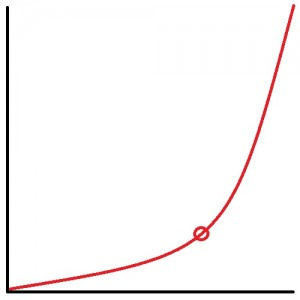
Exponential curve.
Eventually you can use them with pickups machines (and overdub ? ), because the length will be correct after record.
It is actually documented in the manual, I guess the idea is if say wanting a 16 step sample you’d set length to 15 and FOUT as 1 to get a sample of 16 steps total with the fade starting at step 15. In some cases that could be advantageous but most of the time you are better of sampling for the whole duration, and if a fade is required do it in the audio editor.
I wonder if with Pickups the fade out is recorded at the beginning of a loop without overdub…
I succeeded to make a good (better and linear at least) crossfade with 2 recorders and 2 tracks, with slides on VOL. PITA ! 
Interesting - I totally missed that. But since we are not typically using step-long fades, and even the manual suggests 0.063 or whatever it is, I’m still failing to see the utility. How are we supposed to set record length to 15.937 steps? I just wanna record a perfect 16 steps, without a click on loop. I like your idea of just doing it in the editor, but automagically would be better.
Loopers like Boss RCs are better for fades In/Out, for sure. Many other decated loopers too, but I can talk about RCs.
I gave up with OT. Found it less clicky without fades. I can deal with little clicks increasing ATK to 1 in general. I have to check Pickups again with fades.
IIRC fades work strange in pickups, FOUT is fade in - a long time since I messed with it maybe @Open_Mike knows more.
I guess the FOUT is best used when sampling for example a synth doing bar long chords or similar and you want an exact length without having to mess with editing.
The stupidest is that the FOUT curve seems always the same, same length, same time, whatever is FOUT step numbers. After the FOUT it adds silence, depending on step numbers.
It is different for pickups…
I always use the lowest settings for both fin/fout and personally I have never heard anything sound off with recorders or pickups, I have pretty sensitive ears too… I usually use pickups however, but not always…
Personally I never zoom in and look to close at anything either, always use my ears…
I’m really not worried one bit about .063 of a step, it’s much more precise than a human could do… 
Also I guess I’m used to live playing and capturing that, humans deviate more than that from step to step…
I guess my transients get cut from the first beat of a Rytm loop sometimes, personally it doesn’t bother me, still sounds good and no one will no I didn’t mean for it to sound like that, I always have live Rytm going too for perfect transients… My theory is just go for it if it sounds good, and I never get to picky, just pickupy…
All I do is capture rytm loops and instrument loops and slice dice and remix live automagically, never once have used the audio editor nor do I ever save any of the samples. it sounds awesome to me or I wouldn’t even be here… YMMV…
I need a job bad, probably got to put the OT away for a minute, but maybe timestretch makes the 16.063 step loop back to 16, can’t test…
I can always hear a 16.063 step loop sliced into 16 parts. Fine on early slices, clicky/chopped on later slices. Flamming between slices. Not my sound. I definitely prefer full, clean transients on all slices. I’m happy to stick with not using FOUT.
Word, I never expect anyone to agree with me, I just share my opinions…
If you do that’s fine, if you don’t that’s also fine… We’re all different…
Open_Mike, I use your technique of a constantly running Thru machine and a “remix” flex on another track. (This plus xfader, scenes and conditionals is just sick, btw - thanks for the tip!). Since the remix track is rarely playing an unmodified loop, I seldom hear clicks from not using fin/fout anyway. Its just interesting to me that time is added to samples when using them. Still not sure why the fades wouldn’t be applied within the fixed sample time
Yes strange indeed.
Cool! I’m pretty chill and friendly and also overly sensitive, I have a lot of opinions but I always want to make sure it doesn’t seem like I’m telling people what to think, I just share what I think…
I do usually use pickups which do behave differently. I’m also still curious if timestretch is a factor, and also I usually have amp attack on at least 1 for slice remixes so I probably lose my transients anyway…
What’s the old saying, “It’s good enough for jazz.” Haha, that’s how I roll…
I also use start points instead of slices but I don’t think that should matter, but maybe…
I can’t take the cred for slice remixes either, I’m sure folks were doing it long before I got here, I just preach the word… 
Yeah, i’ve been slice remixing since I got my OT, but the lightbulb for me was when you mentioned fading between an always-running input and a remixed sample of the same input. This simple thing really levelled up my template. I think, like you, I’m always trying to develop the most improv-responsive setup. I can’t use pickups since I clock externally :(. I also tried your start point method, but couldn’t gel with needing to calculate every time I’m trying to select a particular point in the sample (what would be slice 11, again?)  I’m also using xvol between my thru and flex tracks, which I love because fx tails are kept when going crazy on the xfader. OT really is an amazing box.
Manual about FOUT
This parameter behaves differently for Pickup machines. In this scenario the fade out will be applied to the beginning of the captured loop.
Minimum FIN and FOUT make sense in that case.
It’s silly how much you can do with that crossfader…
You could do it with a DAW but you probably wouldn’t, the OT just tells you to do it…
I cut this from an old post of mine, in case you ever wanna try again:
Start points allow you to target playback from 128 different positions, 128 slices…
For the equivalent of a 64 slice grid you use the even number start points:
0=slice1
2=slice2
4=slice3
6=slice4, etc…
Key start points are:
0: beginning of bar 1
32: beginning of bar 2
64: beginning of bar 3
96: beginning of bar 4
If your source is a 64 step pattern like capturing a Rytm loop, you can target points in the recording that are specific steps from the Rytm pattern using the equation:
(the step# would be the same slice# for a 64 slice cut)
So for example:
step/slice 33=start point 64 (33x2)-2=64
step/slice 57=start point 112 (57x2)-2=112
-Major benefit of using start points for live sample remixes is you can change tempo, rerecord, and your remix is in time…
If you change tempo with slices it will work but not if you rerecord at the new tempo, you have to reslice again for the new tempo…