With 128 steps, QREC. Not safe.
But what puzzle me is that RLEN don’t take SCALE MULTIPLIER in account. So I wonder how it would change results : just because of Flex playback ?
With 128 steps, QREC. Not safe.
But what puzzle me is that RLEN don’t take SCALE MULTIPLIER in account. So I wonder how it would change results : just because of Flex playback ?
That is related to what was tripping me up with the multiplier. I was in the habit of always setting RLEN to the same as my pattern length, which then made it ignore the clock multiplier. When set to MAX it does use the multiplier.
I’m also really enjoying clickless short loops. 275.6 BPM, multiplier of 2, 2 trigs. A great .05 second long loop. Can use it as the start of making your own reverb or some further synthesis. Too much fun.
I guess you mean QREC takes the multiplier in account ? Because I don’t know how RLEN = MAX would use the multiplier to define recording length.
Sorry to be confusing!
I was relating it to using a trig to start recording, not when using QREC. The sequence ultimately defines the total record length. With a sequenced record I’m always stuck with 64 total trigs, but the 1/8 multiplier can extend that if RLEN is set to MAX instead of 64.
How ?
How do you end recording with RLEN = MAX ?
(Without using Reserve Length, which is not precise, seconds as unit)
The next record trig restarts it. Remember that my goal with all of this is to have a recording buffer that is always recording and doesn’t have any clicks at the loop point.
Ok. No problem to stop it without clic ?
Perpetually recording is clickless. I haven’t tested stopping yet.
Did some testing. I can definitely get clicks when I turn off the recording buffer. Problems grow if you’re switching the buffer on and off. I’ve taken to shutting off the input rather than turning off the record head.
That’s all fine until you want to save the loop if it is really long. Recording to a DAW is probably the best solution for a really long loop if you need it later.
I’ve been playing around with the shortest loop possible (I think it is 275.6 BPM, two steps long, clock multiplier at 2x). The loop is a bit over .05 seconds.
It helped me confirm my earlier findings about loop/sample volume and the impact various effects have. If you leave the Sample volume at +12 dB (the default) and the AMP volume at 0, the loop definitely blows up. I wish 0 were actually 0, but it is slightly higher. If you set the Sample volume to 0 dB and then set the AMP volume to +63 it will loop without blowing up.
Many of the effects introduce artifacts that can cause a loop to blow up or decay in unexpected ways. The most controlled are the EQ, DJ EQ, and Lo-fi. There are lots of creative sounds available across the effects, but you’ll want to keep an eye on the output level.
Some amazing pitch shifting effects are possible with these super-short loops.
Long live the Octatrack.
I don’t remember my settings here. You can use a step lfo with value 1 to have closest unity level.
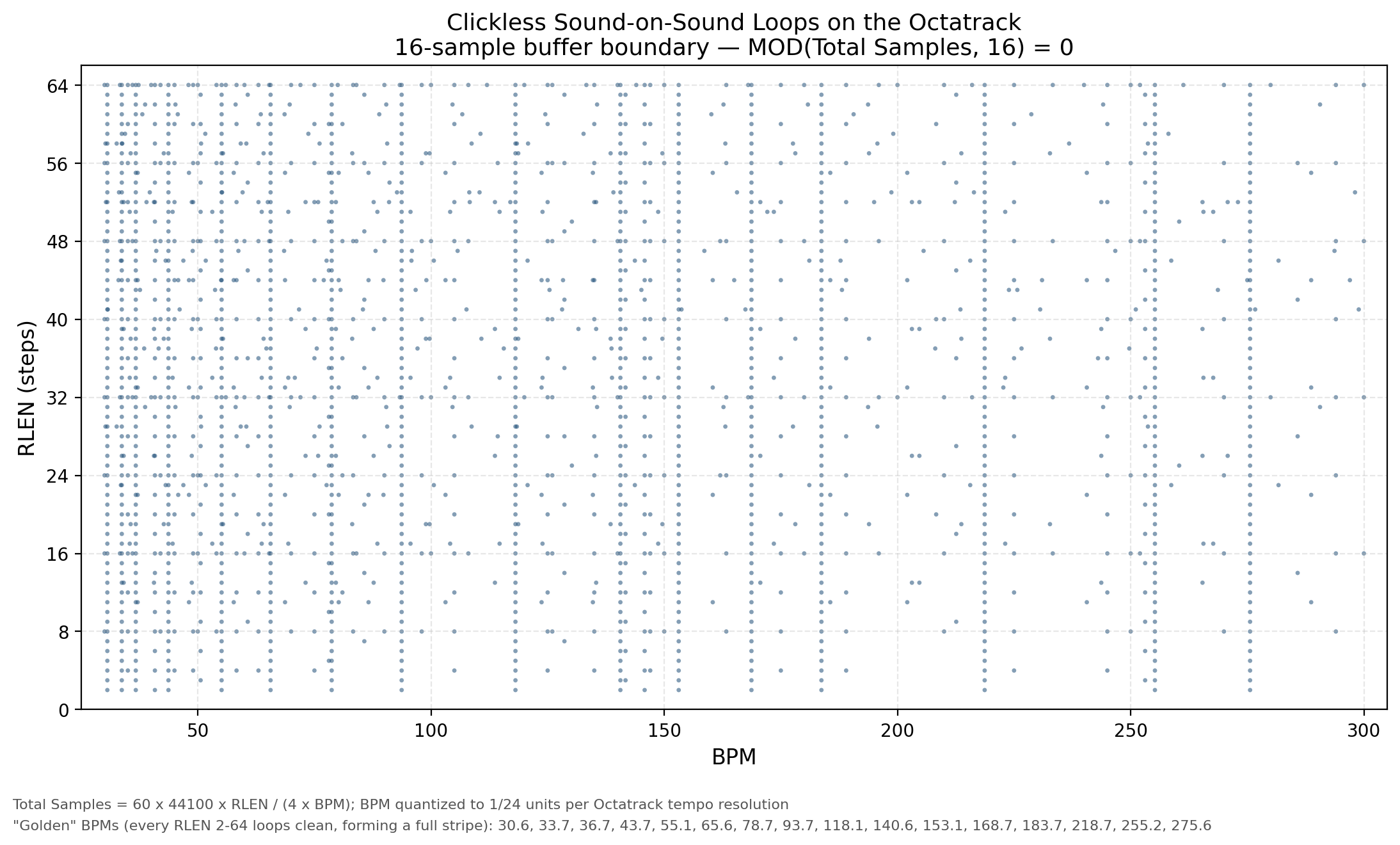
Bumping this with an updated spreadsheet so I have it for later testing. Note that the “Buffer=64” tab is based on the formula that was worked out in this thread, though I’d missed a few values. The “Buffer=16” tab needs to be tested. I think I’ve learned that Octatrack works with a 16-sample buffer (not 64), which increases the available looping options by a factor of close to 4. I’ll test it out and report back.
TLDR: Trust the 64 tab, but I’m hopeful about the 16 tab.
UPDATE: Everything I’ve tested in the Buffer=16 list loops with no boundary clicks. It feels like Christmas!
octatrack_clickless_loops.xlsx (190.6 KB)