I would try to set different behaviour, maybe you have enabled accelerated mode? I would check that, and possibly if “link” to other controller is enabled, that caused strange behaviour for me. You can also set it to toggel the acceleration mode. I.e. when you press the encorder, and compare then the values, also stepping is configurable.
2 Likes
It is an old setup, i’ve already done some lives and never had a problem. Today I reconnected my setup after some months and this happens… on all encoders… Acc mode is on 1, and Link is not activated.
midi loopback isnt possible in your situation?
1 Like
Not really…
Edit: I’ve asked Mathias about the problem and he told me that maybe the encoders where dirty after not using them for some time and to try to clean the contacts by turning very fast in both directions. After some time turning them it seems that it is getting better.
1 Like
I’ve a bit of a minor annoyance with the Ableton script and I’m not sure if it’s an issue with anybody else.
Setups 15 and 16 are reserved for the Live 11 and Live 10 controls but on my EC4 the script is also impacting setups 13 and 14.
If Ableton is started, setups 13 and 14 show whatever tracks are in the project and control parameters associated with those tracks. Now this sort of makes sense as the default channels for these setups are 13 and 14 which are also the channels used for the Live setups. Why not 15 and 16?
So Setup 13, Group 1, control 1 is Number 0.
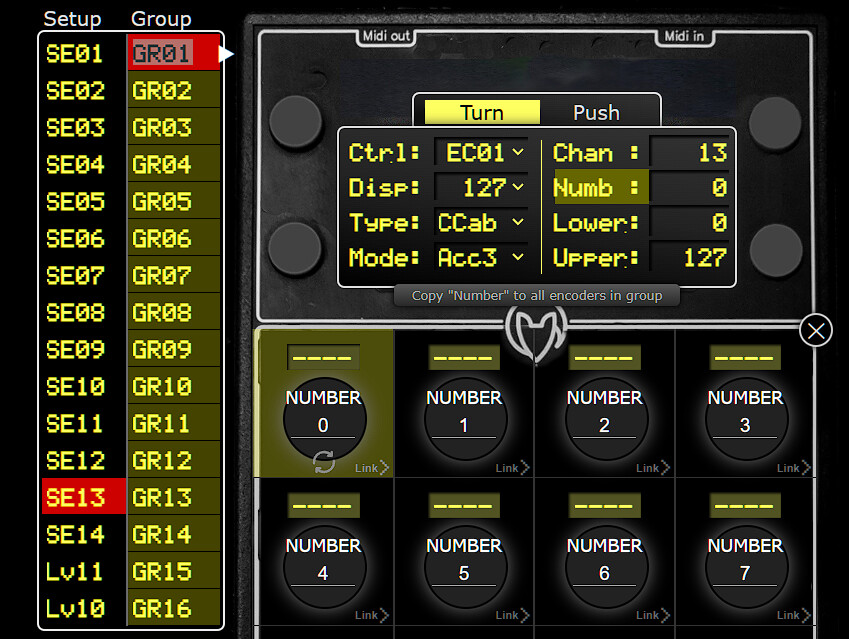
Which is also the same settings for Live11 setup, send A, control 1, so not unexpected that both control the same parameter in Live.
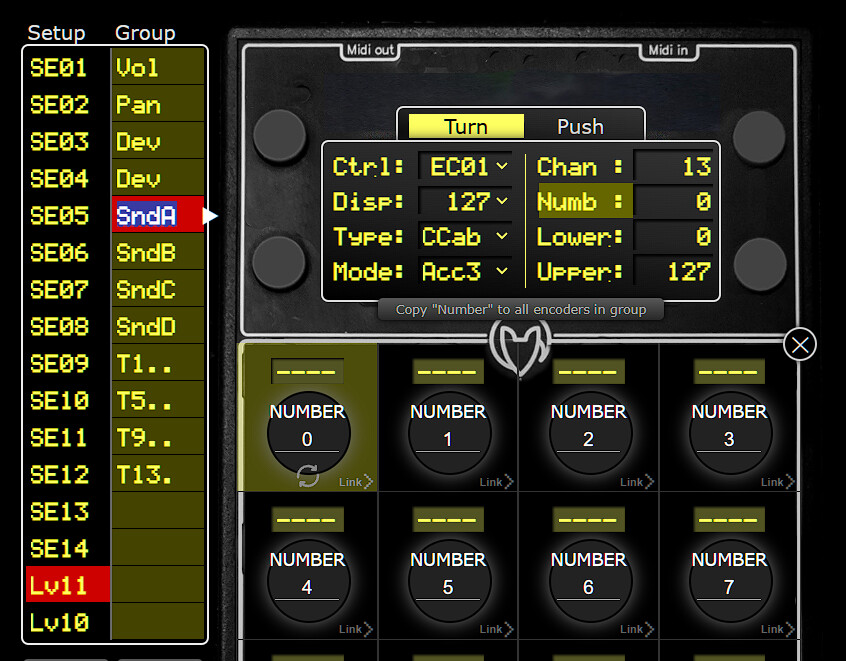
I then think all I have to do is change the channels of the Setups 13 and 14 to channels 15 and 16 and all will be fine, but it’s not. It no longer controls send A but the Ableton live tracks still show on setups 13 and 14, the same as they do on the live setups.
I’ve tried reinstalling the EC4 script and a factory reset but no difference. Is this the same for everyone?
https://lsim.github.io/faderfox-editor
https://www.reddit.com/r/synthesizers/comments/1lyl2be/new_features_for_faderfox_ec4_editor/
13 Likes
Excellent, will check it out
I have an issue where the editor works perfectly fine receiving from EC4 but when I send to EC4, the display keeps getting stuck at 37% with a “Receive Error”. I’m on macOS Sonoma but using editor through Chrome. Anyone know a fix?
Edit: I am reffering to FF’s editor. @alexwasashrimp trying out your editor now…I’ve set the MIDI input/output but how do I get your editor to recieve/send setups to/from device?
Sorry, it’s not my app, and I don’t have an EC4 unfortunately. Wish I had bought one instead of the UC-4 actually.
The new editor is pretty awesome. Primarily because of the copy / paste function for encoders / groups.
It has some glitches, but overall makes the source it was forked from obsolete.
Having the setup file live in the browser and not having to deal with file system is also super convenient.
The main issue to get confused by at the moment is the fact that Push Button Mode is mapped incorrectly - what editor shows as toggle is key on FF and vice versa.
And make sure to understand how ALT key interacts with the page and browser to avoid headaches.
Btw. I was testing what special characters can FF display 
These are just the regular keyboard keys, it might be able to display some additional non-standard characters.
I use those as codes in the first character of the encoder name to indicate the push button function.

4 Likes
Good news, I got in touch with Lars and the toggle / key bug mentioned above is now fixed. Also one additional bug I’ve found that was badly messing up the high end value of the high resolution NRPNs has been fixed.
If anyone is aware of other bugs / requests, the Issues section on GitHub is now open.
Once again, the new editor is fantastic and makes programing EC4 much faster, easier and hassle free. Give it an evening or two if you haven’t done so yet.
4 Likes
New improvements / features:
- Setups and Groups switchboard now in 4x4 grid as on device
- Special characters now match in editor and on device
- F2 key to access virtual keyboard with all compatible special characters
11 Likes
I only just got to the ‘new’ v2.0 live script. Wow! what great work.
Hey everyone,
I’ve been working on the mapping all night. I tested everything via USB and Ableton, and it works perfectly.
But when I try to connect directly via MIDI, it just doesn’t work.
I don’t think the issue is my mapping. Something seems wrong with the MIDI routing, or there might be a technical problem, because:
-
I connected the EC4 via MIDI to my audio interface and I don’t receive any signal in Ableton.
-
When I send MIDI data to the EC4, I also don’t see any signal in a MIDI monitor.
-
When I send MIDI CCs to the Rytm from another device, everything works perfectly.
I think the MIDI TRS Out from EC4 or my Cable are broken. =(
Hope someone can help.
Best regards,
Stefan
Do you use the right type of MIDI trs cables?
1 Like
EC4 needs 3,5 mm MIDI Type B  not the more common Type A.
1 Like
Guys thanks a lot !
a small thing with a big reaction. 
WTF…?! Typ A / Typ B… never heard before… i mean WHY ?
…
Because the manufacturers got ahead of the standards process, decades ago…
5 Likes
This drove me insane when I first got devices with different TRS MIDI spec.
I highly recommend marking your MIDI to TRS dongles the moment you get them so you know the difference between A and B at a glance.
5 Likes
so why arent they ahead on this midi 2.0 rollout…it been over half a decade…