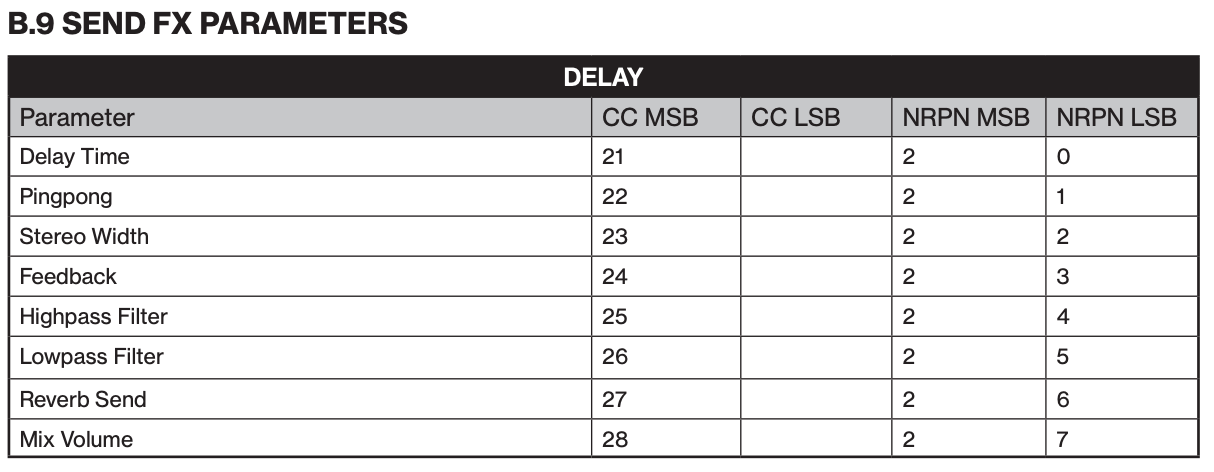
Is it possible to conditional lock the parameters of the mixer? Specifically, I want to use conditional locks to set the output volume of FX like reverb and delay to 0 on specific steps. For example, when I have a moment in the song where everything hard cuts to silence for a few beats, I don’t want reverb/delay heard momentarily. Possible?
The effects don’t work like that unfortunately. I believe you’d have to resample the phrase with the effects baked in then play it dry on a slice grid and mute the audio to get that effect. You can certainly P lock more effects to a step, but I don’t believe you can drastically remove all effects for just a moment like this person is asking about.
I just don’t think you can force it to go fully dry with a P lock.
@LyingDalai help me out here, am I correct about this? I’m pretty sure I tried this exact thing unsuccessfully.
To cut fx you could swap to a new pattern
Remember - patterns don’t have to be 16 steps long , they can be 4 or whatever length of ‘fx less’ time you want
You just need to setup relevant patterns .
You can also get nice odd effects … try changing delay time on short patterns , the delay will spiral in weird ways when it changes between values
Even if you switch to a new pattern you won’t get complete silence because delay, for example, will finish decaying won’t it? They want full stop, like audio mute stop.
Isn’t there a delay volume ? ( I’ll have to check later )
Or change feedback to zero while changing delay time to 0 too
Or reduce filters to very low freq
I’m sure I’ve done this years ago on dt1
Plus parameter locks on step 1 to kill any delay / fx sends on each track
Yeah, even if you p-lock the delay/reverb send to zero at that moment, they are still ringing out from whatever was being sent prior. That’s why I was hoping there was a way to sequence the FX volume temporarily
Lowering Delay Feedback to 0 or Delay Volume should also work.
To plock one of these, you would have to either use another machine, or use a DTII MIDI track and a MIDI cable OUT to IN (aka MIDI feedback loop).