No, they don’t - hence the required modification for SN’s lower than 4000. Additionally, if the Y-splitter works with SN’s after 4000, that indicates that Dreadbox corrected the issue. So, as I said originally, I hope that a Typhon MK2 doesn’t suffer the same issue. All of this can be addressed with the correct manufacturing in the first place.
I can easily power my Roland synths via USB and they do not have this issue. So no - not all synths suffer from it.
I used to have a Typhon. I loved its amazing sound and character. I would absolutely buy a Typhon v2 with the improvements that @SouvlakiPlaystation suggested, but also it would need a dedicated power jack. (I sold all my USB-powered synths.)
My Typhon works with the Y-Splitter after I did the hardware modification and addressed their defective manufacturing.
I don’t.
No, it’s NOT “easily fixable”. Please don’t pretend that it is. I personally did the hardware mod, and it’s not for the faint of heart - especially if they’ve never held a soldering iron.
I’m pretty amazed at just how gnarly the Typhon can get. First run with it with one of the on-board reverbs with a bit of added Valhalla Vintage Verb. I’m gonna do some more melodic stuff with it surely, but hot damn I love the sound of it. It’s merely two takes added together.
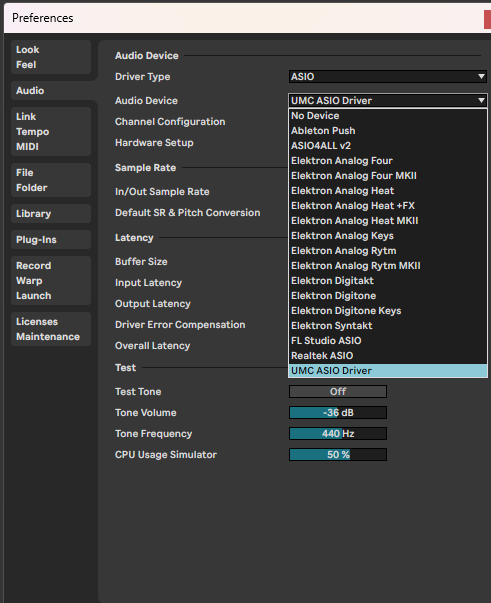
Can anyone help me point out what I’m missing in terms of setting up my Typhon to work with audio over USB? As far as I can tell, I should be able to choose the Typhon as an Audio Device in Ableton, right? Because it doesn’t list itself there.
If anyone can talk me through the procedure, I’d be very thankful
Is your Typhon OS up to date? It was added in a firmware update. Otherwise yes, it should just show as an audio input, even on an iPad (so there’s no need for a driver). Also worth trying another USB cable.
Thanks for the reply
I’m running 4.1, so that part is covered. It does not - however - show up in the menu, weirdly enough. Tried with two different cords now, hmm. Might have to try another computer then.
I’m sorry unfortunately I’ve only ever used mine on macOS and it works really well. There’s nothing to install as I think it’s class-compliant. Does it show up in Device Manager? Make sure you’re not using a hub as well just in case - but if it’s powering up then you should be OK.