I tried it again, and it works indeed. Fat fingers on my side, I guess.
1 Like
Just made this in Drambo. It’s a pretty basic track, but I’m super proud of it as it’s made entirely with sounds that I synthesised from scratch with modular in Drambo.
Even a few months ago I would have had no idea how to do that.
14 Likes
Yesssssss! The videogame vibes. <333
1 Like
I eventually went all-in with plugins, and am super happy with the results. Here’s something with loads of sounds – based on the Elektron sequencer workflow that I love so much:
3 Likes
is Drambo on sale anytime soon, I don’t know when these kind of things happen on the ipad. But if I can save a few pounds that be great.
Yeah I’m all about the video game music vibes.
1 Like
I’ve mostly used it with VSTs so far. It’s lovely just as a groove box.
What are you using on this?
1 Like
My studio is packed, I don’t even have space for a proper laptop workplace anymore, so I’m down to an iPad with Drambo… and that’s fine! Recorded this yesterday:
It’s not 100% Drambo (I hosted three synth plugins and a few effects in it), but the drums are synthesized in my DFAM clone for Drambo.
3 Likes
It’s a lot, and accumulated over the last year:
- Twin 3, AniMoog Z and Flowtones for synth sounds
- PurePiano, NeoSoul Keys Studio 2, Steel Guitar Pro and GeoShred for “real” aounds
- Drums are FAC Drumkit and Slammer
Effects are EOS2, Other Desert Cities, FAC Medusa, but also a lot of Drambos internal fx.
I add and add, then remove remove – and at one point, I have a sound template with which I can create songs that fit together. It’s actually the same kind of workflow that I established with the A4 or the Syntakt, but Drambos offers me access to all these other universes of sound. I love that.
Plus I can use Grand Finale 2 at the end to master the track, and upload it to SoundCloud. This later part of the process never felt as easy and straightforward, as now with the iPad.
Here’s another one made like that:
2 Likes
Thanks got it working now 
1 Like
Lovely stuff.
When will be seeing the new update to Drambo? Heard it’s going to be a big one.

I really hope it has multicore support, would pay a lot for that since it would save me from buying a new iPad, which I can’t afford anyway.
1 Like
I have a tricky problem in routing external MIDI.
There’s an external MIDI source which sends only one note value (eg. C3) (I have to commit to one note on one channel). This note has to be routed to one of multiple tracks. The track needs to be selected by a MIDI CC value. The way I tried to accomplish this didn’t work:
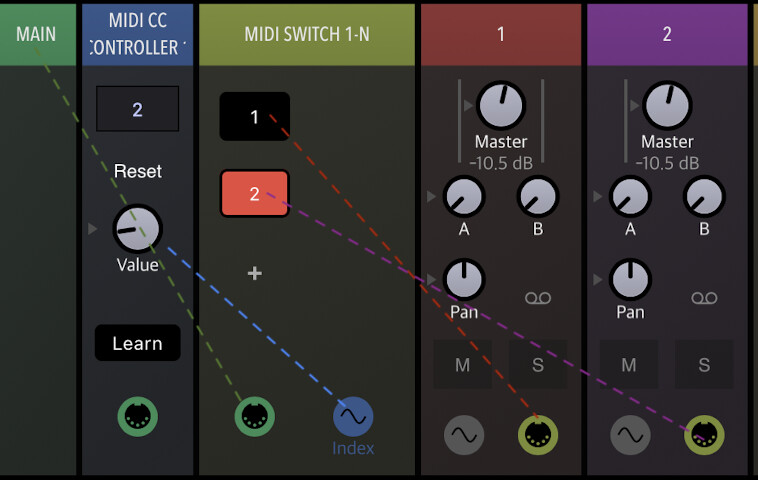
On the Main track I use a MIDI CC controller module which routes CC2 to the index parameter of the MIDI switch module. The output 1 of the switch is routed into input of track 1, output 2 goes to track 2. But it looks like the MIDI track input routing is completely ignored. There are the MIDI input options “always” and “active track” (default) but they don’t help. I also tried to change the MIDI input from “any” to “Drambo” but then no MIDI is passed to that track anymore.
I see that I could use MIDI mapping to select a particular track but this is a bit slow and I don’t want to always switch the view. I could also merge all the modules from the tracks into a single track but this would be hard to overview maintain.
What am I missing with my initial approach?
I’m sure the beepstreet forum can answer this. A lot of Drambo power users there and they are very helpful
Yo @klaustrophil I’ve tried to make this functionality and it works for me as expected via your (very clear!) description and screenshot. So - I’m not sure why it’s not working for you…
Perhaps it’s the main settings for the midi inputs to track, but that seems like a basic thing you’d already have tried. So basically I’m not sure why it’s not working for you - your logic seems sound.
Perhaps you can post the project here and we can dissect it and see if there’s something deeper that’s wrong with your particular setup?
Here’s a video of me trying it:
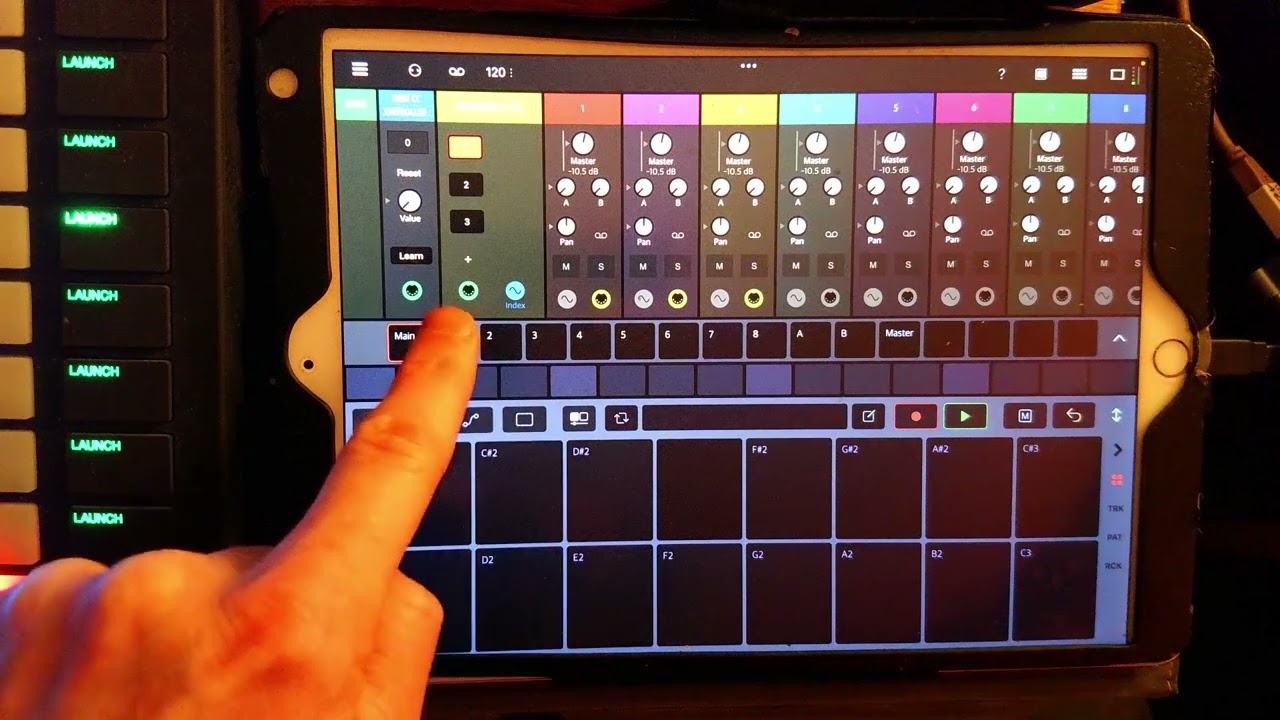
2 Likes
You don’t even need the MIDI CC CONTROLLER module.
Just midi map the MIDI SWITCH 1-N directly to your CC.
Make sure it’s switching with your CC.
Link everything exactly like you have.
Then, go to Track 1 and Track 2 (settings) and set them both to ‘Receives MIDI: Never’. The inputs won’t matter because you break the routing by connecting them directly on the Main Track in that way.
So your Main Track’s midi input setting is important, make sure it’s set to All, or whatever specific device you need to feed Track 1 and 2.
Stick a MIDI MONITOR on each track to test it’s all working properly.
Hope it helps!
1 Like
I moved @echo_opera’s Drambo tracks here:
I am conscious I’ve slightly disturbed the conversation by doing so, my apologies 
4 Likes
Thank you @ThorntonForce and @Laser for your effort and confirmation! I don’t know what was wrong with my patch but there’s a thing I forgot in my description which might play a role: I tried it on a Mac. On the iPad it just worked right away. I will try on Mac again because it doesn’t make much sense in my eyes.
This mapping works different regarding the value ranges. I found the way with the MIDI controller module more predictable.
1 Like
Ah yeah I’ve only got an iPad available at the moment to test it. Weird that its different tho but this tells me it’s not your patch and is instead something specific to the macOS context right?