may I ask what you mean with that?
1 Like
regarding user wavetable files:
does anyone know the specification for
- single cycle wavelength in samples
- overall file length in samples in regards to optional zero points for grid machine to work
2 Likes
Convert an Euclidean sequence into a regular Grid pattern
Hold FUNC while turning the ENC parameter off and all the Euclidean blue trigs are turned into regular “Grid” red trigs.
19 Likes
Got mine today, physically great unit. Sounds terrific, and I know I’m in for a lot of fun…
Factory Wavetables: these work without pops in grid mode, lfo to slice select and it’s a pretty good wavetable synth. 64 grid is smoothest moving sound to sound.
Stereo Resample: is all I’d hoped it’d be. Sample Main LR to length of pattern, record on the 1, yes, yes, 16, where track 16 is muted and set to Grid with trigs in already, then mangle track sound however. Use Prep Mutes to switch to just that track, and back, or set it up as a fill situation. Use lfo 3 or a sound macro to set up crossfade, and play “hi fi octatrack” all day long…
26 Likes
What do you mean by “setup sound macro”?
1 Like
New trig conditions were added:
- /A:B → trigs shut up once every B times starting from the Ath time
- Last and /Last → play only when another Pattern is cued
Trig conditions interact with trig % probability and trig FILL state ⇒ trig will play only if all are True.
I think it doesn’t interact with Track probability though, iirc.
So lock the track probability on the trig if you need it.
10 Likes
Quite excited about that! I’ve wished for the /x:x condition many times!
2 Likes
That was literally a different language, like a half human / machine hybrid
3 Likes
The sound macros (I think that’s their official name?) are in the sound setup menu, the PB, Aftertouch, Mod Wheel, Breath Control options. Each can modify 4 parameters and be controlled via midi loopback or another Elektron machine, new to DT2 but also on ST, DN, A4, etc
@8bitBarry sorry for the shorthand, was just noting you can resample a playing loop with some quick button presses, then there are a bunch of options for switching between the original sounds and that new recorded version with any number of different settings, for fills etc.
Another maybe obvious trick: Euclidean auto-fills: in the Sequencer menu, put non-zero A and B numbers in the tracks you want [edit: that is, populate the Euclidean sequencer for some tracks, but leave the Euc. sequencer turned off], leave the rest at zero. Then control-all->Euclidean On can make a little drum fill.
Also, haven’t tested too far, but p-locks are possible in Euclidean, they stay on the sequencer step in question, for the bongo maniacs among us… [edit: tested further, and it’s consistent but complex behavior. P-locking, say, the 3rd and 6th Euc trigs to retrig in your snare roll, those rolls will move around with sequence shifts, and adds trigs 3 and 6 on the non Euc sequencer.]
24 Likes
Wow
2 Likes
Nice one. Haven’t still understood the part about setting A:B trigs and other to zero, but I’ll definitely mess with CTRL-AL on EUC 
3 Likes
Edited to clarify—essentially holding the Euclidean sequencer, turned off but with settings track by track, as a full alternate sequence to switch to on the fly.
I hadn’t been that interested in the Euclidean sequencer before realizing this, but now it’s in my top 5 new features (though there’s still a lot to explore…)
16 Likes
Awesome trick, thanks a lot for sharing!
I would have never come up with this myself and I can’t wait to play around with this.
1 Like
crossfade sounds interesting but i must admit i did not fully understand. that resampled audio assignment is only on that particular pattern you’re already in, how can you crossfade into another pattern?
1 Like
I was curious about this. This is how plocking works when you shift steps on the T1.
1 Like
Since I’m here, here’s the LFO3 setup to cross fade between the main tracks and a resampled track within the same pattern, stopping the LFO to use it as a scaled offset:
The resample gets LFO3 like this:
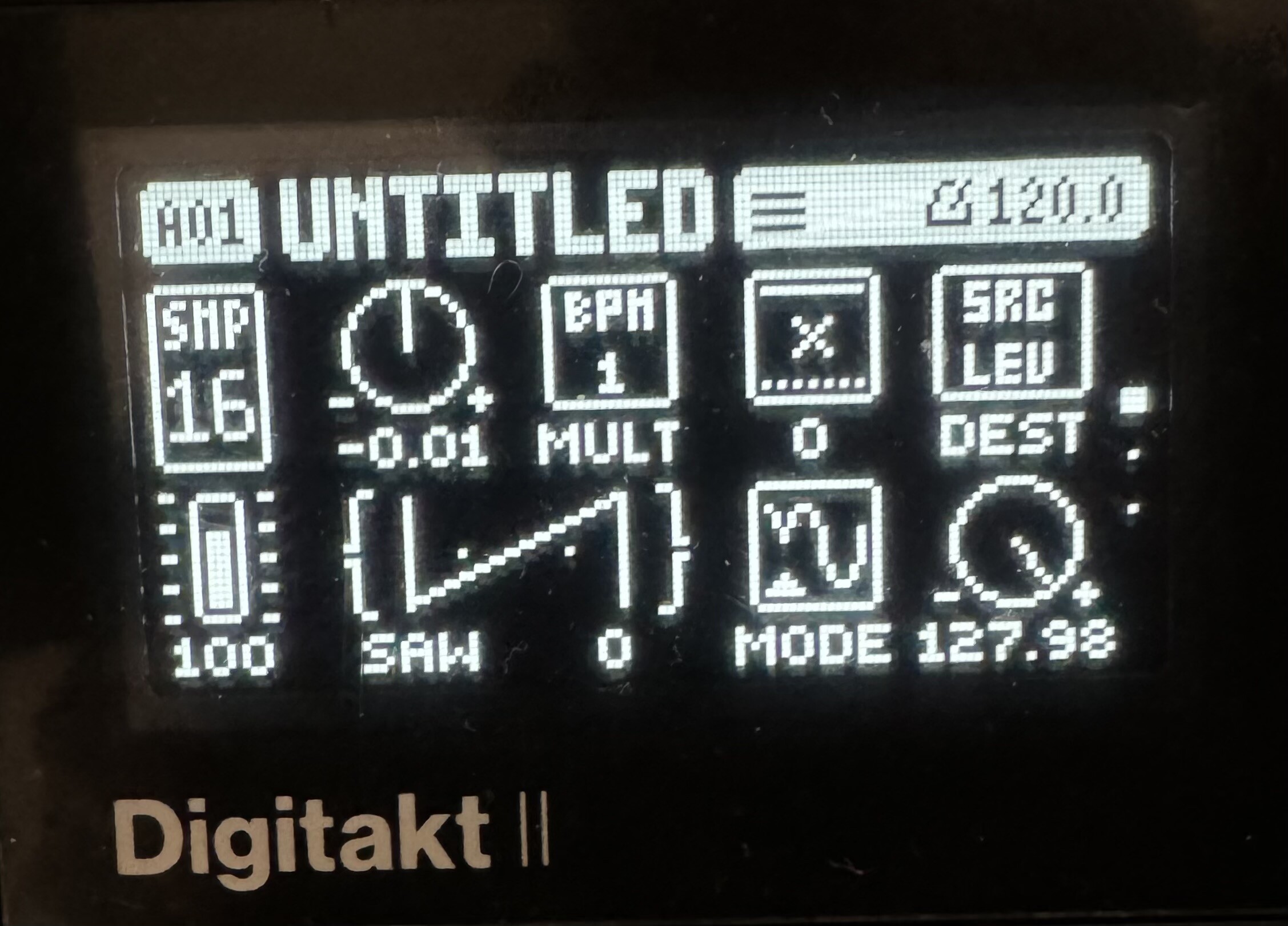
And all other tracks get the same, but with +.01 instead of -.01, to reverse the polarity. Ctrl-all to LFO 3 [depth to] fade between tracks and resample.
Now, pattern to pattern is going to be different, but I just confirmed you can put the resample on infinite loop, global mute all tracks, change pattern, and it’ll keep playing the previous pattern’s loop, and track settings can be modified, until you play a trig on that track. Still thinking about the possibilities there, but there are a lot of interesting options I think…
19 Likes
Weird value, but yes, it works.
In fact 0.01 works too if you start from 0.02 and slowly reduce the value to 0.01; there is something weird I already noticed with START : some parameters values resolution are higher than display; you can hear differences without seeing a value change.
I prefer 128 hole values ! (OCD)
2 Likes
That’s fun. I just tried dedicated t8 and t16 to hold 16s loops from the mains, messing with the original tracks the loops used on their respective rows, then switched back to solo the t8/t16 and back.
It’s kind of like an OT fader. Mind asplode.
8 Likes
Thanks for the detailed explanation! I think it’s doable if you simply avoid having a trig on that track for the first pattern of your next song and keep going from there! Cool!
Or just put /FRST (or FILL) condition on the trigs of the corresponding track of the next pattern…
Using FILL to trig your trick seems in fact the most interesting way.
So yeah, I’d go with FILL so that it trigs the LFO thing, then release FILL, change the pattern, and always keep track 16 for the transition trick I guess.
4 Likes