hey all, I thought I’d start a thread where we can share new USR machines made for the X.20 firmware, released today by MDX, aka @JustinValer and Yatao Li. Do look at the post in that ‘today’ link first if this is all new to you; this topic describes only one facet of what is a MAJOR update to the firmware (not the stable release yet but in public preview)
context
A key feature supported in this new firmware is the ability to install additional custom machines made by the community and manage them across dedicated banks.
From MDX’s release notes.:
“ User machines can now be installed via MIDI. User machines are custom synthesis [and/or effects, or sample manipulation] engines. Up to 16 can be installed and assigned to tracks from the EDIT KIT menu, like built-in MD machines. [With a +Drive you also get 128 Machine Banks] Only install MDS machines from developers you trust. Machine code runs on the DSP and may cause instability or unexpected audio.”
The .ZIP that you download for the X.20 upgrade also includes several of these so called USR machines provided by MDX— lots to explore there. They include several new NFX, synth voices, filters that work on neighboring tracks and also self-oscillate, new TRX machines that faithfully emulate 808 and 909 parts, some TX81Z FM synth presets, several new melodic Physical modelling bits, and more. As I understand it, all of them are compatible with non-UW MDs. I uploaded the descriptions of the new MDX machines from Justin to this post. Try some of those first!
More info on this and the new firmware in his release notes.
for your consideration
Let’s have a thread where we share and discuss further creations, new ideas for machines, best practices and tips for building and designing them, etc.
I am working on a few different things. When they are ready, I will post more machines in this thread and upload them to my project github.
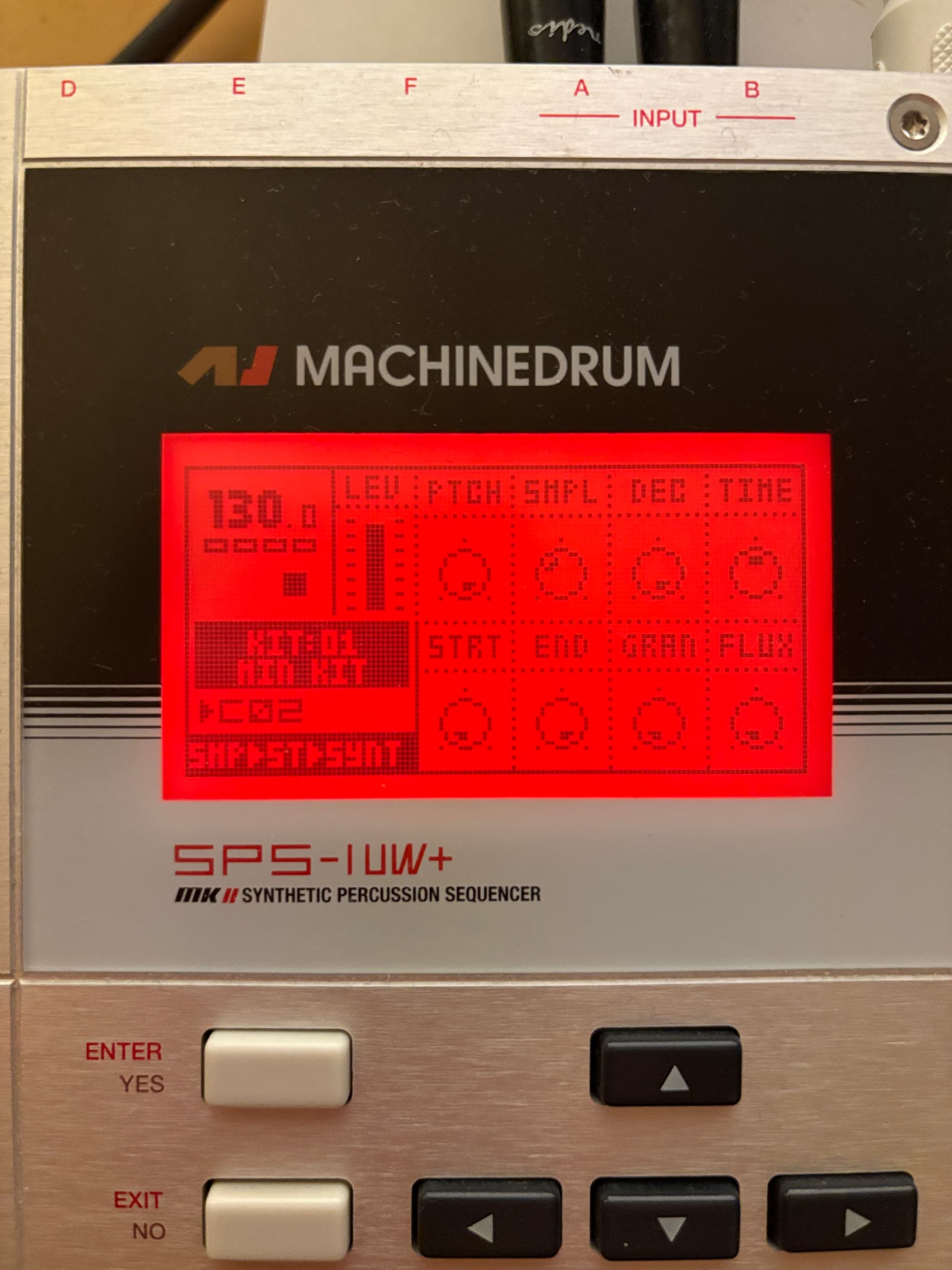
To start it off, today I “made” (with LLM support) a timestretching ROM/E12 playback machine, SMP-ST[RETCH].

audio example:
what it is
I wanted to make a lofi homage to the Ableton texture warp mode: that gritty, Akai S950 kind of timestretch sound. This machine is focused on the textural exploration of slowing down the sample and altering the grain size and flux (jitter of grains). There are 3 versions depending on compatibility and/or your preferred use case (see dl links below): one that addreses samples in UW ROM and E12, one for just the UW ROM, and one that just looks at internal E12 samples (the latter being compatible with all models).
parameters
Here you get a SMPL knob for selecting the respective sample slot to address (plockable of course) – another side benefit of this is you don’t have to dig thru ROM/E12 to find your sample, a DECay, the TIME knob, which starts at no stretch and increases to infinite freeeeeeeeeeze. GRAN and FLUX are designed to work like ableton’s texture warp (grain size and amount of jitter of grains) and unlike in Ableton, we can actually modulate these params!!! have fun sssttrrreeeetttttccccchhhhiiiiiiiiiiiinnnnnggggggggg 
how to install (applies to any USR machine):
requirements: As I understand it, you can use any MD updated to X.20B firmware available here to install machines from the folder of machines provided by MDX that comes in the firmware ZIP. This is also true of my ‘SMP-S2’ below, which works on your internal E12 samples.
To install my ROM and E12 machine (SMP-ST) or the ROM-only version, you’ll need a Machinedrum UW (MKI or II, + or not) on X.20B.
- Locate a USR machine .syx that you want to install (eg one of the many that come with X.20 and/or my timestretcher (dl links below) and drag these into Sysex Librarian (or your sysex app of choice)
- connect the MD to your midi interface
- FUNC+GLOBAL, FILE → MACHINE MGR. Choose an empty slot, select RECV. It will say WAITING…
- Using Sysex Librarian, play the .syx file(s) to the MD. You can select multiple .syx and play all at once; the machine bank will populate empty slots automatically. this is usually a very quick transfer as these are small files. The machine will then install.
- When you go to KIT–>EDIT, you may now see new machine categor(ies) corresponding to the new machine and you’re good to go. Notably several of the ones from MDX will be found in existing categories like NFX and P-I. We’re limited to 16 slots but with a + drive you can have multiple Machine Banks.
NOTE: One current bug to be aware of with all USR machines that I encountered is that if you have a kit loaded that uses USR machines and you install new machines, those that were in your current pattern might start sounding glitchy. This is temporary and is quickly resolved by reloading the kit or power cycling.
–––––––––––––––––––––
NOTE: The sound of an infinite decay/timestretch will continue to play when changing to a new pattern. This can be stopped as soon as the same track receives a new trig. Note as well that until a new trig comes in the new pattern, the repeating sound from the previous pattern will take on the LEV of the new track, so keeping them the same will not cause any level changes of the infinite decay sound when switching patterns.
download links (still in beta):

SMP-ST (ROM and E12 timestretching - only compatible with UW models):
SMP-ST_allbanks.syx (3.8 KB)
The E12 samples are listed after the 48 ROM slots, and are addressed by knob values 49–69.

SMP-SR (ROM timestretching - only compatible with UW models)
SMP-SR_rom.syx (3.6 KB)

SMP-S2 (E12 timestretching - compatible with all models)
SMP-S2_e12.syx (3.6 KB)
edit: just added two new machines – see comment below and updates in my Github (link above)
–––––––––––––––––––––
I hope that this topic is allowed (not sure in this now constantly changing climate), so feel free to take it down if that is necessary. If it is allowed, I hope this can become a place to discuss and exchange our custom-made machines.
important disclaimers
I have tested these new timestretching machines a bunch already and tweaked them but it should of course go without saying, as Justin mentions in the release of X.20B, that you install third-party machines at your own risk. Back up your machine before doing any of this, including upgrading the firmware. That said, all of this appears to be running very smoothly on the UW+ MKII (would love hear reports of how it fares on other models!) Finally, I’m not affiliated with the development of MDX in any way, just a member of the community who is very excited about the possibilities of this firmware!