I’m sure this has been asked before, but I can’t find it.
I’ve taken some field samples and want to create loops from some of them. What is the best way to do this (using a computer is ok)?
I’m sure this has been asked before, but I can’t find it.
I’ve taken some field samples and want to create loops from some of them. What is the best way to do this (using a computer is ok)?
Load into your sampler. Turn on looping. Done.
But more seriously, can you expand on the problem?
Thank you for you answer, @Octagonist. I’ll try to explain myself better.
I’m on vacation with only my computer and a field recording, no hardware synths. My idea is to make some track using only/mostly found sounds. Some sounds can be isolated easily and create one-shots or rhythmic patterns, but others are more difficult to manage.
Let’s put as an example some water falling from a fountain. There are people and other sounds around, so the good quality sample lasts around 10 seconds. I would like to create a looping sample from this, so the loop point can’t be noticed, and without using a fade-out followed by a fade-in.
I’m using bitwig as my DAW, but have others installed (reaper, studio one prime, ableton lite), and also have audacity as a fast audio editor.
FL Studio’s sampler, Edison, have an option to morph the sample you want to loop by adding a bit of the end into the begining, so technically no fade-in/fade-out.
This is something I often do: Take your favorite segments of the recording, put those slices into your timeline, and gently cross fade between them to maintain consistency. Drop slices into the timeline until you have something long enough, or can find a natural loop point. Judicious use of compression and reverb for glue to even things out across the compiled piece.
It all depends on your desired outcome of course. This is what works most of the time for my context.
These constraints are too hard for a single 10sec recording and one loop. It’ll become obvious after about 20sec that the recording is looping and then you’ll lose the listener.
I would accept the need to fade, so you can hide the loop point. Also, consider cutting some parts out (or copying) and use some random or generative process to play them. Process each part a little differently (eq, speed, filtering, maybe even reverse a couple of them).
just don’t tell anybody!  Dude, of course it’s okay?! There is no cheating. Do what ever suits you and is the quickest workflow
for you.
I make loops in audacity. Once you choose a tempo. For example if 133bpm multiples of 1.8 seconds works.
Shoot me the sample and I’ll make a loop for you.
I use Twisted Wave as my preferred audio editor. It allows you to create loops with cross fades for perfect blends.
But I mainly use it to batch process samples to normalize/remove silence/convert to a specific sample rate/mono etc.
It’s great and in my opinion works better than Audacity, though it’s not free.
Seems like this is pretty straightforward in any DAW, unless you need to add loop metadata in some particular format for a sampler, or unless you want some further manipulation to give the loops a particular rhythm or tempo.
Use cross fades. Or look for zero crossings in the waveform and cut there. Export. Easy (?)
Thank you all for your answers.
I’ll try these ideas and see what comes out.
@Octagonist yeah, it was just an example, and the loop creation doesn’t mean you can further process the result and add effects/variations to it.
@PekeDorty  Just saying the computer thing as “I don’t need to do this with an OT/DT/whatever”.
@mynewcolour can you elaborate? At 133bpm, a bit lasts for 2.22 seconds. Why multiples of 1.8 seconds?
@mindexpansionpuzzles thank you for the offering, but the idea is to learn and experiment, not just achievement a specific result with a specific sample.
Yeah for some kind of sustained sound, crossfading (?) the end into the start is what I’d do, as has been said above.
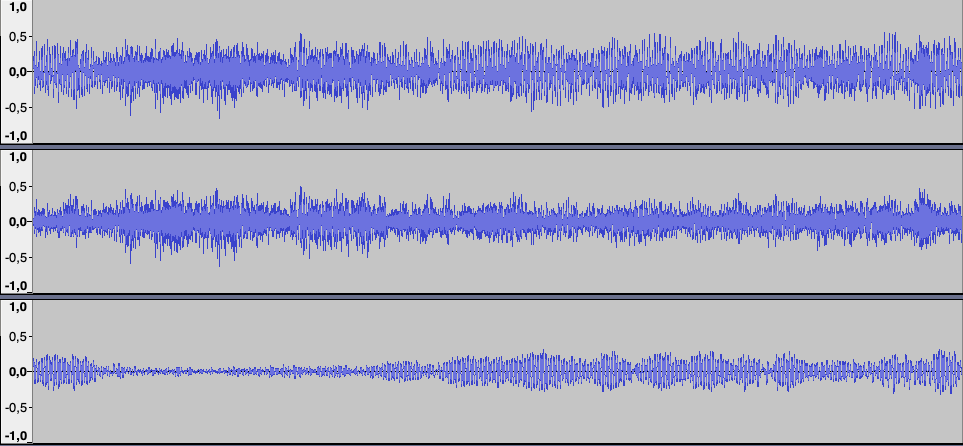
If you want to finetune your loop, something to consider is treating the frequency-bands each on their own. That fade-in/-out could lead to some phase cancellation or whatever that could be noticeable in the loop.
Here is something from a sustained synth pad that I wanted to create a seamless sample from. I did that fade-in/-out thing, but if you separate the original (up) into treble (middle) and bass (bottom) you can clearly see that the low end has a very noticeable dampening due to the fade-in/-out.
At 133.3 bpm one bar is 1.8 seconds.
My sampler is super basic ( it’s a Microgranny ) so I compensate with some maths
Don’t forget to HPF all yer samples.
Now I get it. At 133bpm, 2.22 beats per second, 0.55 bars per second in 4/4 time, and inverting this, 1.8 seconds per bar