Hey all its been a very long time! Hope this is still active…
I am currently controlling parameters on my OT via a Novation Launchcontrol MK3 and have run into an issue.
I would like to be able to control the ARP MODE of MIDI track 1 but I cannot seem to get it to work.
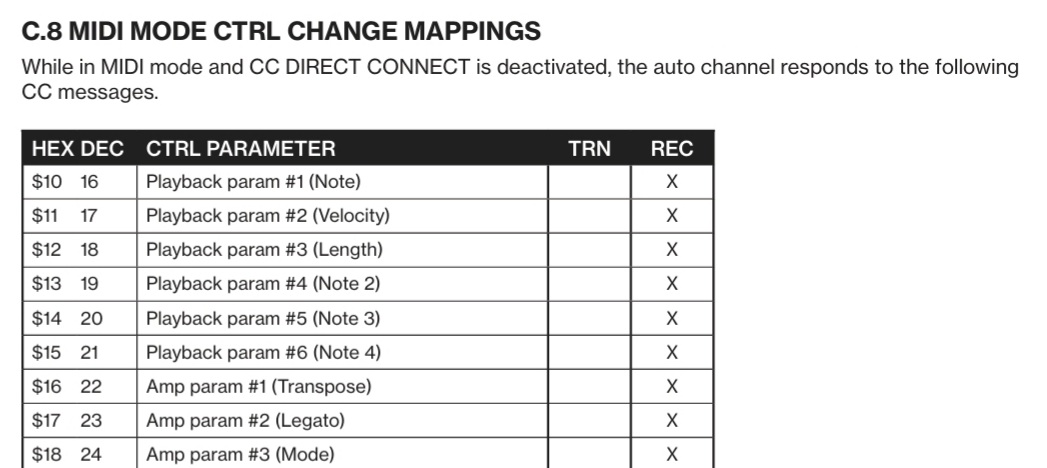
MIDI track 1 - MIDI Channel 9 - MIDI CC 24 - this should be all the correct chain of events - i have also tried it on the global channel (11) and pretty much any other channel.
I have tried CC Direct Connect both on and off.
Slightly at a loss now - its been a good few years since i delved into my OT so i may be missing somehting obvious but any pointers would be appreciated.
Thanks! i thought i had tried every version of those settings but i started it all again following your instructions and it worked. Think it was the auto channel !
so there is no way to control all midi channels arp transposition at once? (apart from in arranger mode?)
damn… i want to send midi CC’s to LFO depth of a midi track or midi arp transpition… can be done it seems but only one track at a time and this specific midi settings as above?
moment, in theory you can use one Track to build your own LFO-design, in example a flat line ‾‾‾‾‾‾‾‾‾‾‾‾‾‾‾‾, doing so on Track1 becomes LFO-design T1.
If you use that T1 design as source of all your track LFO’s btw: [LFO_T1Audio != LFO_T1Midi], those ‘connected’ should become relative to T1. If flat, than the curves of them are fixed value but scale from min to max depending on value chosen in arp per track. Now do that with all tracks you want by mapping the LFO1 (in example) with that T1 to target ARP TRAN. So that the relation is given.
From here you need to find a way to control that curve, means the lfo-design and voilá all tracks react at least on their next trig (they should immediately) all together. Means you’d use the LFO design editor to alter the curve T1 for that.
So far so good. Not ideal but its a first attempt…
i remember vague… since you can map each tracks LFO3 onto LFO2 further onto LFO1 you can create more complex curves, where one curve alters the higher priority from 3 to 1. Maybe that allows to make some more trickery. cheers
ps: guessing you try to play a polyphonic synth or multiple at once.
ps2, another way: depending if you can work with only 4 voices, then the other 4 (5…8) left free can be exact copies of 1…4 and if you turn 5…8 on, their properties become valid, even better when you turn 1…4 off. This way you can at least have two melodic altercations fixed.